You have spent hours perfecting your Amazon product title and bullet points. You have optimised your images and written compelling A+ content. But there is a hidden field that most sellers either ignore or fill incorrectly – and it could be costing you thousands of searches every month.
Amazon backend keywords are the invisible search terms that only the algorithm sees. They never appear on your listing, but they directly influence whether your product shows up when shoppers search. Get them right, and you capture traffic from misspellings, synonyms, and alternate phrases your competitors miss. Get them wrong – or worse, violate Amazon’s rules – and your entire listing can be suppressed.
This guide covers everything: the real byte limit (it is not what most guides tell you), exactly what to include and exclude, how to verify your keywords are indexed, and advanced strategies most sellers never discover. Whether you are launching your first product or optimising an established catalogue, this is the definitive resource for Amazon SEO backend keyword mastery.
Table of Contents
- What Are Amazon Backend Keywords?
- Where to Find Backend Keywords in Seller Central
- The 249-Byte Limit (Not 250 Characters)
- What Gets Indexed vs What Does Not
- Format Rules: How to Structure Your Keywords
- What to Include in Backend Keywords
- What NOT to Include
- How to Check if Your Keywords Are Indexed
- Backend Keywords and Organic Ranking
- Backend vs Frontend Keywords
- How to Research Backend Keyword Opportunities
- Platform Comparison: Amazon vs eBay vs Walmart
- Common Mistakes That Get Your Listing Suppressed
- Step-by-Step: Fill in Your Backend Keywords Today
- Tools for Backend Keyword Research
- Advanced: Using All 5 Backend Fields
- Frequently Asked Questions
What Are Amazon Backend Keywords?
Backend keywords (also called hidden keywords or search terms) are a set of fields in Amazon Seller Central that let you add search terms to your product listing without displaying them to customers. Think of them as metadata – information that tells Amazon’s A10 algorithm what your product is, without cluttering the customer-facing listing.
When a shopper types a query into Amazon’s search bar, the algorithm checks multiple elements of your listing to determine relevance: your title, bullet points, description, and backend keywords. All of these contribute to whether your product appears in search results. The difference is that backend keywords are invisible to shoppers – they exist purely for the algorithm.
This creates a powerful opportunity. Your product title needs to be readable and compelling. Your bullet points need to sell benefits. But backend keywords? They just need to be relevant. You can include misspellings, alternate names, abbreviations, and foreign language terms that would look terrible in your visible listing but capture real search traffic.
A well-optimised backend keyword field is like having a second, invisible listing that catches all the searches your visible content cannot. Combined with strong Amazon listing optimisation, it is one of the highest-leverage activities in Amazon SEO.
Where to Find Backend Keywords in Seller Central
Finding the backend keyword field is not immediately obvious to new sellers. Amazon has moved it around over the years, and the interface can be confusing. Here is exactly where to look:
- Log into Amazon Seller Central
- Navigate to Inventory > Manage All Inventory
- Find your product and click “Edit”
- Click the “Product details” tab (previously called “Keywords” tab)
- Scroll down to the “Generic Keywords” or “Search Terms” field
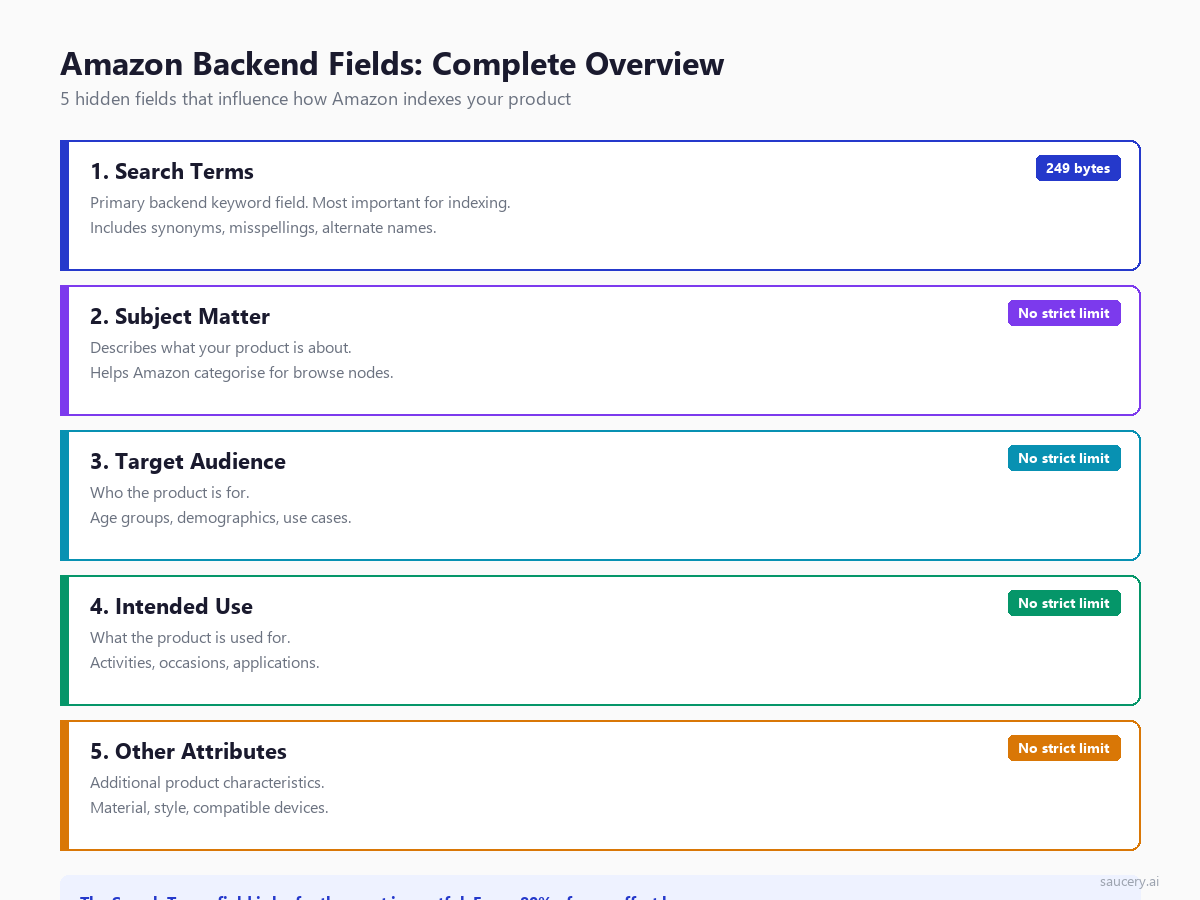
The field is a single text box. In some categories, you will also see additional fields like Subject Matter, Target Audience, Intended Use, and Other Attributes. These secondary fields provide additional indexing opportunities that most sellers completely ignore.
If you cannot see the Keywords/Product details tab, check your seller permissions. Brand Registry enrolled sellers sometimes have a different interface through the “Edit” flow. You can also access backend keywords through flat file uploads (Inventory > Add Products via Upload), which is faster for bulk updates across large catalogues.
The 249-Byte Limit (Not 250 Characters)
Here is where most guides get it wrong. Amazon’s backend keyword limit is 249 bytes, not 249 characters and not 250 of either. This distinction matters more than you think, especially if you sell internationally or include foreign language terms.
A standard English letter (a-z, 0-9) takes 1 byte in UTF-8 encoding. So for purely English keywords, 249 bytes equals 249 characters. But accented characters common in Spanish, French, Portuguese, and German take 2 bytes each. Some characters (like certain Asian scripts) take 3-4 bytes.
Practical examples:
- “protein powder” = 14 bytes (all standard ASCII)
- “acai bowl” with the proper accent on the i = 10 bytes for 9 characters
- “jalapeno” with the tilde on the n = 9 bytes for 8 characters
- “naive” with diaeresis on the i = 6 bytes for 5 characters
If you exceed the 249-byte limit, Amazon does not just truncate your keywords – it ignores the entire field. None of your backend keywords get indexed. This is catastrophic, and many sellers never realise it has happened because there is no error message in Seller Central.
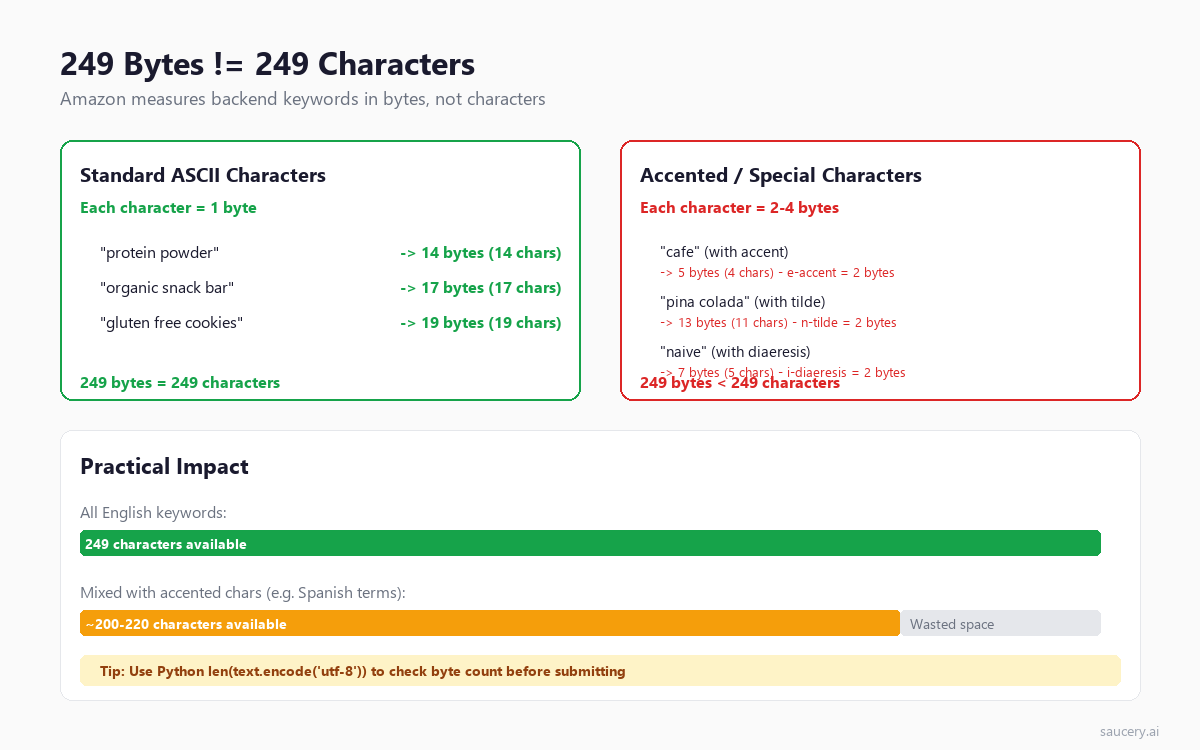
To check your byte count, paste your keywords into any text editor that shows file size, or use Python: len(your_keywords.encode('utf-8')). Some keyword research tools now include byte counters specifically for Amazon backend keywords.
Important historical note: Amazon used to allow 5,000 characters in backend keywords. They reduced it to 249 bytes in 2018 for most categories. Some categories (like Books and Media) still have higher limits, but for the vast majority of physical products, 249 bytes is your ceiling. Indian marketplace (Amazon.in) was the last to enforce this limit, switching in 2020.
Same product. Better listing. More sales.
What Gets Indexed vs What Does Not
Not everything you put in backend keywords will actually get indexed by Amazon. Understanding what the algorithm processes – and what it ignores – is essential for making every byte count.
What Amazon indexes from backend keywords:
- Individual words (Amazon breaks your string into tokens)
- Phrases (word order matters less than in titles, but proximity still helps)
- Misspellings (yes, Amazon indexes these and matches them to searches)
- Synonyms and alternate names for your product
- Foreign language terms relevant to your marketplace
What Amazon does NOT index or actively penalises:
- Competitor brand names (violates TOS – can trigger listing suppression)
- ASINs (Amazon’s own product identifiers are not searchable terms)
- Subjective claims like “best,” “cheapest,” “top-rated”
- Temporary promotional language like “sale,” “free shipping,” “limited time”
- Any terms that violate Amazon’s content policy
A critical point that many sellers miss: Amazon de-duplicates across your entire listing. If a word appears in your title, you do not need to repeat it in backend keywords. It is already indexed. Repeating words wastes precious bytes that could be used for new search terms. This applies across title, bullet points, description, and backend keywords – Amazon combines them all into one indexing pool.
Format Rules: How to Structure Your Keywords
The formatting of your backend keywords directly impacts how efficiently you use your 249 bytes. Here are the rules Amazon follows and the best practices that maximise your coverage:
Separators: Use spaces between words. Commas are not required and waste bytes. Amazon treats spaces as word separators, so “protein powder chocolate” is three separate indexed terms. Some sellers still use commas out of habit – every comma is a wasted byte.
Capitalisation: Does not matter. Amazon’s search is case-insensitive. “Protein” and “protein” are identical to the algorithm. Save yourself the mental overhead and write everything lowercase.
Singular vs plural: Amazon’s algorithm handles basic stemming. If you include “cookie,” the algorithm will generally match “cookies” as well. However, for important keywords, including both forms is safer – stemming is not always reliable across all categories.
Hyphens: Hyphens create both the hyphenated version and the individual words. “sugar-free” indexes for “sugar-free,” “sugar,” and “free.” This makes hyphens efficient for compound terms.
No repeats: Never repeat a word that already appears in your title or bullets. Amazon has already indexed those terms. If your title says “Organic Protein Powder,” you do not need “organic” or “protein” or “powder” in your backend.
Order: Word order within backend keywords has minimal impact on ranking. “chocolate protein shake” and “shake protein chocolate” will index similarly. However, keeping logical phrases together may provide a slight proximity benefit.
What to Include in Backend Keywords
Your backend keyword strategy should focus on terms you cannot naturally include in your visible listing. Here is a priority-ordered list of what to include:
1. Common misspellings of your product
People misspell things constantly. “Protien” (protein), “vitamn” (vitamin), “collegen” (collagen), “tumeric” (turmeric), “matcha” vs “macha.” Amazon’s autocorrect catches some misspellings but not all, especially for niche or technical terms. Including common misspellings captures traffic your competitors miss.
2. Synonyms and alternate names
Different regions and demographics use different words for the same thing. “Sneakers” vs “trainers” vs “running shoes.” “Fizzy drink” vs “soda” vs “pop.” “Capsicum” vs “bell pepper.” Include all variations your target customers might search for.
3. Spanish and foreign language terms (for US marketplace)
Over 40 million people in the US speak Spanish at home. If your product has a Spanish equivalent name, include it. “Proteina en polvo” (protein powder), “vitaminas” (vitamins), “aceite de coco” (coconut oil). This is massively underutilised by English-speaking sellers.
4. Abbreviations and alternate formats
Include measurement abbreviations (oz, ml, g, kg, lb, ct), shortened forms (vit C, b12), and format variations (single serve, bulk, travel size, multipack).
5. Use case and occasion terms
How will people use your product? “Gym,” “pre-workout,” “meal replacement,” “breakfast,” “hiking,” “camping,” “gift for dad,” “stocking stuffer.” These long-tail terms individually have low volume but collectively drive significant discovery.
6. Problem/solution terms
What problem does your product solve? “Bloating,” “energy crash,” “dry skin,” “muscle recovery,” “sleep aid.” Shoppers often search by problem rather than product category.
What NOT to Include in Backend Keywords
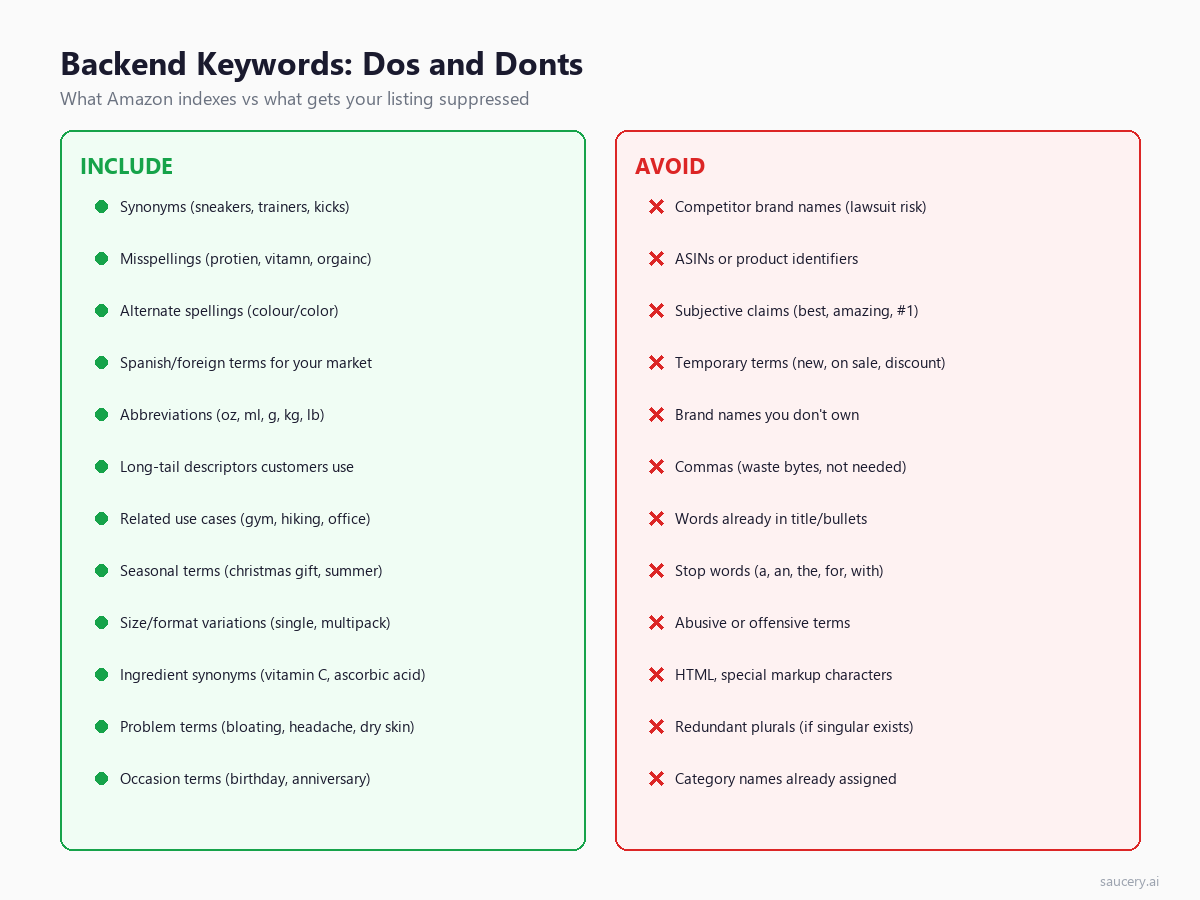
Including prohibited terms does not just waste space – it can get your listing suppressed entirely. Amazon’s systems actively scan backend keywords for policy violations. Here is what to avoid:
Competitor brand names. This is the most common mistake and the most dangerous. Including “Nike” or “Yeti” or any brand you do not own can trigger an intellectual property complaint. Even if no complaint is filed, Amazon’s automated systems flag brand-name stuffing in backend keywords. Your listing can be suppressed without warning.
ASINs and product identifiers. Some sellers try to include competitor ASINs in backend keywords hoping to appear in their search results. This does not work – Amazon does not index ASINs as search terms – and it violates Terms of Service.
Subjective or unverifiable claims. Words like “best,” “cheapest,” “amazing,” “top-rated,” “#1,” and “guaranteed” are not indexed and may trigger compliance reviews. Amazon considers these misleading unless backed by verifiable data.
Promotional and temporary terms. “Sale,” “discount,” “free shipping,” “limited time offer,” “new” – these waste bytes and Amazon explicitly states they should not be in backend keywords. Pricing and availability change constantly; backend keywords are permanent metadata.
Words already in your visible listing. This bears repeating: if a word is in your title or bullets, it is already indexed. Including it again in backend keywords is pure waste. Audit your title and bullets first, then fill backend with genuinely new terms.
Stop words. “A,” “an,” “the,” “for,” “with,” “and,” “or” – Amazon ignores these in search. Every stop word in your backend is a wasted byte.
Offensive, abusive, or explicit terms. Amazon scans for these and will suppress your listing immediately. Even if a term describes a legitimate product use case, if it could be interpreted as offensive, leave it out.
Same product. Better listing. More sales.
How to Check if Your Backend Keywords Are Indexed
After adding backend keywords, you need to verify they are actually indexed. Amazon does not provide a dashboard showing which keywords are indexed – you have to test manually. Here is the reliable method:
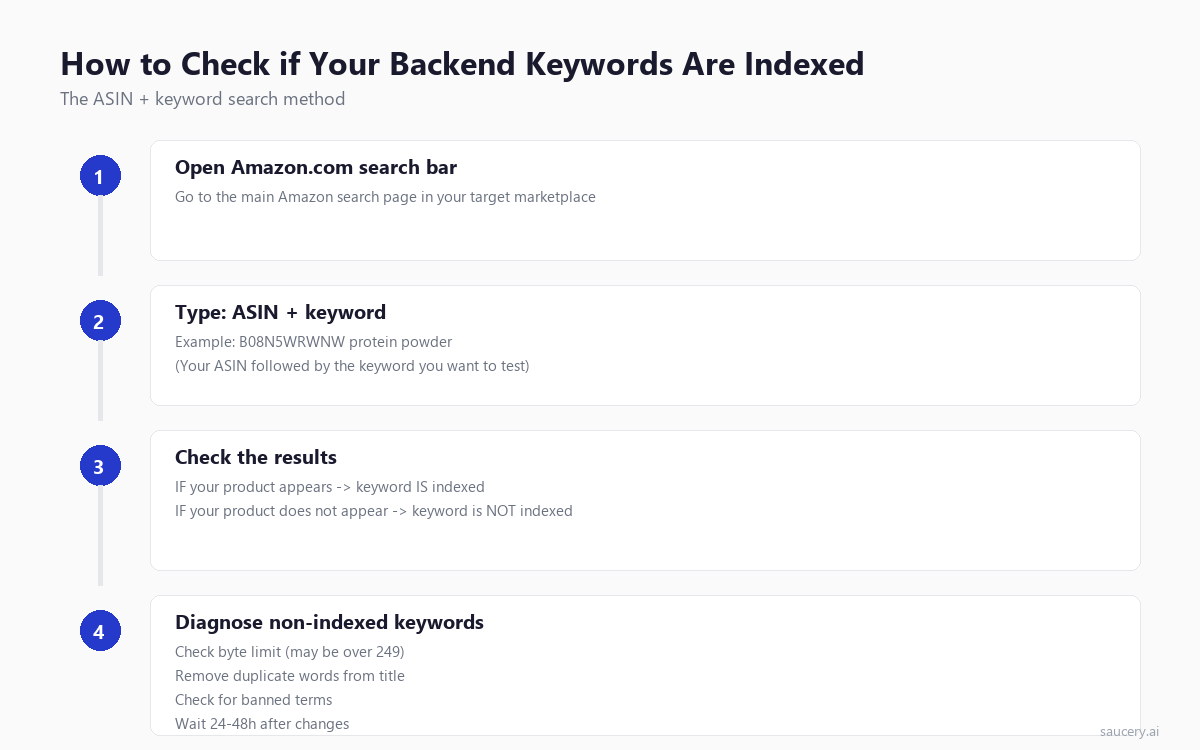
The ASIN + Keyword method:
- Open Amazon’s search bar in your target marketplace
- Type your ASIN followed by the keyword (e.g., “B08N5WRWNW protein powder”)
- If your listing appears in results, the keyword is indexed
- If your listing does not appear, the keyword is not indexed
Important caveats:
- Test one keyword at a time. Multi-word searches may return your listing based on partial matches, giving false positives
- New keywords can take 24-48 hours to index. Do not test immediately after making changes
- Some keywords are indexed but your listing ranks so low it does not appear in normal results. The ASIN method bypasses ranking – if the listing shows, it is indexed regardless of rank
- Use an incognito/private browsing window to avoid personalised results affecting your test
If a keyword is not indexed after 48 hours, the usual culprits are: exceeding the 249-byte limit (entire field gets ignored), the term duplicates a word already in your listing (Amazon may de-prioritise), or the term violates content policy (silently dropped). The most common fix is checking your total byte count.
For sellers with large catalogues, manually testing every keyword is impractical. Tools like Helium 10 Index Checker automate this process, testing multiple keywords against your ASIN in bulk and flagging any that fail to index.
Backend Keywords and Organic Ranking
Being indexed for a keyword is not the same as ranking for it. Indexing means Amazon acknowledges your product is relevant to that search term. Ranking determines where you appear in results. Backend keywords primarily help with indexing – getting you into the consideration set – while other factors determine your position.
The ranking factors that work alongside backend keyword indexing include:
- Sales velocity: Products that sell well for a keyword rank higher for that keyword
- Conversion rate: A high Amazon conversion rate signals relevance to the algorithm
- Click-through rate: If shoppers click your listing from search, Amazon ranks you higher
- Keyword placement: The same keyword in your title carries more ranking weight than in backend
- Review quality and quantity: Social proof signals influence ranking position
- Price competitiveness: Relative to similar products in the search results
Think of backend keywords as casting a wider net. They get you into more search results (indexing), but your listing quality, pricing, and sales history determine where you appear in those results (ranking). A comprehensive Amazon SEO strategy addresses both indexing breadth and ranking depth.
One practical implication: use backend keywords for mid-to-long-tail searches where competition is lower. For these terms, simply being indexed can put you on page one because fewer products compete for visibility. High-volume head terms require strong sales velocity and conversion to rank well regardless of where the keyword appears.
Backend vs Frontend Keywords: Why Both Matter
Your visible listing content (title, bullets, description) and backend keywords serve different but complementary roles. Understanding the relationship helps you allocate keywords strategically across both.
Frontend keywords (title, bullets, description):
- Carry higher indexing weight, especially the title
- Influence click-through rate (shoppers see these terms)
- Must be readable and compelling to humans
- Limited by readability and character limits (200 bytes for titles in most categories)
- Directly impact conversion when terms match shopper intent
Backend keywords:
- Lower indexing weight than title, similar to bullets
- No readability constraint – purely algorithmic
- Perfect for misspellings, synonyms, and alternate terms
- Limited to 249 bytes
- No impact on conversion (shoppers never see them)
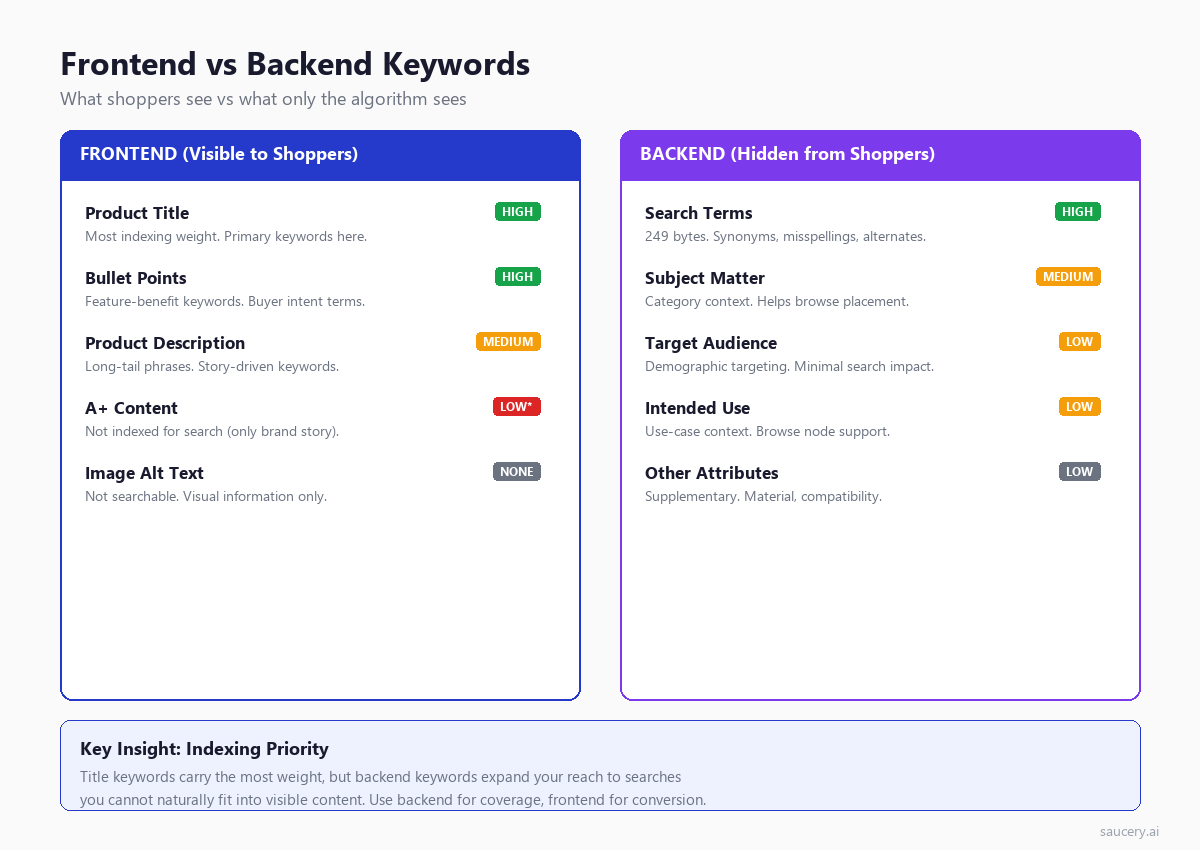
The optimal strategy is: put your highest-value, highest-volume keywords in your title (where they carry maximum weight and influence clicks). Put secondary keywords in your bullets (where they are indexed and influence conversion). Then use backend keywords exclusively for terms that do not fit naturally into visible content – misspellings, foreign language terms, synonyms, and long-tail variations.
A common mistake is duplicating title keywords in backend. If your title says “Organic Whey Protein Powder 2lb Chocolate Flavour,” every one of those words is already indexed at maximum weight. Repeating them in backend wastes bytes. Instead, your backend should include terms like “protien” (misspelling), “proteina” (Spanish), “workout supplement,” “gym shake,” “muscle building” – terms that expand your reach without repeating what is already covered.
For a deeper understanding of what shoppers actually read and respond to on your listing, see our research on what shoppers read on product listings.
How to Research Backend Keyword Opportunities
Finding the right keywords to include in your backend field requires systematic research. Here are the most effective methods, ranked by value:
1. Amazon autocomplete and related searches
Start typing your main keyword into Amazon’s search bar and note every suggestion. These are real searches from real shoppers. Also check the “Related searches” and “Customers also searched for” sections at the bottom of search results pages. These reveal terminology your customers actually use.
2. Competitor reverse ASIN analysis
Tools like Helium 10 Cerebro and Jungle Scout Keyword Scout show which keywords your competitors rank for. Filter for keywords where they rank but you do not – these are immediate backend keyword candidates. Pay special attention to keywords with decent search volume that do not appear anywhere in their visible listing, as these are likely in their backend.
3. Amazon Brand Analytics
If you are Brand Registered, Amazon Brand Analytics shows actual search frequency data. Look at the search terms driving traffic to your category but not to your specific listing. These gaps are backend keyword opportunities.
4. Customer language mining
Read your reviews and competitor reviews. Note the exact words customers use to describe the product. They often use different terminology than sellers. “Belly fat burner” instead of “thermogenic supplement.” “Gym bag” instead of “athletic duffel.” Customer language goes in backend keywords.
5. Google Keyword Planner (with caution)
Google search data can reveal alternate terms people use, but remember that Google search behaviour differs from Amazon search behaviour. Amazon searches are transactional – people are ready to buy. Use Google data for synonym discovery, not volume estimation. For proper Amazon-specific keyword research, use Amazon-native tools.
6. Foreign language translation
For the US marketplace, translate your core product terms into Spanish. For European marketplaces, consider the primary secondary languages (e.g., Turkish in Germany, Arabic in France). This is low-competition, high-value territory that most sellers overlook entirely.
Platform Comparison: Amazon vs eBay vs Walmart
If you sell across multiple marketplaces, understanding how each platform handles hidden/backend keywords helps you optimise consistently. Here is how the three major platforms compare:
Amazon:
- Dedicated “Search Terms” backend field (249 bytes)
- 4 additional backend fields (Subject Matter, Target Audience, Intended Use, Other Attributes)
- Strict enforcement of content policies
- De-duplicates across all listing fields
- Byte-based limit (not character-based)
eBay:
- No dedicated backend keyword field
- Item Specifics serve a similar function (structured attributes that help search)
- Title is the primary ranking factor (80 characters)
- eBay relies more heavily on item specifics and category for discoverability
- Optimising for eBay listing optimisation requires a different approach – front-loading keywords into the title and using every available item specific field
Walmart:
- Has a “Key Features” backend section that influences search
- Uses “Shelf Description” field as additional indexing content
- Product attributes (similar to Amazon item specifics) play a major role
- Less strict enforcement than Amazon but similar best practices apply
- Walmart listing optimisation increasingly follows Amazon patterns as the marketplace matures
The key takeaway: Amazon gives you the most control over hidden search terms through its dedicated backend field. eBay and Walmart require you to embed keywords more creatively through structured attributes and visible fields. A strong e-commerce listing optimisation strategy adapts keyword placement to each platform’s architecture.
Same product. Better listing. More sales.
Common Mistakes That Get Your Listing Suppressed
Amazon listing suppression means your product disappears from search results entirely. It is not a ranking penalty – it is complete invisibility. These backend keyword mistakes trigger suppression:
1. Exceeding the 249-byte limit. This is the single most common mistake. Sellers paste in keywords without checking byte count, exceed the limit, and their entire backend field is ignored. No error message, no warning – just silent failure. Every word you added becomes worthless.
2. Including competitor brand names. Even one competitor brand name can trigger an automated IP complaint. Amazon’s systems cross-reference backend keywords against brand registrations. “Nike” in your running shoe backend? Expect a policy violation notice within days.
3. Using restricted terms. Words like “FDA approved,” “organic” (without certification), “cure,” “treat,” “prevent” in certain categories trigger compliance reviews. Supplement, health, and beauty categories are particularly scrutinised.
4. Stuffing irrelevant keywords. Adding high-volume keywords unrelated to your product (e.g., putting “iPhone” in backend keywords for a phone case because it gets searches) violates relevancy policies. Amazon’s algorithm detects this through purchase behaviour – if shoppers search a keyword, click your listing, but never buy, that signals irrelevance.
5. HTML or special characters. Angle brackets, ampersands, and other markup characters can corrupt the field. Keep it to plain text with spaces.
6. Repeated words filling up space. Some sellers repeat important keywords 3-5 times thinking repetition helps ranking. It does not. Amazon counts a word once regardless of how many times it appears. You are just wasting bytes that could contain new terms.
If your listing gets suppressed, you will notice a sudden drop in sessions and sales. Check Seller Central’s “Listing Quality Dashboard” or “Account Health” for notifications. Fix the violation, re-submit your listing, and allow 24-48 hours for re-indexing.
Step-by-Step: How to Fill in Your Backend Keywords Today
Here is the exact process to follow, from research to submission:
Step 1: Audit your current listing. Write down every word that appears in your title, bullet points, and description. These are already indexed – you will not repeat any of them in backend keywords.
Step 2: Research new terms. Using the methods described above (autocomplete, competitor analysis, customer reviews), build a list of keywords that are NOT in your visible listing. Aim for 50-100 candidate terms.
Step 3: Remove duplicates. Cross-reference your candidate list against your visible listing words. Remove anything that already appears. Remember that Amazon stems basic plurals, so if “cookie” is in your title, you do not need “cookies” in backend.
Step 4: Prioritise by value. Sort your remaining terms by estimated search volume and relevance. High-volume synonyms and common misspellings go first. Obscure long-tail terms fill remaining space.
Step 5: Format your string. Combine your prioritised keywords into a single space-separated string. No commas, no punctuation, all lowercase. Check the byte count – stay under 249.
Step 6: Submit in Seller Central. Paste your string into the Search Terms field under the Product details tab. Save and close.
Step 7: Verify indexing. Wait 24-48 hours, then test your highest-priority backend keywords using the ASIN + keyword method. If any fail to index, check byte count and content policy compliance.
Step 8: Monitor and iterate. Backend keywords are not set-and-forget. Revisit quarterly to add new seasonal terms, trending searches, and terms from new customer review language. Use A/B testing on your visible listing to free up title space, then capture those freed keywords in backend instead.
Tools for Backend Keyword Research
Several tools are purpose-built for Amazon backend keyword research and optimisation. Here are the most effective options:
The gold standard for reverse ASIN lookup. Enter a competitor ASIN and see every keyword they rank for, including estimated backend keywords. Cerebro shows search volume, ranking position, and competition for each term. The “Relative Rank” filter helps identify keywords where competitors rank via backend (not visible in their listing). Pricing starts at $79/month for the Starter plan.
A keyword processor that takes your raw research list and cleans it for backend submission. It removes duplicates, strips common words, and calculates byte count. Useful for the formatting step of your workflow.
Similar to Cerebro but with a different data methodology. Jungle Scout estimates search volume using their own panel data and shows “Ease” scores indicating how competitive a keyword is. Good for identifying low-competition long-tail terms ideal for backend placement.
Automates the ASIN + keyword indexing test described earlier. Paste up to 200 keywords and it checks each one against your ASIN, flagging any that are not indexed. Saves hours of manual testing for large keyword sets.
Amazon Brand Analytics (free for Brand Registered sellers)
The only first-party keyword data from Amazon itself. Shows search frequency rank, top clicked products, and conversion share. Cannot be beaten for accuracy on high-volume terms, though it does not reveal exact search volumes or long-tail data.
Alternative tools with similar functionality to Helium 10 and Jungle Scout. SellerApp offers a free tier with limited searches. Viral Launch excels at market intelligence and can identify keyword gaps across an entire product category.
For sellers just starting out, Amazon autocomplete combined with the free tier of SellerApp provides sufficient data for initial backend keyword research. As your catalogue grows, investing in Helium 10 or Jungle Scout becomes worthwhile for the automation and competitive intelligence features.
Advanced: Using All 5 Backend Fields
Most sellers only fill in the Search Terms field and ignore the other four backend fields entirely. This is a missed opportunity. While the Search Terms field carries the most indexing weight, the other fields provide additional context that influences browse placement and category relevance.
Search Terms (249 bytes)
Your primary backend keyword field. This is where misspellings, synonyms, foreign language terms, and alternate names go. Treat this as the critical field – it directly impacts search indexing.
Subject Matter
Describes what your product is about at a category level. For a protein powder, subject matter might include “sports nutrition bodybuilding fitness supplements workout recovery.” This helps Amazon place your product in the right browse nodes and show it in relevant category pages.
Target Audience
Who is your product for? “Athletes men women beginners gym enthusiasts runners cyclists.” This field helps Amazon’s personalisation algorithm show your product to the right shoppers. It has minimal direct search impact but influences the “Recommended for you” and “Customers who bought” placements.
Intended Use
What is the product used for? “Post-workout recovery meal replacement weight management muscle building endurance training.” Similar to Target Audience in function – it helps Amazon understand context and serve your product to relevant shoppers.
Other Attributes
A catch-all field for additional product characteristics: “vanilla flavoured plant-based lactose-free soy-free non-gmo third-party tested.” Include material, certification, compatibility, and other attributes not captured elsewhere.
The secondary fields (Subject Matter through Other Attributes) do not have a strict byte limit displayed in Seller Central, but practical testing shows that keeping each under 200 bytes is safe. Amazon does not officially document indexing behaviour for these fields, but multiple seller experiments confirm they contribute to browse node placement and contextual recommendations.
For a new product launch, filling all five fields is part of a comprehensive Amazon product launch strategy. Every signal you give Amazon about your product’s relevance helps the algorithm categorise and surface it correctly from day one.
Same product. Better listing. More sales.
Frequently Asked Questions
How often should I update my backend keywords?
Review quarterly at minimum. Update when: seasonal terms become relevant (e.g., “christmas gift” in Q4), you notice new search terms in Brand Analytics, customer reviews reveal new language patterns, or competitors launch products with different naming conventions. Major product updates (new flavour, reformulation) should always trigger a backend keyword refresh.
Can I use the same backend keywords across multiple listings?
You can, but you should not duplicate blindly. Each listing should have backend keywords specific to that product’s unique attributes and the gaps in that specific listing’s visible content. A chocolate protein powder and a vanilla protein powder should share some backend terms (misspellings of “protein,” Spanish translations) but differ in flavour-specific synonyms and use cases.
Do backend keywords affect PPC campaigns?
Yes, indirectly. Amazon’s automatic targeting campaigns use your listing content (including backend keywords) to determine which searches trigger your ads. If “muscle recovery” is in your backend keywords, automatic campaigns may show your ad for that search. For manual campaigns, backend keywords have no impact – you directly specify target terms.
What happens if I leave the backend keywords field empty?
Nothing bad happens – your listing will not be penalised. But you miss indexing opportunities. Your product will only appear in searches matching words in your title, bullets, and description. For many products, that means hundreds of relevant long-tail searches are invisible to you. An empty backend field is lost potential, not a penalty.
Is there a difference between “Search Terms” and “Generic Keywords”?
No – these are the same field. Amazon’s interface uses different labels depending on your category and account type. “Search Terms” and “Generic Keywords” refer to the same 249-byte backend field. If you see both in flat file templates, they populate the same attribute.
Do backend keywords work for Amazon FBA and FBM equally?
Yes. Backend keywords are a listing attribute, not a fulfilment attribute. Whether you fulfil via FBA (Fulfilled by Amazon) or FBM (Fulfilled by Merchant), the backend keyword field functions identically. The only difference is that FBA listings may rank slightly higher overall due to Prime eligibility, but this is a separate ranking factor unrelated to keyword indexing.
Can Amazon see and use my backend keywords against me?
Amazon absolutely monitors backend keywords for policy compliance. Automated systems scan for brand name infringement, restricted claims, and offensive content. However, Amazon does not use your backend keywords to inform their private label product development (despite seller concerns). Backend keywords are purely a search indexing mechanism within the marketplace.
Should I include my own brand name in backend keywords?
No. Your brand name is already indexed through your Brand Registry enrollment, product title, and brand field in Seller Central. Including it in backend keywords wastes bytes. The exception: if your brand name has common misspellings, include those misspellings (e.g., if your brand is “Acai Naturals,” include “acai naturels” or “acai naturalls”).
About the Author
Andrew Mac is the founder of Saucery, where he helps e-commerce brands optimise product listings using AI-powered analysis. With experience across Amazon, eBay, and Walmart marketplaces, he focuses on the intersection of search algorithms, shopper behaviour, and listing content that converts.
Subscribe for F&B Consumer Insights
Data-driven insights on food & beverage consumer preferences, straight to your inbox.