Products with optimised listings convert 3-5x more than identical products with default copy. That is not a typo. The same physical product, same price point, same fulfilment speed – but one version has a listing built with intent, and the other was thrown together in fifteen minutes.
I have tested thousands of listing variations across Amazon, eBay, Etsy, Walmart, and Shopify stores. The gap between a mediocre listing and an optimised one is not marginal. It is the difference between a product that sells 3 units per day and one that sells 15. Between a product that bleeds ad spend and one that converts organically.
This guide covers everything I know about e-commerce listing optimisation – the universal principles that apply regardless of platform, the platform-specific tactics that most sellers miss, and the testing frameworks that separate brands scaling profitably from those burning cash on traffic that never converts.
What Is E-commerce Listing Optimisation?
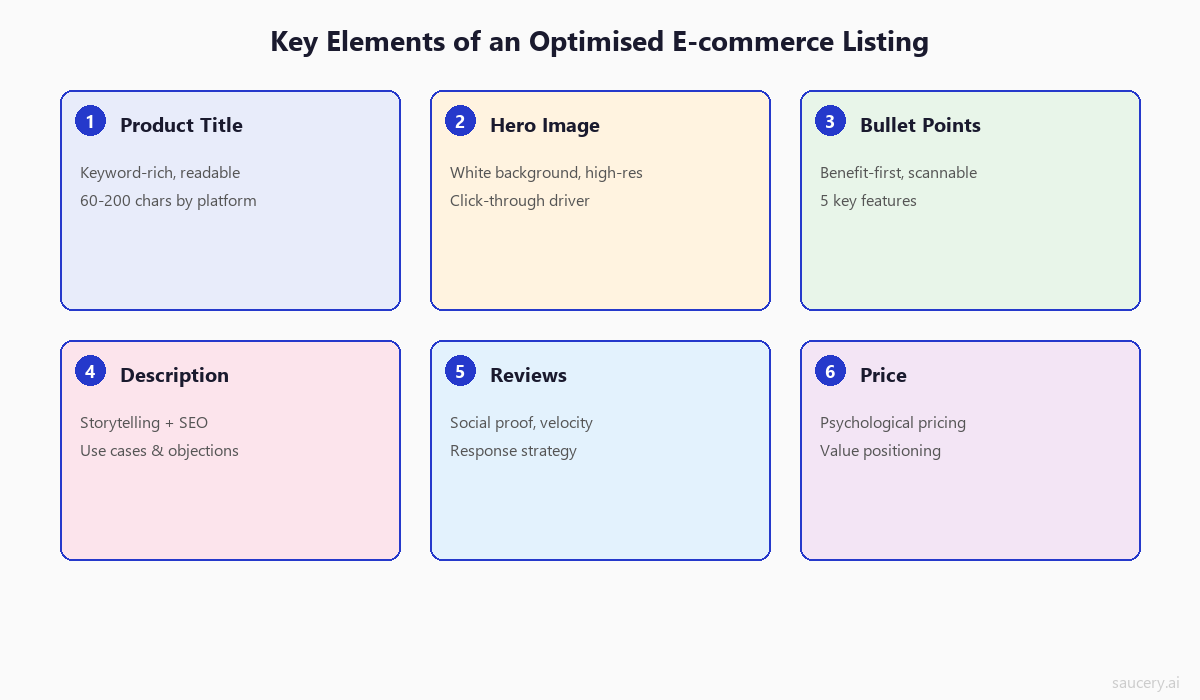
E-commerce listing optimisation is the systematic process of improving every element of a product listing to maximise visibility in search results, click-through rates from browse pages, and conversion rates on the product detail page itself.
Most sellers think listing optimisation means “putting keywords in the title.” That is roughly 15% of what actually moves the needle. A fully optimised listing addresses:
- Title structure – keyword placement, readability, character limits, brand positioning
- Bullet points / key features – benefit-first messaging, scannable formatting, keyword integration
- Product descriptions – storytelling, use cases, objection handling, SEO value
- Backend search terms – invisible keywords that expand discoverability without cluttering visible copy
- Image stack – main image for click-through, secondary images for conversion, infographics, lifestyle shots
- Pricing strategy – positioning relative to category, psychological pricing, perceived value alignment
- Review management – velocity, recency, response strategy, social proof signals
- Enhanced content – A+ Content (Amazon), Item Description (eBay), brand story modules
- Category and attribute accuracy – correct taxonomy placement, complete item specifics
Each of these elements works as part of an interconnected system. Optimising your title without fixing your images is like tuning an engine without changing the oil. You will see some improvement, but you are leaving most of the performance on the table.
The Two Jobs of a Product Listing
Every product listing has exactly two jobs:
Job 1: Get found. This is the visibility game – ranking in search results, appearing in browse categories, showing up in recommendations. It is driven primarily by keyword relevance, sales velocity, and listing completeness.
Job 2: Convert the click. Once a shopper lands on your listing, every element must work together to move them from “interested” to “add to cart.” This is driven by messaging clarity, image quality, social proof, and price positioning.
Most sellers optimise for one job and neglect the other. They stuff keywords everywhere (great for Job 1, terrible for Job 2) or write beautiful marketing copy (great for Job 2, invisible for Job 1). The best listings nail both simultaneously.
Why Listing Optimisation Matters More Than Ever
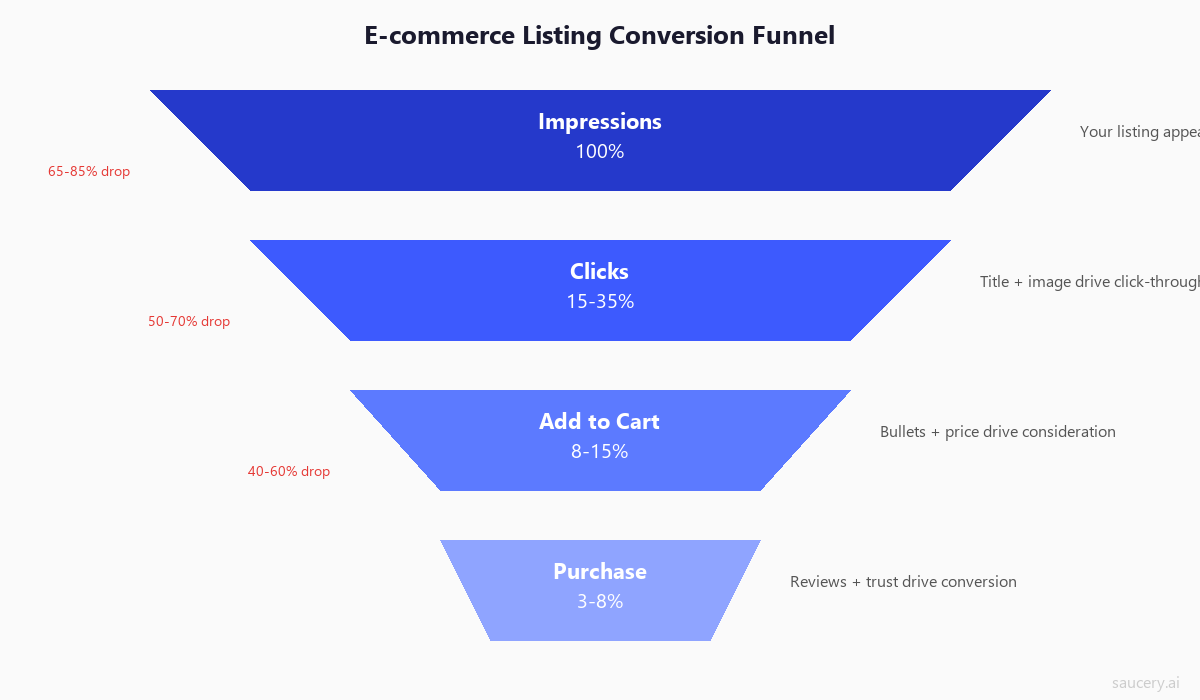
Three forces are converging to make product listing optimisation more critical in 2026 than at any point in e-commerce history:
1. Platform Algorithms Are Getting Smarter (and Less Forgiving)
Amazon’s A10 algorithm now weighs external traffic, seller authority, and listing engagement metrics more heavily than ever. According to Amazon’s own seller guidance, listings with complete and accurate information receive preferential treatment in search results.
eBay’s Cassini search engine has shifted from keyword-matching to behavioural signals – click-through rate, watch-to-sale ratios, and item specifics completeness now determine ranking more than title keyword density. eBay’s Seller Center reports that listings with complete item specifics are up to 12% more likely to sell.
Etsy’s search algorithm update in late 2022 began indexing description text for the first time, fundamentally changing how sellers should approach their listing copy. The Etsy Seller Handbook now explicitly recommends using relevant keywords in descriptions.
2. Competition Has Never Been Higher
Amazon alone now hosts over 9.7 million active sellers globally, with 2,000+ new sellers joining daily. The average product category has seen a 37% increase in competing listings since 2023. On Etsy, there are now over 9 million active shops competing for buyer attention.
When competition was lower, a mediocre listing could still generate sales simply by being present. Those days are over. In saturated categories, the difference between page 1 and page 3 is not just visibility – it is survival.
3. AI Shopping Agents Are Reading Your Listings
This is the change most sellers are not prepared for. AI shopping assistants – from Google’s Shopping Graph to Amazon’s Rufus to standalone AI agents – are now parsing product listings to make purchase recommendations. These systems do not respond to clever marketing copy the way humans do. They respond to structured data, clear specifications, and unambiguous claims.
A listing that says “amazing protein bar with loads of protein” tells an AI agent nothing useful. A listing that says “22g whey protein per 60g bar, 190 calories, gluten-free” gives the AI exactly what it needs to recommend your product when a shopper asks for “a high-protein, low-calorie snack that is gluten-free.”
The brands that structure their listings for both human shoppers AND AI agents will dominate the next five years of e-commerce.
The Universal Principles of Product Listing Optimisation
Before we get into platform-specific tactics, there are six principles that apply across every marketplace. These are the fundamentals. Get these right and you will outperform 80% of competing listings regardless of which platform you sell on.
Principle 1: Keyword Relevance (Matching Search Intent)
Keywords are the foundation of discoverability, but most sellers approach them wrong. They focus on search volume without considering intent.
A shopper searching “protein bar” has broad intent – they are browsing. A shopper searching “vegan protein bar peanut butter 20g” has purchase intent – they know exactly what they want. Your listing needs to serve both, but the specific, high-intent keywords are where conversion happens.
The keyword hierarchy:
- Primary keyword – your main search term, placed at the front of your title
- Secondary keywords – related terms with high relevance, distributed across title and bullets
- Long-tail keywords – specific phrases with lower volume but higher conversion, placed in backend terms or descriptions
- Latent semantic keywords – related concepts that signal topical authority to the algorithm
Research from Jungle Scout’s annual seller report indicates that 70% of Amazon purchases begin with a search query rather than browsing, making keyword strategy non-negotiable for visibility.
Principle 2: Benefit-First Messaging
Features describe what a product IS. Benefits describe what it DOES for the buyer. Every element of your visible listing copy should lead with the benefit and follow with the feature that enables it.
Feature-first (weak): “Made with 304 stainless steel construction”
Benefit-first (strong): “Never rusts or stains – built with food-grade 304 stainless steel that lasts a lifetime”
The feature is identical. The benefit-first version tells the shopper what problem it solves (rust, staining) and what outcome they get (lifetime durability). This matters because shoppers scan – they give each bullet point roughly 2-3 seconds. If the benefit is not front-loaded, they will never read far enough to find it.
This connects directly to how you define your unique selling proposition – the listing is where your USP either lands or falls flat.
Principle 3: Specificity Beats Generics
This is the single most underrated principle in listing optimisation. Specific claims outperform generic claims in every test I have ever run – on conversion rate, click-through rate, and perceived value.
Generic (weak): “High protein snack bar”
Specific (strong): “11g Plant Protein Per Bar – Pea & Brown Rice Blend”
Generic (weak): “Long battery life”
Specific (strong): “47-Hour Battery Life on Single Charge”
Generic (weak): “Large capacity backpack”
Specific (strong): “38L Main Compartment – Fits 16-Inch Laptop + 3 Days of Clothes”
Specificity works for three reasons:
- It builds trust. Vague claims feel like marketing. Specific claims feel like facts.
- It enables comparison. Shoppers comparing products need concrete data points to make decisions.
- It filters intent. Specific details attract the right buyers and repel the wrong ones, reducing returns and negative reviews.
Principle 4: Image Hierarchy
Your main image determines whether shoppers click. Your secondary images determine whether they buy. These are two completely different jobs requiring different approaches.
Main image (the click generator):
- Pure white background (RGB 255, 255, 255) for marketplace compliance
- Product fills 85%+ of the frame
- Sharp, professional lighting with no shadows
- Shows the actual product (not lifestyle, not infographic)
- Must stand out in a grid of competing thumbnails
Secondary images (the conversion engine):
- Image 2-3: Infographics showing key benefits, dimensions, specifications
- Image 4-5: Lifestyle images showing the product in use
- Image 6: Comparison chart or “what’s in the box”
- Image 7: Social proof elements – review quotes, awards, certifications
Research from BigCommerce shows that 78% of online shoppers cite product images as the most important factor in their purchase decision, ahead of reviews (69%) and price (65%).
Principle 5: Social Proof Signals
Reviews are not just a trust signal for shoppers – they are a ranking signal for algorithms. Products with higher review counts and ratings receive preferential search placement on every major marketplace.
The data from PowerReviews’ consumer survey is clear:
- Products with 1-10 reviews see a 52.2% conversion lift versus products with zero reviews
- Products with 11-30 reviews see an additional 23% lift
- The conversion impact plateaus around 100 reviews for most categories
- A 4.2-4.7 star rating converts better than a perfect 5.0 (perceived as fake)
While you cannot directly control your review count within the listing itself, your listing optimisation strategy should account for review velocity – how quickly you accumulate reviews after launch. This means optimising for the right customers (specificity in your listing attracts buyers who will be satisfied) and managing expectations (accurate descriptions reduce negative reviews from mismatched expectations).
Principle 6: Price Positioning Relative to Category
Your price is a listing element. It communicates quality, value, and positioning whether you intend it to or not. The most common pricing mistakes in e-commerce are:
- Pricing in no-man’s land – too expensive for the value segment, too cheap for the premium segment
- Ignoring the “price ladder” – not understanding where competitors cluster and where gaps exist
- Misaligned price-quality signals – premium pricing with budget-quality images and copy
Your listing copy and images must justify your price point. If you are priced 30% above the category average, your listing needs to clearly communicate why. If you are positioned as the value option, your listing should emphasise quantity, bundle value, or unit economics.
For a deeper dive on pricing architecture, see our guides on product pricing strategy and markup vs margin calculations.
Platform-by-Platform Listing Optimisation
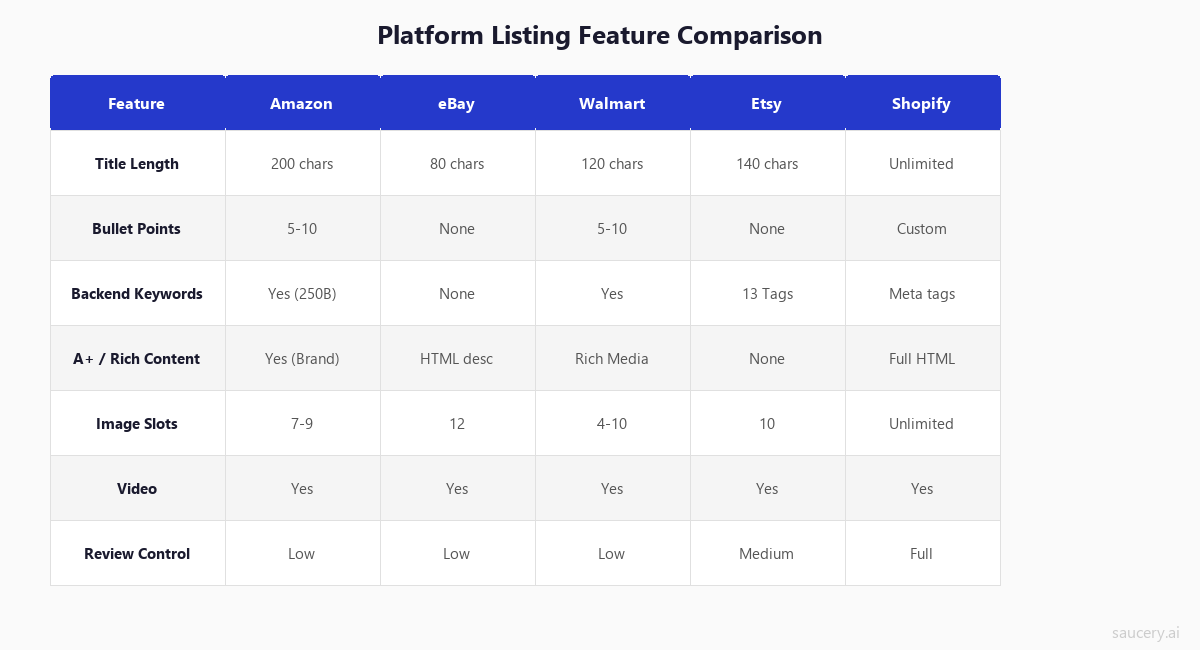
The universal principles above apply everywhere. But each platform has specific rules, character limits, algorithm quirks, and formatting requirements that demand tailored approaches. Here is what you need to know about each major marketplace.
Amazon Listing Optimisation
Amazon remains the dominant marketplace with over 300 million active customer accounts and approximately 60% of US e-commerce product searches starting on the platform, according to Amazon’s seller resources.
Key listing elements:
- Title: 200-character limit, but only ~80 characters visible on mobile and in search results. Front-load your primary keyword and brand name in the first 80 characters.
- Bullet points: 5 bullets (some categories allow 10), maximum 500 characters each. Lead each bullet with a CAPITALISED benefit phrase followed by supporting detail.
- Product description: 2,000 characters. Less SEO weight than title and bullets, but important for A9/A10 indexing and shopper persuasion.
- Backend search terms: 250 bytes total across all search term fields. No need to repeat words already in your title. Use this space for synonyms, misspellings, and related terms.
- A+ Content: Enhanced brand content available to brand-registered sellers. Increases conversion by 3-10% on average but is NOT indexed for search.
- Images: Up to 9 images plus video. Main image must be pure white background, minimum 1000×1000 pixels (2000×2000 recommended for zoom functionality).
Algorithm considerations (A9/A10):
Amazon’s search algorithm weighs relevance (keyword matching) and performance (conversion rate, sales velocity) in roughly equal measure. A listing can rank for a keyword it has never sold against if the keyword relevance is strong enough, but it will not maintain that position without conversions. Sales velocity is the strongest ranking signal – products that sell more rank higher, creating a flywheel effect.
Common Amazon mistakes:
- Repeating keywords across title, bullets, and backend (wastes indexing capacity)
- Using all 200 title characters when only 80 are visible (confuses shoppers)
- Ignoring backend search terms entirely (missing 250 bytes of free keyword space)
- A+ Content that duplicates bullet point information instead of adding new value
Detailed guide: Amazon Listing Optimisation: The Complete Seller’s Guide
eBay Listing Optimisation
eBay has 134 million active buyers globally and processes $73.2 billion in gross merchandise volume annually. Unlike Amazon, eBay gives sellers significantly more control over listing presentation but provides no backend keyword fields.
Key listing elements:
- Title: Strict 80-character limit. Every character counts – there is no backend keyword field to compensate. Use all 80 characters with your highest-value keywords.
- Item specifics: These are eBay’s equivalent of backend keywords. Complete every available item specific field – Cassini uses these heavily for search matching and filtering. Listings with complete item specifics rank significantly higher.
- Description: HTML-enabled, no character limit. Indexed by Cassini but given less weight than title and item specifics. Mobile-first design is critical – over 60% of eBay purchases now happen on mobile.
- Images: Up to 24 images free. First image is the gallery image (drives click-through from search). eBay allows text overlays on secondary images, which is a competitive advantage over Amazon’s stricter image policies.
- Subtitle: Additional 55 characters (paid feature, ~$1.50). Can improve click-through rate by 5-15% for competitive categories.
Algorithm considerations (Cassini):
Cassini heavily rewards seller performance metrics (shipping speed, defect rate, response time) alongside listing quality. A perfectly optimised listing from a seller with a 95% positive feedback score will be outranked by a decent listing from a Top Rated Seller. According to eBay’s seller updates, item specifics completeness is now one of the top three ranking factors.
Common eBay mistakes:
- Leaving item specifics incomplete (the single biggest ranking penalty on eBay)
- Using desktop-optimised HTML descriptions that render poorly on mobile
- Wasting title characters on brand name when it should be in item specifics
- Ignoring the subtitle feature in competitive categories where CTR is tight
Detailed guide: eBay Listing Optimisation: Ranking with Cassini in 2026
Etsy Listing Optimisation
Etsy hosts over 9 million active sellers and 96 million active buyers, with a focus on handmade, vintage, and craft supply categories. Etsy’s search system operates differently from Amazon and eBay, with unique elements like tags and a strong emphasis on listing freshness.
Key listing elements:
- Title: 140-character limit. Etsy’s search weights the first few words most heavily, so front-load your primary keyword. Unlike Amazon, exact phrase matching matters more than individual keyword presence.
- Tags: 13 tags, up to 20 characters each. These function as your primary keyword targeting mechanism. Use all 13 – each tag is a chance to match a different search query. Multi-word phrases work better than single words.
- Description: No character limit. Since late 2022, Etsy’s search algorithm indexes description text, making it an SEO opportunity. The first 160 characters appear in search result snippets. The Etsy Seller Handbook confirms that using natural, relevant keywords in descriptions improves search visibility.
- Categories and attributes: Selecting the most specific category available and completing all attributes helps Etsy match your listing to relevant searches.
- Images: Up to 10 images. First image drives click-through. Etsy allows more creative freedom – lifestyle images, flat-lays, and styled photography outperform clinical white-background shots in this marketplace.
Algorithm considerations:
Etsy’s search factors in listing quality score, recency (newer or recently renewed listings get a temporary boost), shop quality score, and shipping price (free shipping gets preferential placement via the free shipping priority programme). Conversion rate and click-through rate from search results are strong behavioural signals.
Common Etsy mistakes:
- Not using all 13 tags (leaving discoverability on the table)
- Repeating exact title phrases in tags (Etsy already indexes your title – tags should target DIFFERENT keywords)
- Ignoring description SEO since the 2022 indexing change
- Using single-word tags instead of multi-word phrases that match how shoppers actually search
Detailed guide: Etsy Listing Optimisation: Tags, Titles, and Search Ranking
Walmart Marketplace Listing Optimisation
Walmart Marketplace has grown to over 150,000 active sellers and is the fastest-growing major marketplace in the US. With significantly less competition than Amazon (150K sellers vs 2M+ US sellers on Amazon), Walmart represents a major opportunity for brands willing to optimise their listings properly.
Key listing elements:
- Title: 50-75 characters recommended (max 200). Walmart’s algorithm favours shorter, clearer titles. Format: Brand + Product Name + Key Attribute + Size/Count. Avoid keyword stuffing – Walmart’s content quality score penalises it explicitly.
- Key features: 3-10 bullet points, 80 characters each recommended. Similar to Amazon bullets but Walmart favours brevity and clarity over length.
- Shelf description: Short description (up to 500 characters) that appears above the fold. This is your highest-converting copy real estate on Walmart.
- Long description: Extended description (up to 4,000 characters) for detailed product information. Rich text supported.
- Attributes: Product attributes are heavily weighted by Walmart’s search algorithm. Complete every available attribute field.
- Images: Minimum 2, recommended 4+. White background for main image. Walmart’s Listing Quality Score directly penalises listings with insufficient images.
Algorithm considerations:
Walmart uses a Listing Quality Score (visible in Seller Center) that directly impacts search ranking. This score is based on content quality, offer quality (price competitiveness, shipping speed), and performance metrics. Unlike Amazon, Walmart’s search algorithm uses exact keyword matching more than semantic matching – meaning the precise words in your listing matter more than on Amazon.
Common Walmart mistakes:
- Writing Amazon-length titles (Walmart penalises titles over 75 characters)
- Ignoring the Listing Quality Score dashboard (free diagnostic tool most sellers never check)
- Not completing the shelf description (highest-visibility copy field, often left blank)
- Using broad keyword strategies that work on Amazon but fail on Walmart’s exact-match system
Detailed guide: Walmart Listing Optimisation: Standing Out on the Fastest-Growing Marketplace
Shopify Store Listing Optimisation
Shopify powers over 4.4 million active stores globally. Unlike marketplaces, Shopify stores are standalone websites – meaning your listing optimisation is fundamentally about Google SEO and on-site conversion rather than marketplace algorithm ranking.
Key listing elements:
- Product title: No character limit, but Google displays ~60 characters in search results. Your title should be clear, keyword-rich, and readable.
- SEO title (meta title): Separate from product title. Use this to target Google search queries specifically, including location modifiers and buying intent keywords.
- Product description: No character limit. Full HTML formatting supported. This is your chance to write comprehensive, persuasive product copy that also targets Google’s search algorithm. Long-form descriptions (300-1000 words) outperform short ones for SEO.
- Meta description: 155-160 characters. Does not directly impact rankings but significantly affects click-through rate from Google search results.
- URL handle: Keep it short, include primary keyword, use hyphens. Avoid auto-generated URLs with unnecessary parameters.
- Alt text: Every image should have descriptive alt text targeting relevant keywords. This drives Google Image search traffic.
- Images: Unlimited. Mix product photography, lifestyle images, size guides, and user-generated content. Page speed matters – optimise file sizes.
SEO considerations:
Shopify product pages compete in Google’s organic search results against every other website, not just other sellers on a marketplace. This means standard Google structured data (Schema.org Product markup) is essential, page speed optimisation matters, and your product pages need to be supported by broader content marketing (blog posts, category pages, buying guides) to build topical authority.
Common Shopify mistakes:
- Using manufacturer descriptions instead of original content (duplicate content penalty)
- Ignoring meta titles and descriptions (relying on auto-generated versions)
- Not implementing structured data / rich snippets (missing star ratings in search results)
- Thin product descriptions that provide no SEO value or differentiation
Detailed guide: Shopify Product Page Optimisation: Google SEO for E-commerce
The “Test Once, Optimise Everywhere” Approach
Here is what most multi-platform sellers get wrong: they treat each marketplace listing as a completely independent project. They write separate titles, separate bullet points, separate descriptions for each platform from scratch.
This is inefficient and it misses a fundamental truth: the purchase decision is platform-agnostic, but the formatting is not.
A shopper deciding between your hot sauce and a competitor’s hot sauce is weighing the same factors whether they are on Amazon, eBay, or your Shopify store:
- What flavour is it?
- How hot is it?
- What makes it different from alternatives?
- Is it good value for the price?
- Do other people like it?
The answers to these questions do not change across platforms. What changes is HOW you present those answers – character limits, formatting rules, keyword strategies.
The efficient approach:
- Define your core messaging – what are the 5-7 key claims/benefits your product offers?
- Prioritise those claims – test which claims resonate most with your target buyer (more on this below)
- Format for each platform – adapt the winning messaging to each platform’s specific requirements
This approach means you test your core messaging ONCE – determining which claims, which benefit hierarchy, which positioning resonates most – then adapt the proven messaging to each platform’s format. Instead of running separate A/B tests on Amazon (8 weeks), then eBay (8 weeks), then Shopify (8 weeks), you validate the decision first and deploy with confidence everywhere simultaneously.
Common Listing Optimisation Mistakes (And How to Fix Them)
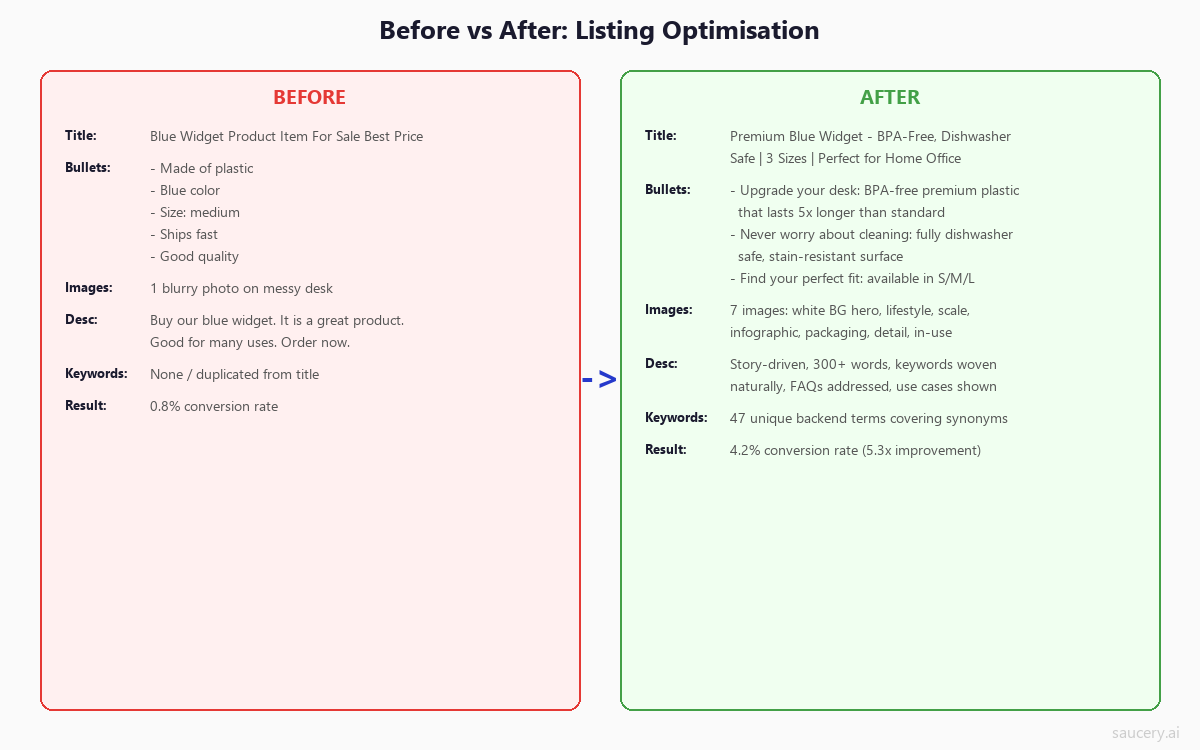
After reviewing thousands of product listings across every major platform, these are the mistakes I see most frequently. Each one costs sellers measurable revenue.
Mistake 1: Writing for Algorithms Instead of Humans
Keyword stuffing was a viable strategy in 2015. In 2026, every major marketplace algorithm penalises it. More importantly, even if a keyword-stuffed listing ranks, it does not convert. Shoppers can tell when a title was written for a robot, and they scroll past it.
The fix: Write for humans first, then verify keyword coverage. If your title sounds awkward when read aloud, rewrite it. Natural language that includes keywords will always outperform keyword strings that ignore readability.
Mistake 2: Copy-Pasting the Same Listing Across Platforms
Your Amazon listing should not be identical to your eBay listing. Character limits differ, algorithm weights differ, shopper expectations differ. A 200-character Amazon title crammed into eBay’s 80-character limit gets truncated. Amazon-style bullets pasted into an Etsy description look out of place.
The fix: Use the “Test Once, Optimise Everywhere” framework. Same core messaging, adapted formatting. The WHAT stays consistent; the HOW changes per platform.
Mistake 3: Ignoring Mobile Formatting
Over 70% of e-commerce browsing now happens on mobile devices. On Amazon, only your first 80 title characters are visible on mobile. On eBay, HTML descriptions that look beautiful on desktop become unreadable on phone screens. On Etsy, only your first image thumbnail and first line of the title drive the click decision.
The fix: Always preview your listings on mobile before publishing. Ensure your most important information appears within the mobile-visible portion of every field. Design your image stack assuming the thumbnail will be viewed at 150×150 pixels on a phone screen.
Mistake 4: Setting and Forgetting
Listing optimisation is not a one-time project. Search trends shift seasonally, competitors adjust their positioning, algorithms update their weighting. A listing optimised perfectly in January may be underperforming by June.
The fix: Schedule quarterly listing audits. Monitor your search rank for target keywords, track conversion rate trends, and re-optimise when performance declines. Use Amazon’s Search Query Performance report, eBay’s Traffic tab, or Etsy’s Search Analytics to identify opportunities.
Mistake 5: Optimising Traffic Without Optimising Conversion
Spending money on PPC to drive traffic to an unoptimised listing is like pouring water into a bucket with holes. I have seen sellers spending $5,000/month on Amazon Sponsored Products with a 3% conversion rate, when a properly optimised listing could achieve 12-15% organically.
The fix: Always optimise your listing BEFORE scaling traffic. Fix your images, sharpen your bullet points, address the most common objections, ensure your pricing is competitive – then turn on the traffic firehose.
Mistake 6: Guessing Instead of Testing
Most sellers optimise their listings based on gut instinct or competitor imitation. They look at what the top seller in their category does and copy the format without understanding WHY it works (or whether it actually does – correlation is not causation in search ranking).
The fix: Test your listing variations with real purchase decision data before deploying. Traditional A/B testing takes 8-12 weeks on marketplace platforms due to the volume required for statistical significance. Predictive testing can validate your listing hypotheses in 48 hours, letting you deploy with confidence on day one.
Mistake 7: Neglecting the Review Ecosystem
Your reviews are part of your listing. Sellers who treat listing optimisation as only “title + bullets + images” are ignoring the most influential conversion factor on every platform. A perfectly optimised listing with 2 reviews will lose to a mediocre listing with 200 reviews almost every time.
The fix: Build review generation into your post-purchase workflow. Use Amazon’s Request a Review button, eBay’s feedback reminders, or post-purchase email sequences on Shopify. Address negative reviews publicly and professionally – your response is visible to future buyers and signals how you handle problems.
How AI Is Changing E-commerce Listing Optimisation
The listing optimisation landscape is shifting rapidly as AI reshapes both how shoppers discover products and how sellers optimise their listings.
AI Shopping Agents Are Rewriting Discovery
Amazon’s Rufus, Google’s AI Shopping assistant, and a growing ecosystem of third-party AI shopping agents are fundamentally changing how products get discovered. These agents do not browse listings the way humans do. They parse structured data, evaluate claims against specifications, and make recommendations based on explicit criteria matching.
This has profound implications for listing optimisation:
- Explicit specifications beat vague claims. An AI agent asked to find “a laptop backpack that fits a 15-inch MacBook Pro” will recommend listings that explicitly state “fits 15-inch laptops” over those that say “fits most laptops.”
- Structured data wins. Clear attribute fields, consistent specification formatting, and schema markup (for Shopify/DTC) make your products parseable by AI agents.
- Comparison shopping intensifies. AI agents can compare dozens of products simultaneously – meaning your differentiators must be explicit and quantifiable, not buried in marketing language.
Predictive Testing Replaces Wait-and-See
Traditional listing optimisation follows a painful cycle: make a change, wait 4-8 weeks for data, evaluate results, iterate. For a product with five possible title variations and three possible bullet point structures, testing all combinations sequentially could take over a year.
AI-powered predictive testing compresses this timeline from weeks to hours. Instead of running live A/B tests with real traffic (and real revenue at risk), you can test listing variations against modelled shoppers calibrated to your target demographic. This means:
- Pre-launch validation. Test your listing before it goes live, not after. Launch with the winning version on day one instead of spending your honeymoon period (the algorithm boost new listings receive) with a B-grade listing.
- Multi-variable testing. Test title, bullets, and pricing simultaneously rather than one variable at a time. Understand interaction effects between listing elements.
- No revenue risk. Your live listing continues performing while you test variations in a simulated environment. No lost sales during the testing period.
- Cross-platform optimisation. Test which claims resonate most, then deploy the winners formatted correctly for each platform simultaneously.
AI-Generated Listing Copy (And Its Limitations)
Large language models can now generate product listing copy in seconds. This has lowered the bar for baseline listing quality (product differentiation matters more than ever) – but it has also made differentiation harder. When every seller is using AI to write “benefit-focused, keyword-optimised” bullet points, the copy starts sounding identical.
The sellers winning in 2026 are not those generating copy with AI – they are those using AI to TEST which copy resonates before publishing. The generation is easy. Knowing which version to deploy is the hard part. That is where predictive testing creates an unfair advantage.
Building a Listing Optimisation Workflow
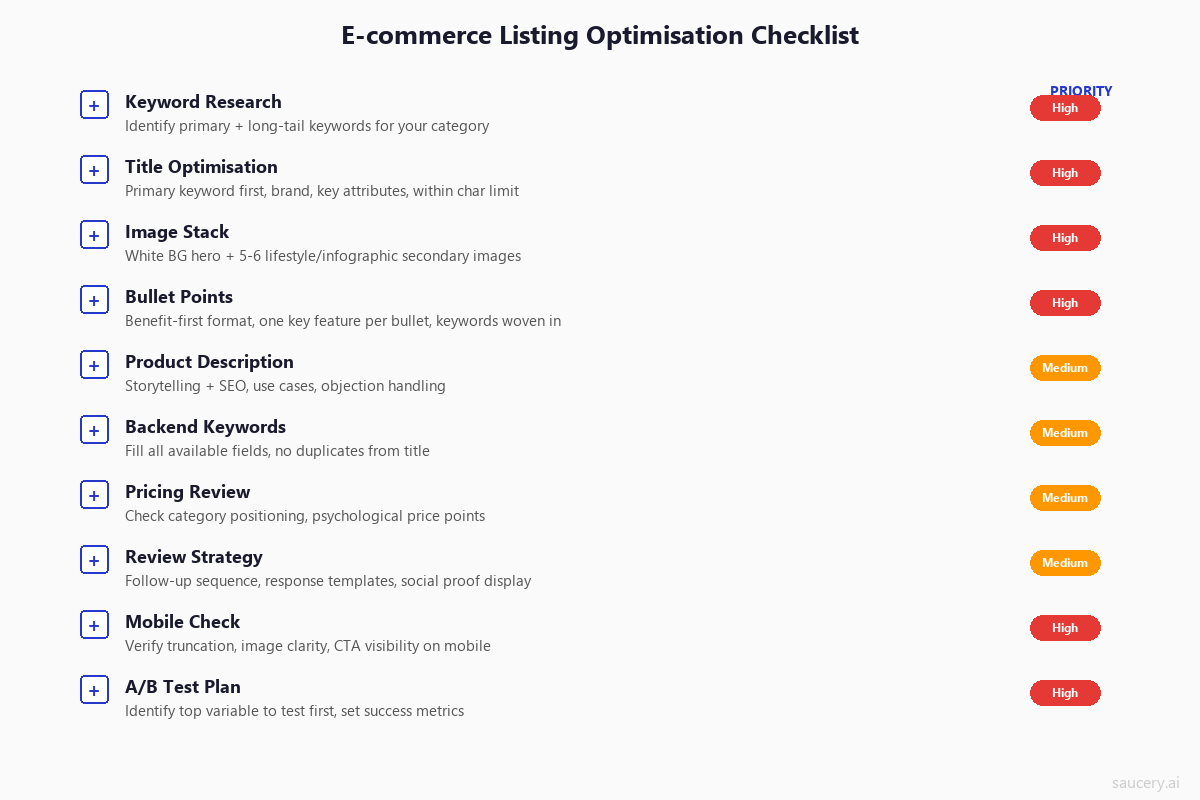
Optimising a single listing is straightforward once you understand the principles. Optimising an entire catalogue across multiple platforms requires a systematic workflow. Here is the framework I use:
Step 1: Audit Your Current Listings
Before optimising anything, baseline your current performance. For each listing, document:
- Current search rank for target keywords
- Click-through rate from search results (where available)
- Conversion rate (sessions to purchase)
- Revenue and units sold per period
- Review count and average rating
- Listing completeness score (if platform provides one)
Step 2: Prioritise by Impact
Not all listings deserve equal optimisation effort. Prioritise based on:
- Revenue potential – focus on products with high demand but underperforming conversion
- Margin contribution – optimise high-margin products before low-margin ones
- Competitive gap – where are you losing to competitors with worse products but better listings?
- Quick wins – some listings have obvious gaps (missing images, empty bullet points) that take minutes to fix
Step 3: Research and Plan
For each prioritised listing:
- Conduct keyword research using platform-specific tools (Helium 10 for Amazon, Marmalead for Etsy, Terapeak for eBay)
- Analyse top 5 competing listings – what are they doing well? What are they missing?
- Identify your key differentiators – what can you claim that competitors cannot?
- Draft your claim hierarchy – which benefits lead, which support?
Step 4: Test Before Deploying
Before publishing optimised listings, validate your key decisions:
- Which title variation drives the highest click-through?
- Which benefit hierarchy converts best?
- Which price point maximises revenue (not just conversion)?
- Which title format generates the most clicks from a grid of competitors?
Step 5: Deploy and Monitor
Publish your optimised listings, then monitor performance daily for the first two weeks and weekly thereafter. Look for:
- Search rank changes for target keywords (allow 48-72 hours for indexing)
- Conversion rate movement (statistically significant improvement typically needs 200+ sessions)
- Impact on review sentiment (new bullet points setting better expectations?)
- PPC performance improvements (better listings = higher quality scores = lower CPC)
Measuring Listing Optimisation Success
How do you know if your optimisation efforts are working? Track these metrics:
Visibility metrics:
- Organic search rank for target keywords
- Impressions (how often your listing appears in search results)
- Click-through rate from search (impressions to clicks)
Conversion metrics:
- Unit session percentage / conversion rate
- Add-to-cart rate
- Buy box percentage (Amazon)
Revenue metrics:
- Revenue per session
- Organic revenue vs paid revenue ratio
- Average order value (for stores with multiple products)
Efficiency metrics:
- Advertising cost of sale (ACoS) – should decrease as organic conversion improves
- Return rate – should decrease as listing accuracy improves
- Customer question volume – should decrease as listings become more complete
The gold standard is measuring organic revenue growth with stable or decreasing ad spend. When your listing converts better organically, you can reduce PPC while maintaining or growing total revenue – that is the true ROI of listing optimisation.
Frequently Asked Questions
How often should I update my product listings?
At minimum, conduct a full listing audit quarterly. However, you should update listings immediately when: a competitor launches a similar product, your reviews reveal a common misconception, seasonal keywords become relevant, or platform algorithm changes affect your ranking. Continuous monitoring with quarterly deep-dives is the approach that balances effort with results.
Does listing optimisation work differently for new products vs established ones?
Yes, significantly. New products have no sales history or reviews, so the listing itself carries 100% of the conversion burden. Your images, copy, and pricing must be flawless from day one because you have no social proof to compensate for weak messaging. Established products can often see bigger percentage gains from optimisation because they already have traffic – even a small conversion rate improvement on high traffic equals meaningful revenue. However, be cautious with established listings: major changes can temporarily confuse the algorithm and cause ranking fluctuations for 1-2 weeks.
Should I optimise for the same keywords across all platforms?
Your primary product keywords will likely be relevant across platforms, but search behaviour differs. Amazon shoppers tend to use more specific, purchase-intent queries. Etsy shoppers use more descriptive, discovery-oriented terms. eBay shoppers often search by brand and model number. Shopify/Google shoppers use broader informational queries. Research keywords separately for each platform using platform-specific tools, even if there is significant overlap in your primary terms.
How long does it take to see results from listing optimisation?
Algorithm re-indexing typically takes 24-72 hours after a listing change. Ranking improvements from better keyword targeting can appear within a week. Conversion rate improvements from better copy and images are measurable within 2-4 weeks (assuming sufficient traffic volume). The full impact of listing optimisation – including the compounding effects of better conversion feeding higher organic rank feeding more traffic – typically materialises over 6-8 weeks.
Is it worth paying for listing optimisation tools?
It depends on your catalogue size and revenue. For sellers with fewer than 10 SKUs, manual research and optimisation is feasible. For larger catalogues, tools like Helium 10, Jungle Scout (Amazon), Marmalead (Etsy), or Terapeak (eBay) provide keyword data and competitive insights that would take hours to gather manually. The ROI calculation is simple: if a tool costs $97/month and helps you identify optimisations that generate $500/month in additional revenue, it pays for itself five times over. Most serious sellers find keyword research tools indispensable.
Can I use the same images across all platforms?
You can use the same image files, but you should consider platform-specific requirements. Amazon requires pure white backgrounds for main images and prohibits text overlays. eBay allows text on images and supports up to 24 photos. Etsy rewards lifestyle-styled photography that looks native to the platform’s aesthetic. Shopify gives you complete control but requires mobile-optimised file sizes for page speed. Create a master image set, then curate and order images appropriately for each platform’s best practices and technical requirements.
How do I optimise listings for AI shopping agents?
AI shopping agents prioritise structured, specific, and factual product information. To optimise for AI discovery: use exact specifications rather than relative claims (“350ml” not “large size”), complete every attribute and specification field the platform offers, use consistent formatting for numerical data, include material compositions and certifications explicitly, and ensure your listing could answer a factual question about your product without ambiguity. Think of it this way – if an AI agent asked “what is the protein content per serving?” would your listing answer that clearly? Structure your information to answer the specific, comparison-oriented questions that AI agents process.
Next Steps: From Knowledge to Action
Listing optimisation is not about knowing the theory – it is about execution. Here is how to move forward:
- Pick your highest-potential listing. The product with the most traffic but lowest conversion rate is your biggest opportunity.
- Apply the six universal principles. Audit keyword coverage, benefit-first messaging, specificity, image hierarchy, social proof, and price positioning.
- Adapt for each platform. Format your optimised messaging within each platform’s specific character limits and structural requirements.
- Test before you deploy. Validate your key listing decisions with predictive testing rather than risking live revenue on untested changes.
- Monitor and iterate. Track conversion rate, search rank, and revenue weekly. Optimisation is ongoing, not one-and-done.
The sellers who win on marketplaces in 2026 are not those with the biggest ad budgets or the lowest prices. They are the ones with listings engineered to convert – listings where every character, every image, and every claim has been tested and validated against real purchase behaviour.
Same product. Better listing. More sales.
Find out which version of your product listing converts best – before you publish.
Subscribe for F&B Consumer Insights
Data-driven insights on food & beverage consumer preferences, straight to your inbox.