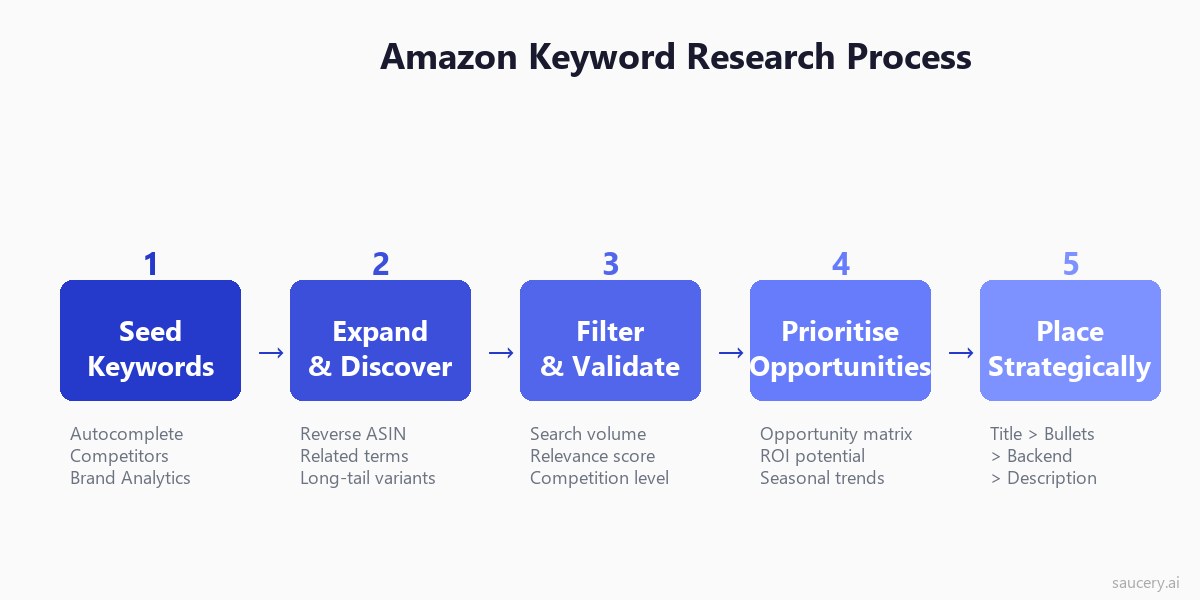
Most Amazon sellers treat keyword research like a Google SEO task. They plug a seed term into a tool, export a spreadsheet of 500 keywords, paste the highest-volume ones into their listing, and wonder why they are stuck on page 4. This approach fails because Amazon is not Google. Every search on Amazon carries purchase intent. The algorithm rewards conversions, not clicks. And the competition is not a blog post – it is another product that ships tomorrow.
I have optimised hundreds of Amazon listings across categories from supplements to pet food to home cleaning. The sellers who rank on page 1 do not have more keywords. They have better keywords in better places. This guide covers the complete process: how to find keywords that actually drive sales, where to put them for maximum indexing weight, and how to build a keyword strategy that compounds over time – even if you are launching with zero reviews.
Table of Contents
- Why Keyword Research Is Different on Amazon vs Google
- The 3 Types of Amazon Keywords
- How to Find Seed Keywords
- Using Brand Analytics Search Query Performance
- Reverse ASIN Lookup Strategy
- Amazon Autocomplete Mining Techniques
- How to Evaluate Keyword Opportunity
- Where to Place Keywords
- Backend Keyword Rules
- Long-Tail Keyword Strategy for New Listings
- Seasonal Keyword Planning
- Common Mistakes
- Tools Comparison
- How to Track Keyword Rankings Over Time
- When to Update Keywords
- FAQ
Why Keyword Research Is Different on Amazon vs Google
Google keyword research optimises for information seekers. Amazon keyword research optimises for buyers. This distinction changes everything about how you select, prioritise, and deploy keywords.
On Google, a search for “best protein powder” might lead to a review article, a Reddit thread, or a YouTube video. On Amazon, the same search leads directly to a purchase decision. Every keyword on Amazon carries commercial intent by default. There is no “informational” search category. The person typing “whey protein isolate unflavoured 2kg” knows exactly what they want and is ready to buy it right now.
This means three things for your keyword research:
- Specificity converts. On Google, broad terms drive traffic. On Amazon, specific long-tail keywords drive sales. A shopper searching “protein powder” might browse. A shopper searching “grass fed whey protein isolate chocolate 1kg” is pulling out their credit card.
- Competition is product-level, not page-level. You are not competing against content – you are competing against other products with reviews, price advantages, and sales velocity. A keyword with 50,000 monthly searches means nothing if the top 10 results have 10,000+ reviews each.
- The algorithm tracks conversions, not clicks. Amazon’s A9 algorithm (now COSMO and RUFUS) measures whether your listing converts for a given keyword. If you rank for a keyword but nobody buys, you will lose that ranking. Relevance is not optional – it is the mechanism.
The practical implication: do not chase volume. Chase relevance-weighted volume. A keyword with 5,000 monthly searches where your product is genuinely the best answer will outperform a keyword with 50,000 searches where you are one of 200 similar options. Your Amazon listing optimisation strategy should be built on this foundation.
The 3 Types of Amazon Keywords
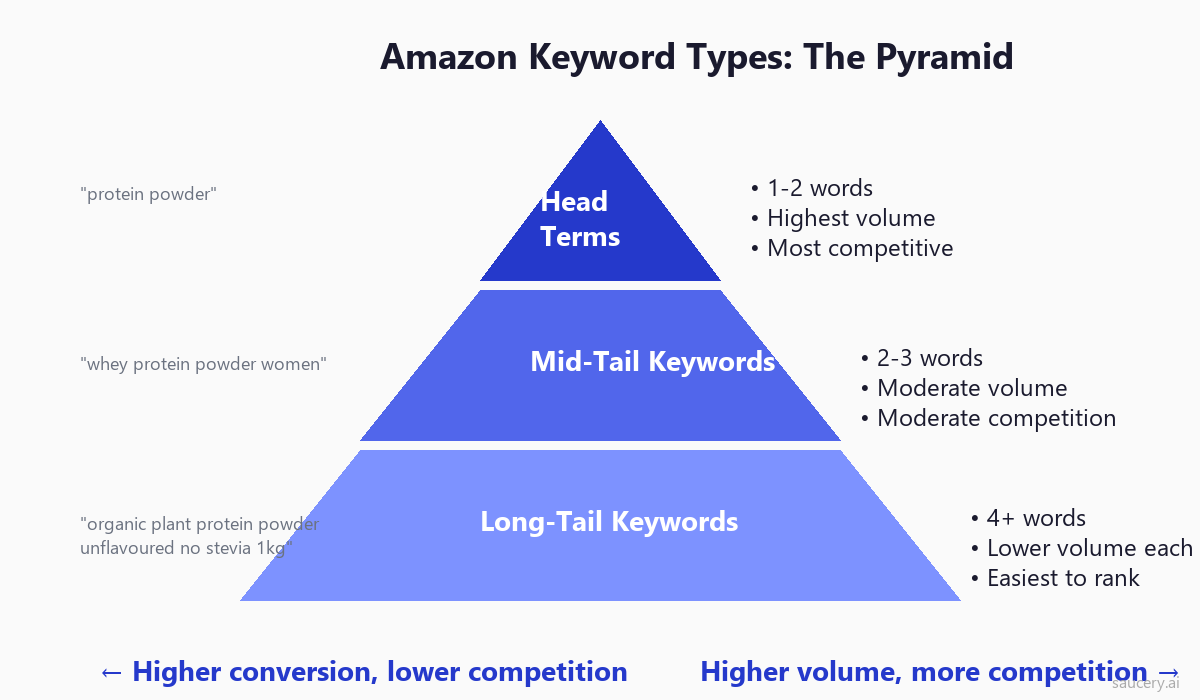
Before you start researching, understand that Amazon keywords fall into three distinct categories. Each serves a different purpose in your listing strategy, and you need all three working together.
Head Terms (1-2 Words)
These are your category-level keywords: “protein powder”, “dog treats”, “yoga mat”. They have the highest search volume and the highest competition. For most sellers – especially those launching new products – head terms are aspirational targets, not starting points. You will not rank for “protein powder” on day one. But you need these terms in your listing because they tell Amazon what category you belong to.
Head terms typically have 100,000+ monthly searches on Amazon. The top results have thousands of reviews, strong sales velocity, and often Amazon’s Choice badges. Your strategy here is presence, not dominance – include them for indexing, but do not build your entire keyword strategy around them.
Mid-Tail Keywords (2-4 Words)
This is where most of your ranking opportunities live. “Whey protein powder”, “organic dog treats”, “thick yoga mat” – these are specific enough to signal intent but broad enough to capture meaningful volume. Mid-tail keywords typically range from 10,000 to 100,000 monthly searches.
The key insight: mid-tail keywords often reveal what attribute matters most to the buyer. “Thick yoga mat” tells you thickness is the differentiator. “Organic dog treats” tells you the certification matters. Use these keywords not just for SEO but for understanding what to emphasise in your Amazon bullet points.
Long-Tail Keywords (4+ Words)
Long-tail keywords are your secret weapon for new listings. “Grass fed whey protein isolate unflavoured 2kg”, “grain free puppy training treats small breed”, “extra thick non slip yoga mat with alignment lines”. These have lower individual volume (500-10,000 searches) but dramatically higher conversion rates and dramatically lower competition.
A new listing with zero reviews can rank on page 1 for long-tail keywords within weeks. Each long-tail keyword you rank for builds sales velocity, which builds your authority for mid-tail and eventually head terms. This is the compounding effect of smart keyword research.
Your product differentiation shows up most clearly in long-tail keywords. If your protein powder is specifically grass-fed, unflavoured, and comes in a 2kg bag, the long-tail keyword that matches all those attributes is where you will convert best.
How to Find Seed Keywords
Seed keywords are your starting points – the 5-10 core terms that describe what your product is. From these seeds, you will expand into hundreds of relevant keyword variations. Here is how to find them.
Method 1: Amazon Autocomplete
Open Amazon in an incognito browser window (to avoid personalised results). Type the first 2-3 words of what your product is. Watch what Amazon suggests. These suggestions are based on actual shopper searches – they represent real demand.
For a protein powder, start typing “protein p…” and note every autocomplete suggestion. Then try “whey p…”, “plant p…”, “protein powder f…” (for flavours), “protein powder w…” (for women, workout, etc). Each suggestion is a validated seed keyword.
Method 2: Competitor ASIN Analysis
Find the top 3-5 competitors in your category. Look at their titles, bullet points, and product descriptions. The keywords they use are keywords they have tested and validated. Write down every unique keyword phrase you see across their listings.
Pay special attention to what appears in their titles – this is where sellers put their highest-priority keywords. If three competitors all include “isolate” in their title, that is a strong signal that “isolate” is a high-value keyword in your category.
Method 3: Brand Analytics (If Enrolled in Brand Registry)
Amazon’s Brand Analytics tool shows you actual search terms that shoppers use, along with search frequency rank and the top three clicked ASINs for each term. This is first-party data from Amazon itself – more reliable than any third-party estimate.
Navigate to Brand Analytics > Search Query Performance. Filter by your category. Sort by search frequency rank. The top terms in your category are your head term seeds. The longer phrases further down are your mid-tail and long-tail seeds.
Method 4: Your Own Search Term Report
If you are already running Amazon PPC (Sponsored Products), your Search Term Report is a goldmine of seed keywords. Go to Campaign Manager > Reports > Search Term Report. Filter for terms with orders > 0. These are keywords that have already converted for your product – they are validated by actual sales.
Using Brand Analytics Search Query Performance
Brand Analytics is the single most underused keyword research tool on Amazon. It provides data that no third-party tool can replicate because it comes directly from Amazon’s search data. If you have Brand Registry access, this should be your primary research tool.
Search Query Performance Dashboard
The Search Query Performance report shows you:
- Search Query Score: Relative search volume (not absolute numbers, but relative rank)
- Impressions: How many times products appeared for that search
- Clicks and Click Share: Which ASINs get the most clicks for each keyword
- Cart Adds and Purchases: Which keywords actually convert to sales
The most valuable metric here is the gap between impressions and purchases. If a keyword shows high impressions but low purchases for the top ASINs, it means shoppers are searching but not finding what they want. That is an opportunity – your product might be what they are looking for.
Top Search Terms Report
This report ranks search terms by frequency within a specified time period. Use it to:
- Identify trending keywords (compare week-over-week changes)
- Find seasonal spikes (compare same period year-over-year)
- Discover new keyword opportunities your competitors might not have found yet
- Validate third-party search volume estimates against Amazon’s own data
Cross-reference Brand Analytics data with your listing’s current keyword coverage. If a high-frequency search term is not present anywhere in your listing, you are leaving rankings on the table. Your product title optimisation should always start with Brand Analytics data.
Reverse ASIN Lookup Strategy
Reverse ASIN lookup is the process of finding every keyword that a competitor’s product ranks for. Instead of guessing which keywords matter, you let your competitors’ data tell you. This is the fastest way to build a comprehensive keyword list for an established category.
How It Works
Tools like Helium 10 Cerebro, Jungle Scout Keyword Scout, and DataDive track which keywords each ASIN appears in search results for. You input a competitor’s ASIN, and the tool returns a list of every keyword they rank for, along with their position, estimated search volume, and organic vs sponsored placement.
The Multi-ASIN Method
Do not just reverse-lookup one competitor. Run 5-10 ASINs through the tool and look for keyword overlap. Keywords that multiple competitors rank for are category-essential – you must target them. Keywords that only one competitor ranks for might be niche opportunities or irrelevant flukes.
Here is the process:
- Identify 5-10 top competitors in your sub-category (page 1 results for your main keyword)
- Run each ASIN through your reverse ASIN tool
- Export all keyword lists into a single spreadsheet
- Add a column counting how many competitors rank for each keyword
- Sort by overlap count (descending) – keywords present for 4+ competitors are mandatory
- Filter the remaining by relevance to your specific product
Finding Gaps Your Competitors Miss
The real power of reverse ASIN lookup is finding keywords where competitors rank poorly (positions 20+) despite the keyword being relevant. These are gaps – keywords with demand but weak supply of well-optimised listings. Targeting these gaps gives you the fastest path to page 1.
Look specifically for keywords where competitors rank on page 2-3. This tells you the keyword has enough volume for Amazon to show results, but the existing listings are not strongly optimised for it. A well-optimised listing with the keyword in the title can often jump to page 1 for these terms within weeks. This is fundamental to e-commerce listing optimisation.
Amazon Autocomplete Mining Techniques
Amazon’s autocomplete (also called search suggestions) reflects what real shoppers are actually typing. Unlike third-party estimates, these suggestions come directly from Amazon’s search data. Mining them systematically gives you keywords that are guaranteed to have real search demand.
The Alphabet Method
Type your seed keyword followed by each letter of the alphabet: “protein powder a”, “protein powder b”, “protein powder c”, and so on. Record every suggestion. Then do the same with a space before the letter: “protein powder a…” vs “a protein powder”. This surfaces different keyword patterns.
For a typical product, the alphabet method generates 50-150 unique keyword suggestions. Each one represents a real search pattern with real volume behind it.
The Modifier Method
Add common modifiers before and after your seed keyword:
- Before: best, organic, natural, cheap, premium, professional, [colour], [size]
- After: for women, for men, for beginners, with [feature], without [ingredient], [size], [flavour]
- Intent modifiers: vs, alternative, replacement, like, similar to
The Question Method
While Amazon is not primarily an informational search engine, shoppers do search with question-like phrases: “protein powder that tastes good”, “yoga mat that does not slip”, “dog treats for sensitive stomach”. These longer phrases convert extremely well because they express a specific need your product can solve.
Department-Specific Suggestions
Amazon shows different autocomplete suggestions depending on which department is selected. Switch between “All Departments”, your specific category, and adjacent categories. A protein powder searched in “Health & Household” shows different suggestions than one searched in “Sports & Outdoors”.
How to Evaluate Keyword Opportunity
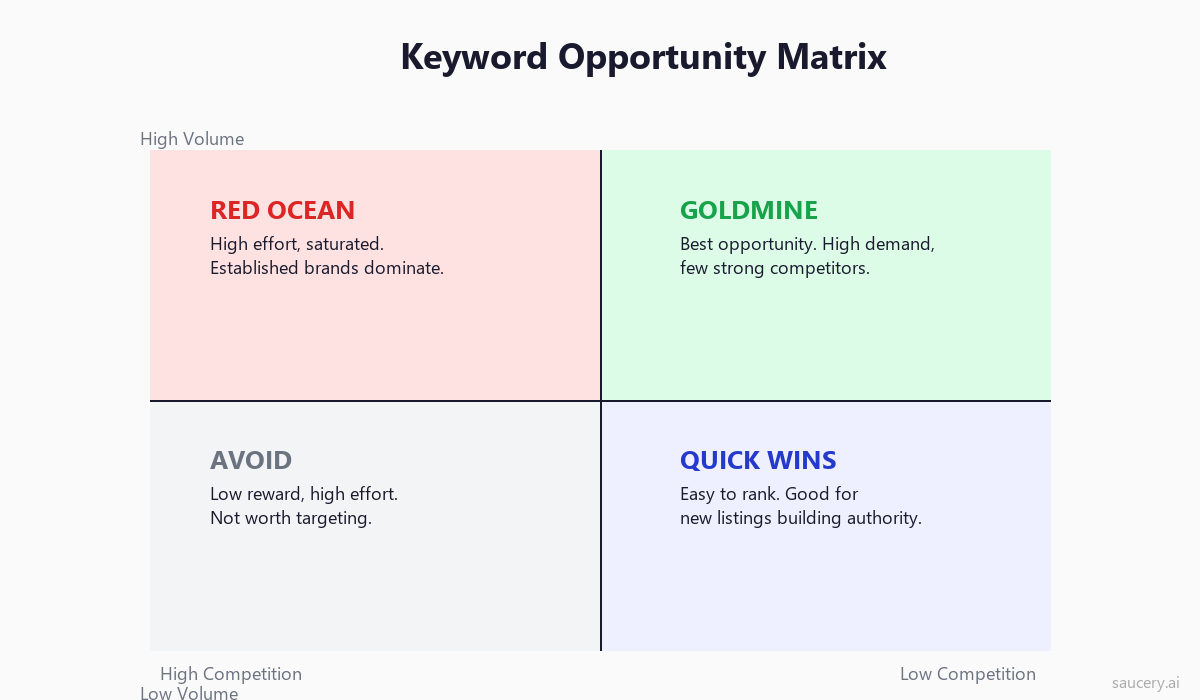
Having a list of 500 keywords is useless if you cannot prioritise them. Not every keyword is worth targeting. You need a framework for evaluating which keywords will actually drive sales for your specific product.
The Three Filters
Every keyword must pass through three filters before it earns a spot in your listing:
Filter 1: Relevance. Does this keyword accurately describe your product? If someone searches this keyword and sees your product, will they think “yes, that is what I am looking for”? If not, even if you rank, you will not convert – and Amazon will punish you for low conversion.
Filter 2: Volume. Does this keyword have enough search volume to justify a spot in your limited keyword real estate? Use tools like Helium 10 or Brand Analytics to estimate monthly searches. For most categories, keywords below 500 monthly searches are only worth including in backend terms.
Filter 3: Competition. Can you realistically rank for this keyword? Check the current page 1 results. If every listing has 5,000+ reviews, strong brands, and Amazon’s Choice badges, that keyword is probably not your starting point. Look for keywords where page 1 has listings with fewer than 500 reviews, weak titles, or missing keywords – these are winnable.
The Opportunity Score Formula
For a quick prioritisation, use this mental model:
Opportunity = (Search Volume x Relevance Score) / Competition Level
- Relevance Score: 1-10 (10 = perfect match to your product)
- Competition Level: Average review count of top 5 organic results
- Search Volume: Monthly estimated searches from your tool of choice
Keywords with high opportunity scores go in your title and bullets. Medium scores go in backend search terms. Low scores get cut from your list entirely. Understanding your unique selling proposition helps you assess relevance accurately – the keywords that match your USP will always convert better than generic category terms.
Where to Place Keywords
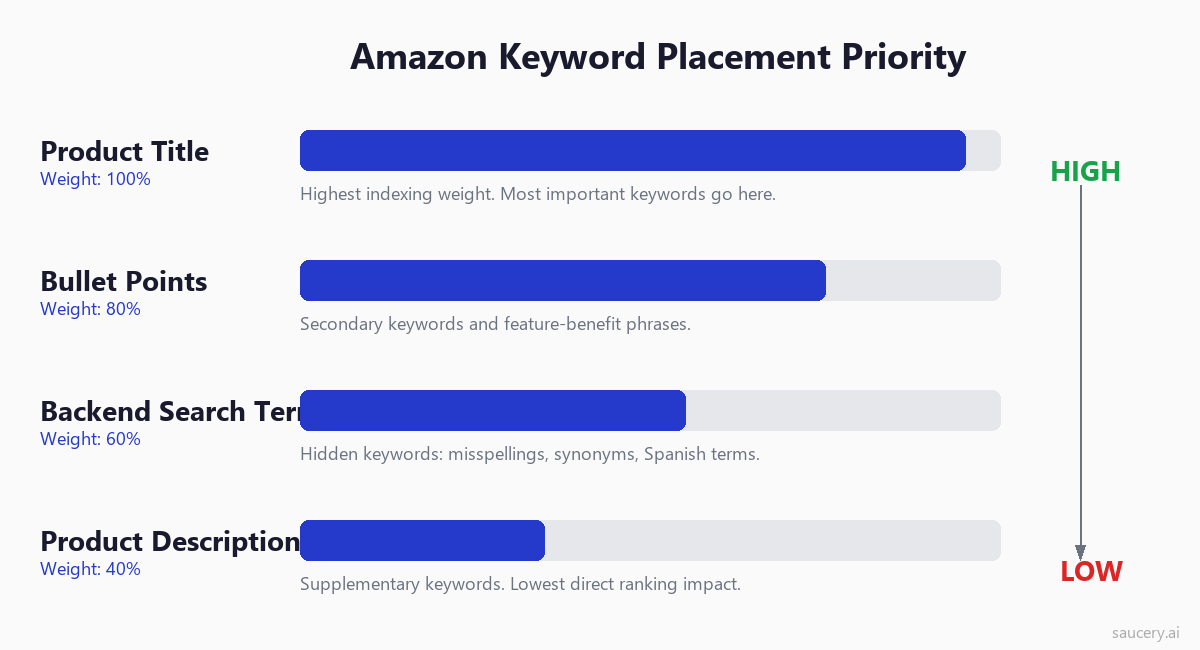
Amazon indexes keywords differently based on where they appear in your listing. Not all placements are equal. Understanding the hierarchy lets you allocate your best keywords to the highest-impact positions.
Product Title (Highest Priority)
Your title carries the most indexing weight. Keywords in the title have the strongest correlation with ranking. This is where your top 3-5 keywords belong – the ones with the highest opportunity scores.
Title best practices for keyword research:
- Lead with your primary keyword (the one with highest relevant volume)
- Include 3-5 secondary keywords naturally
- Keep it readable – keyword stuffing in titles hurts click-through rate
- Stay within your category’s character limit (typically 150-200 characters)
- Front-load important keywords (mobile truncates after ~80 characters)
For detailed guidance on structuring titles, see our guide on product title optimisation.
Bullet Points (High Priority)
Your five bullet points are the second-highest priority for keyword placement. They carry strong indexing weight and also influence conversion rate. The goal is to incorporate keywords naturally while communicating benefits.
Each bullet should target 2-3 keywords that did not fit in your title. Effective Amazon bullet points weave keywords into benefit statements so they read naturally while covering maximum keyword ground.
Backend Search Terms (Medium Priority)
Backend search terms are invisible to shoppers but indexed by Amazon. This is where you put keywords that do not fit naturally into your visible listing: misspellings, synonyms, Spanish translations (for the US market), and alternate phrases that would look odd in customer-facing copy.
Product Description / A+ Content (Lower Priority)
Standard product descriptions carry some indexing weight. However, if you have A+ Content (Enhanced Brand Content), Amazon reportedly does not index the text within A+ modules for search. Use descriptions for keywords but prioritise conversion-focused copy over keyword density. Understanding what shoppers actually read on product listings will help you balance keywords with readability.
Subject Matter and Other Attributes
Many categories have additional fields in Seller Central: subject matter, target audience, intended use, and other attributes. These fields are indexed and provide extra keyword real estate. Fill them all with relevant keywords that did not fit elsewhere.
Backend Keyword Rules
Backend search terms are the most misunderstood part of Amazon keyword optimisation. Get them right and you unlock hundreds of additional keyword rankings. Get them wrong and Amazon ignores the entire field. Here are the rules, based on Amazon’s official Search Terms guidelines.
The 249-Byte Limit
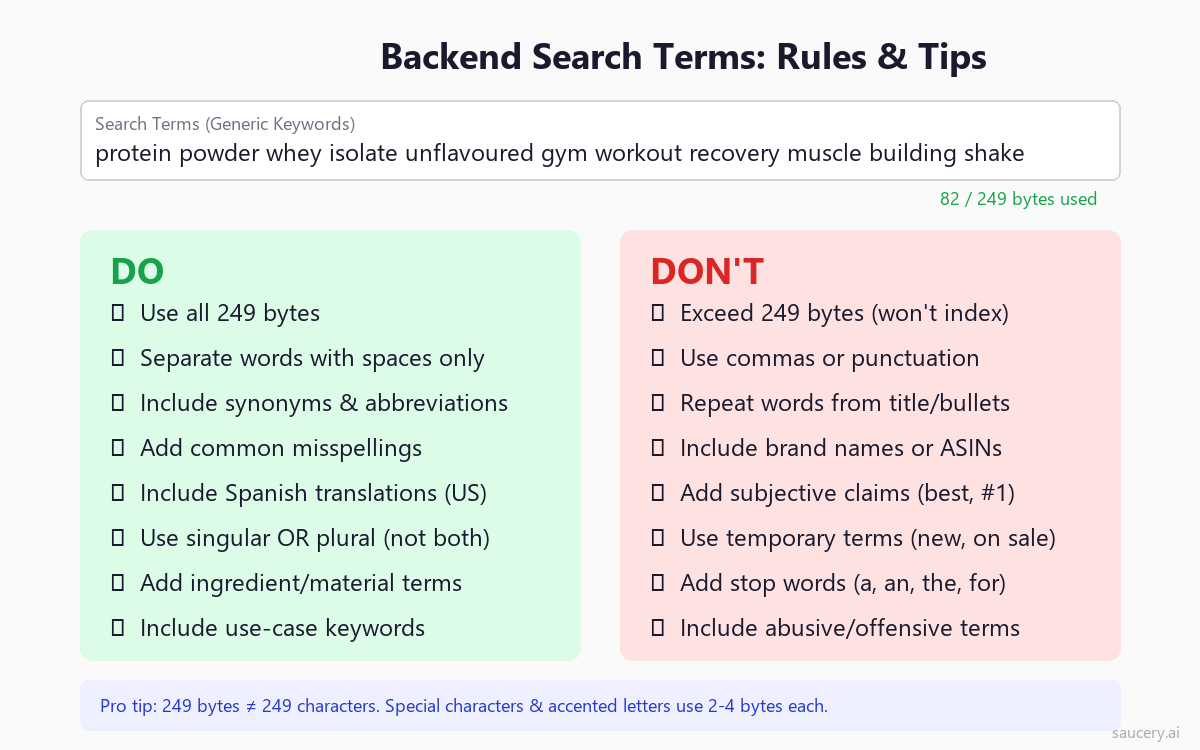
Amazon allows a maximum of 249 bytes in the search terms field. This is bytes, not characters. Standard English letters use 1 byte each, but accented characters (like n with tilde) use 2 bytes, and some special characters use 3-4 bytes. If you exceed 249 bytes, Amazon will not index ANY of your backend keywords – the entire field becomes useless.
Practical limit: stick to approximately 240 bytes of plain English words separated by spaces. Check your byte count using an online byte counter or your tool’s built-in checker.
Formatting Rules
- Separate words with spaces only. No commas, semicolons, or other punctuation. Commas waste bytes and add nothing.
- Do not repeat words. Amazon indexes each unique word once. Repeating “protein” three times wastes bytes and does not help.
- Use singular or plural, not both. Amazon’s algorithm matches both forms from a single entry. “Treat” will match searches for “treats” and vice versa.
- No ASINs or brand names. Amazon explicitly prohibits competitor brand names and ASINs in backend terms. Violating this can result in listing suppression.
- No subjective claims. Words like “best”, “cheapest”, “amazing” or “#1” are not indexed and waste space.
- No temporary statements. “New”, “on sale”, “limited time” are a waste of bytes.
What to Put in Backend Terms
Use your backend keyword space for:
- Synonyms: Words that mean the same thing as your visible keywords (e.g., “tumbler” for “water bottle”)
- Common misspellings: “protien”, “colagen”, “matress” – shoppers misspell constantly
- Spanish translations: For the US market, Spanish keywords tap into a massive bilingual shopper base
- Abbreviations: “vit c” for vitamin C, “prot” for protein
- Alternate names: Regional terms, slang, or technical names
- Use cases: “post workout”, “meal replacement”, “gift for dad”
- Materials/ingredients: Technical ingredient names shoppers might search
Backend Keyword Strategy Example
For a grass-fed whey protein isolate, here is what good backend terms look like:
proteina suero leche aislado polvo gimnasio entrenamiento musculo recuperacion batido sin sabor hierba alimentado pasto vaca libre hormona suplemento deportivo nutricion fitness
This example uses Spanish translations, avoids repeating words already in the title and bullets, uses no punctuation, and stays well within 249 bytes.
Long-Tail Keyword Strategy for New Listings
If you are launching a new product with zero reviews and zero sales history, you cannot compete on head terms. You need a long-tail strategy that builds momentum from the bottom of the keyword pyramid upward.
The Ranking Ladder
Think of keyword ranking as a ladder:
- Weeks 1-4: Target long-tail keywords (4+ words, under 5,000 monthly searches). Rank on page 1 for 20-30 of these terms.
- Weeks 4-8: The sales velocity from long-tail rankings gives you authority to rank for mid-tail keywords. Start pushing for 2-3 word phrases with 5,000-20,000 monthly searches.
- Weeks 8-16: Sustained mid-tail rankings compound into authority for head terms. You start appearing on page 2-3 for broad category keywords.
- Months 4+: With enough reviews and sales velocity, you break onto page 1 for head terms.
This is not a theory – it is the observable pattern for successful launches across every Amazon category. Sellers who try to shortcut this by only targeting head terms stall on page 5 and wonder why PPC is eating their margins.
Finding Long-Tail Keywords for Your Launch
Use these methods to find long-tail opportunities:
- Amazon autocomplete (deep): Type your main keyword plus 2-3 modifier words and see what Amazon suggests
- Competitor review mining: Read competitor reviews and note the specific language customers use to describe what they wanted
- PPC auto campaigns: Run an automatic Sponsored Products campaign with low bids. Amazon will match you to long-tail terms. Harvest the converting ones.
- Question-based searches: “Protein powder that…” or “yoga mat for…” style queries
Your long-tail strategy should align with your unique selling proposition. The keywords that describe what makes your product different are precisely the long-tail terms where you will convert best – because you ARE the best answer for that specific search.
Seasonal Keyword Planning
Amazon search behaviour is not static. Keywords that peak in January (fitness-related) crater in July. Keywords that spike in November (gift-giving) are quiet in March. If you are not adjusting your keywords seasonally, you are missing volume spikes and wasting real estate on terms that are out of season.
Identifying Seasonal Patterns
Use Google Trends as a proxy for Amazon seasonality (the patterns correlate strongly). Also check Brand Analytics week-over-week changes to spot trending terms before they peak.
Common seasonal patterns:
- January: Fitness, health, diet, organisation, “new year” modifiers
- February: Valentine’s gift keywords, chocolate, romantic
- March-April: Spring cleaning, outdoor, garden, Easter
- May-June: Summer, travel, outdoor, Father’s Day gifts
- July-August: Back to school, college, dorm
- September-October: Halloween, autumn, pumpkin spice
- November-December: Gift keywords, Christmas, holiday, stocking stuffer
How to Adjust Keywords Seasonally
You do not need to rewrite your entire listing every month. Use backend keywords as your seasonal rotation space. Keep your title and bullets stable (for ranking consistency) but rotate backend terms to capture seasonal demand:
- 4-6 weeks before a seasonal peak, add relevant seasonal keywords to backend terms
- Replace low-performing evergreen keywords with seasonal ones during peak periods
- After the season passes, swap back to your evergreen backend keywords
- Track which seasonal keywords drove sales so you can prioritise them next year
For products with strong seasonal hooks (supplements in January, outdoor gear in summer), consider adjusting one bullet point seasonally as well. A protein powder might emphasise “new year fitness goals” in January and “summer body workout” in June.
Common Mistakes
After reviewing thousands of Amazon listings, these are the keyword mistakes I see most often. Each one costs rankings and sales.
Mistake 1: Keyword Stuffing
Cramming every possible keyword into your title makes it unreadable. “Protein Powder Whey Isolate Concentrate Casein Plant Vegan Organic Natural Unflavoured Chocolate Vanilla Strawberry Men Women Workout Gym” – nobody clicks on this. Amazon’s algorithm now factors in click-through rate. An unreadable title gets fewer clicks, which hurts rankings, which defeats the entire purpose of including those keywords.
The fix: prioritise your top 3-5 keywords for the title. Put the rest in bullets and backend terms. A clear, readable title with strong keywords outperforms a stuffed title every time.
Mistake 2: Targeting Irrelevant High-Volume Keywords
A seller with a vegan protein powder targets “whey protein” because it has massive volume. They rank, shoppers click, see it is not whey, and bounce. Conversion rate drops. Amazon demotes the listing. The seller wasted effort and actively damaged their ranking for relevant keywords.
The fix: only target keywords where your product is a genuine match for the shopper’s intent. High volume with zero relevance equals zero sales and negative ranking signals.
Mistake 3: Repeating Words Across Listing Sections
Amazon indexes unique words across your entire listing. If “organic” appears in your title, you do not need to repeat it in your bullets or backend terms. Every repeated word is wasted space that could be a new keyword. This is especially costly in the 249-byte backend field.
The fix: treat your listing as one connected keyword document. Title keywords do not need to appear in backend terms. Bullet keywords do not need to appear in the description. Use each placement for unique terms.
Mistake 4: Ignoring Backend Search Terms Entirely
A surprising number of sellers leave their backend keywords field blank or filled with a few random words. This is 249 bytes of free keyword real estate – enough for 30-40 additional keywords. Leaving it empty means leaving 30-40 potential ranking keywords on the table.
Mistake 5: Never Updating Keywords
Markets change. New competitors launch. Search behaviour evolves. Seasonal trends shift. A listing optimised 12 months ago with static keywords is almost certainly missing new opportunities and targeting some dead terms. Regular keyword audits are essential for maintaining rankings.
Tools Comparison
The right tool depends on your budget, scale, and experience level. Here is an honest comparison of the major Amazon keyword research tools available in 2026.
Helium 10 (Cerebro + Magnet)
Best for: Serious sellers who want the deepest data. Price: From $39/month (Starter) to $249/month (Diamond).
Cerebro is the industry-standard reverse ASIN tool. It provides estimated search volume, organic and sponsored positions, competing products count, and historical ranking data. Magnet is the keyword discovery tool – input a seed keyword and get hundreds of related terms with volume estimates.
Strengths: largest keyword database, most accurate search volume estimates, excellent competitor tracking, historical data. Weaknesses: expensive for beginners, overwhelming interface, accuracy decreases for very low-volume keywords.
Jungle Scout (Keyword Scout)
Best for: Beginners and mid-level sellers who want simplicity. Price: From $49/month.
Keyword Scout provides reverse ASIN lookup and keyword discovery with a cleaner, more intuitive interface than Helium 10. The data is slightly less comprehensive but more than sufficient for most sellers.
Strengths: easier to learn, good integration with other Jungle Scout tools (product research, listing builder), solid accuracy for mid-to-high volume keywords. Weaknesses: smaller keyword database than Helium 10, less granular competition metrics.
DataDive
Best for: Data-driven sellers who want raw data at scale. Price: From $19.99/month.
DataDive pulls data directly from Amazon’s API and presents it with minimal filtering. It is less polished than Helium 10 or Jungle Scout but often surfaces data that other tools miss. Particularly strong for niche categories and long-tail keyword discovery.
Strengths: affordable, raw data access, good for bulk analysis, strong community. Weaknesses: steeper learning curve, less guidance for beginners, interface is functional rather than beautiful.
Amazon’s Own Tools (Brand Analytics + Search Term Report)
Best for: Brand-registered sellers who want first-party data. Price: Free (with Brand Registry).
Nothing beats Amazon’s own data for accuracy. Brand Analytics shows relative search frequency, click share, and conversion share for search terms. The Search Term Report from PPC campaigns shows exactly which keywords drive your sales. The limitation is that you need Brand Registry for Brand Analytics and active PPC campaigns for search term reports.
Strengths: most accurate data source, free, shows actual conversion data. Weaknesses: limited to your own brand’s data, no competitor reverse ASIN lookup, requires Brand Registry.
Free Options for Starting Out
If you are just starting and cannot justify a paid tool yet:
- Amazon autocomplete: Free and directly from Amazon’s data
- Amazon “Customers also bought” / “Related searches”: Shows associated products and search patterns
- Helium 10 free tier: Limited searches per day but still useful for initial research
- Sonar by Sellics: Free Amazon keyword tool with basic search volume estimates
The tools help you scale and systematise, but the fundamentals of good keyword research – relevance, intent, and strategic placement – work regardless of which tool you use. If your product pricing strategy is sound and your keywords are relevant, you will rank.
How to Track Keyword Rankings Over Time
Keyword research is not a one-time activity. You need to track your rankings over time to understand what is working, what is declining, and where new opportunities are emerging.
What to Track
- Organic rank: Your natural position in search results (where you appear without paying)
- Sponsored rank: Your PPC ad position (useful for understanding keyword competitiveness)
- Rank change over time: Week-over-week or month-over-month movement tells you whether your optimisation is working
- New keyword rankings: Terms you were not ranking for before that you now appear in results for
- Lost rankings: Terms you used to rank for but have dropped off – these need attention
Tracking Methods
Manual spot checks: Search your key terms in incognito mode and note your position. Time-consuming but free and immediately actionable.
Helium 10 Keyword Tracker: Automatically monitors your rank for specified keywords daily. Shows historical trends and alerts you to significant drops. This is the most comprehensive automated option.
Jungle Scout Rank Tracker: Similar functionality to Helium 10 with a simpler interface. Good for tracking your top 20-50 priority keywords.
Search Query Performance (Brand Analytics): Shows your impression share and click share over time for specific search terms. The most reliable data since it comes directly from Amazon.
How Often to Check
For most sellers, a weekly check of your top 20 keywords is sufficient. Track your full keyword list monthly. After making listing changes, check daily for the first week to see the impact. Avoid obsessing over daily fluctuations – Amazon ranks are noisy in the short term but trend-clear in the medium term.
When to Update Keywords
Static keyword strategies decay. Here are the specific triggers that should prompt a keyword update.
Reoptimisation Triggers
- Ranking decline: If you drop 10+ positions for a key term over 2+ weeks, investigate and adjust
- New competitor launches: A strong new competitor changes the competitive landscape for your keywords
- Seasonal shift: 4-6 weeks before a seasonal peak, swap in seasonal keywords
- New product features: If you update your product (new flavour, improved formula), update keywords to match
- PPC data reveals new converters: When your search term report shows a keyword converting that is not in your organic listing, add it
- Category changes: Amazon sometimes restructures browse nodes and category keywords
- Algorithm updates: Major A9/COSMO updates can shift what Amazon prioritises
The Quarterly Keyword Audit
Every 90 days, conduct a full keyword audit:
- Re-run reverse ASIN lookups on your top 5 competitors (their keywords may have changed)
- Check Brand Analytics for new trending terms in your category
- Review your Search Term Report for high-converting keywords not in your listing
- Check for keywords you rank for but have not optimised (surprise rankings you can boost)
- Remove any keywords from backend terms that have zero impressions over 90 days
- Update backend terms with new synonyms, misspellings, or seasonal terms
Do not change your title or bullets unless you have strong data supporting the change. Title changes can temporarily disrupt rankings. Backend term changes carry no risk and take effect within 24-48 hours. This same principle applies across marketplaces – whether you are optimising for Walmart, eBay, or Etsy SEO.
Frequently Asked Questions
How many keywords should I target per listing?
A well-optimised listing typically targets 50-100 unique keywords across all placements (title, bullets, backend, and description combined). Your title should focus on 3-5 primary keywords. Bullets should cover 15-20 secondary keywords. Backend terms should include 30-40 additional keywords. Quality and relevance matter more than quantity – 50 highly relevant keywords outperform 200 loosely relevant ones.
How long does it take to rank for a keyword on Amazon?
For long-tail keywords with low competition, you can reach page 1 within 1-2 weeks of optimising your listing. Mid-tail keywords typically take 4-8 weeks with consistent sales. Head terms can take 3-6 months or longer, depending on competition and your sales velocity. PPC can accelerate organic ranking by driving sales for specific keywords.
Should I use the same keywords in PPC and organic listing?
Yes – your PPC strategy and organic keyword strategy should work together. Use PPC to test which keywords convert before committing them to your listing. Run auto campaigns to discover new keywords. Then add proven converters to your organic listing for long-term ranking. The combination of organic presence and sponsored visibility for the same keyword also increases your total share of the search results page.
Do backend keywords still work in 2026?
Yes. Backend search terms remain indexed and influence rankings in 2026. Amazon has not deprecated this field. The rules have tightened (249-byte limit is strictly enforced, prohibited content is filtered more aggressively), but the fundamental mechanism – hidden keywords that contribute to search indexing – remains active and valuable.
What is the difference between indexed and ranked keywords?
Indexed means Amazon recognises your listing as relevant for that keyword – your product appears somewhere in results (possibly page 10+). Ranked means you appear high enough to get visibility (page 1-3). All ranked keywords are indexed, but not all indexed keywords are ranked. Your goal is to move from indexed to ranked through sales velocity, conversion rate, and click-through rate.
How do I know if a keyword is indexed for my listing?
Search the keyword on Amazon and add your ASIN to the end of the URL (e.g., search “protein powder” then add &field-keywords=B0XXXXXXXXX). If your product appears, it is indexed for that term. Alternatively, tools like Helium 10 Index Checker can test multiple keywords at once. If a keyword is not indexed, check that it appears in your listing and that your backend terms are within the 249-byte limit.
Can I use competitor brand names in my backend keywords?
No. Amazon explicitly prohibits competitor brand names, competitor ASINs, and trademarked terms in backend search terms. Violating this policy can result in listing suppression, keyword deindexing, or account warnings. Use generic descriptive terms instead – if competitors rank for “brand X protein powder”, target the non-branded version “whey protein powder” instead.
How does Amazon’s COSMO algorithm affect keyword research?
Amazon’s COSMO update (and the RUFUS AI shopping assistant) adds semantic understanding to search. This means Amazon can match your product to searches even without exact keyword matches, based on context and meaning. However, this does not make keyword research obsolete – it makes relevance more important. The algorithm is better at understanding what your product IS, which means irrelevant keyword targeting is punished more quickly. Focus on keywords that genuinely describe your product and its use cases.
Should I optimise differently for mobile vs desktop searchers?
Over 70% of Amazon shopping now happens on mobile. The main implication for keywords: your title is truncated after approximately 80 characters on mobile. Put your most important keywords in the first 80 characters of your title. Bullet points are hidden behind a “Read more” tap on mobile, which means title keyword placement is even more critical for mobile visibility. The keywords themselves do not change between mobile and desktop – but their placement priority does.
Same product. Better listing. More sales.
Keyword research tells you what shoppers are searching for. The right listing turns those searches into sales.
About the Author
Andrew Mac is the founder of Saucery, where he helps brands optimise product listings using AI-modelled shopper behaviour. He has worked with hundreds of Amazon sellers across supplements, food and beverage, pet, and home categories. Connect on LinkedIn.
Subscribe for F&B Consumer Insights
Data-driven insights on food & beverage consumer preferences, straight to your inbox.