You have a good product. Decent reviews. Competitive pricing. But your listing is not converting the way it should – and you know that better copy, better images, or better keyword placement could change that. The question is: which Amazon listing optimisation tool actually helps you figure out what to change?
I have spent the last three years building and testing Amazon listing optimisation approaches – from manual keyword research to AI-generated copy to predictive testing. Most tools solve one piece of the puzzle. Some solve pieces you did not even know existed. And a few are genuinely not worth the money.
This guide compares everything available in 2026: what each tool actually does, what it costs, where it falls short, and which combination makes sense for your specific situation. I have included Saucery (my own tool) in the comparison because it solves a specific problem the others do not – but I will be upfront about its limitations too.
Table of Contents
- Why Listing Optimisation Tools Exist
- What to Look for in a Listing Optimisation Tool
- Categories of Listing Tools
- Helium 10
- Jungle Scout
- PickFu
- Splitly / DataDive
- Saucery
- Amazon’s Own Tools
- ChatGPT and AI Copywriters
- Full Comparison Table
- When to Use Which Tool
- The Stack Approach
- Why Testing Beats Generating
- FAQ
Why Listing Optimisation Tools Exist
Manual listing optimisation is slow, competitive, and genuinely difficult to measure. You change a title, wait two weeks, check conversion rate – but in those two weeks, a competitor launched a coupon, Amazon shifted the algorithm, and your PPC costs fluctuated. Was the title change responsible for the uptick? Or was it noise?
This is the core problem. Amazon gives you almost no controlled testing environment. Your Amazon conversion rate is influenced by dozens of variables simultaneously. Isolating the impact of listing changes from everything else happening in your market is nearly impossible with manual methods.
Listing optimisation tools exist to solve specific parts of this problem:
- Keyword tools tell you what shoppers are searching for, so you put the right terms in the right places
- Copywriting tools generate or improve listing text using proven frameworks
- Testing tools let you compare versions and measure which one performs better
- Analytics tools track performance over time so you can spot problems early
- Prediction tools tell you which version will win before you publish it
No single tool covers all five. That is why most serious sellers use a combination – and why understanding what each category actually delivers matters more than picking whichever tool has the best marketing.
What to Look for in a Listing Optimisation Tool
Before diving into specific tools, here is what actually matters when evaluating them. I have seen sellers waste months on tools that look impressive but do not move the needle on conversions.
Actionability over information. Some tools give you data. Others give you decisions. A keyword tool that shows search volume is useful. A tool that tells you which specific keyword to put in your title instead of your current one is more useful. The gap between information and action is where most tools fall short.
Speed of feedback loop. Amazon A/B testing through Manage Your Experiments takes 8-12 weeks. PickFu polls take 30 minutes. Saucery predictions take 5 minutes. If you are launching next week, a tool that takes two months to give you an answer is useless regardless of how accurate it is.
Statistical validity. Anecdotes are not data. When a tool says “Version A is better,” ask: better according to what sample, what methodology, and what confidence level? Some tools compare 50 poll responses. Others use live traffic with thousands of sessions. Others use AI models calibrated against real purchasing data. The methodology matters.
Integration with your workflow. A brilliant tool you never use is worse than a mediocre tool embedded in your weekly process. Consider: does it require Brand Registry? Does it need significant traffic? Does it work for new product launches or only established ASINs?
Cost relative to impact. A $229/month tool that improves conversion by 2% across 50 ASINs pays for itself many times over. The same tool for a single-ASIN seller doing $3,000/month probably does not. Always calculate the ROI based on your specific situation – not the case studies in the tool’s marketing materials.
Categories of Amazon Listing Tools
The market has matured into distinct categories. Understanding which category you actually need saves you from buying an all-in-one suite when you only need one specific capability.
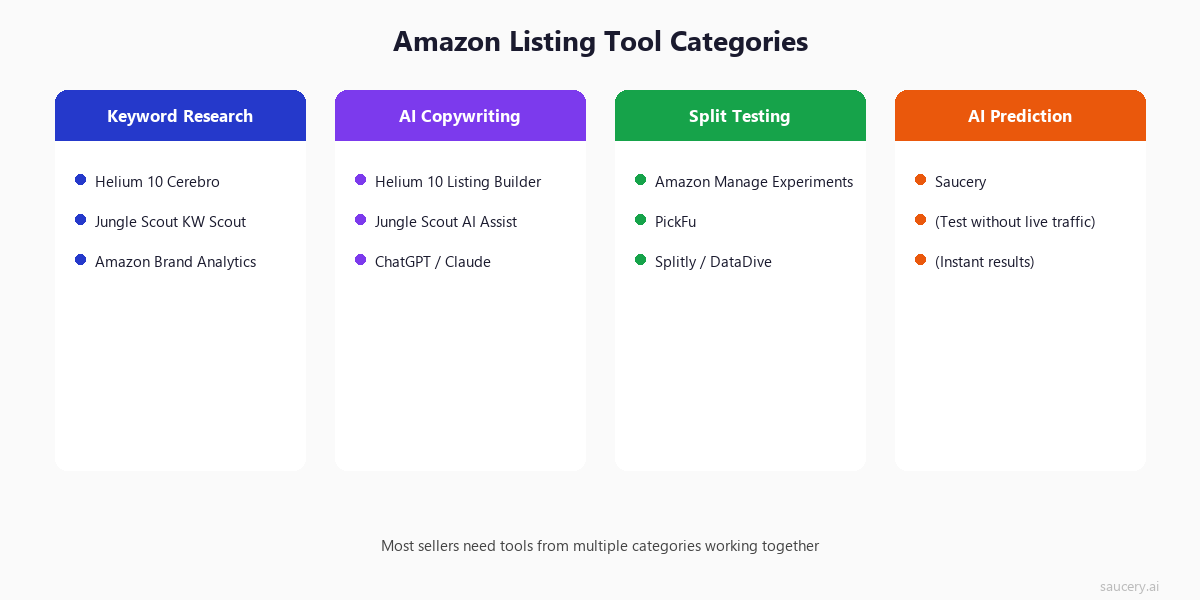
Keyword Research Tools help you understand what shoppers type into Amazon search. They reveal search volume, competition levels, and related terms you might be missing. The best ones pull data directly from Amazon (not Google) and show actual Amazon keyword metrics like search frequency rank.
AI Copywriting Tools generate listing text – titles, bullet points, descriptions, A+ content. They take your product details and keywords, then produce optimised copy. The quality varies wildly, from generic filler to genuinely compelling text.
Split Testing Tools let you run controlled experiments. Show version A to half of shoppers, version B to the other half, measure which converts better. The gold standard for evidence – but requires traffic, time, and often Brand Registry.
AI Prediction Tools are the newest category. Instead of testing on live shoppers, they simulate the decision using AI models trained on purchasing behaviour. Faster than split testing, no traffic required – but newer and less established.
Analytics and Monitoring Tools track your listing performance over time. They alert you to ranking drops, hijacker activity, suppressed listings, and conversion rate changes. Essential for maintenance, less useful for initial optimisation.
Helium 10
Helium 10 is the largest all-in-one Amazon seller toolkit. If you have spent more than a week researching Amazon selling, you have encountered their marketing. The question is whether the breadth justifies the price.
What It Does
Helium 10 covers keyword research (Cerebro, Magnet), listing creation (Listing Builder), analytics (Profits, Keyword Tracker), and operations (Inventory, Refund Genie). For listing optimisation specifically, the relevant tools are:
- Cerebro: Reverse ASIN lookup. Enter a competitor ASIN and see every keyword they rank for, with search volume, competing products, and Amazon’s own suggested rank. This is genuinely best-in-class for keyword research.
- Magnet: Keyword discovery from seed terms. Useful for finding long-tail variations and related search terms you might miss.
- Listing Builder: AI-powered copy generation. You input keywords and product details, it generates title, bullets, and description. Includes a “Listing Score” that rates keyword coverage.
- Audience: Consumer polling similar to PickFu. You can test images, copy, and pricing against real respondents. This is their attempt at a split-testing solution.
Pricing
Starter: $39/month (limited). Platinum: $99/month (most features). Diamond: $229/month (full suite plus multi-user). The Listing Builder and Audience tools require Platinum or higher. Annual billing saves roughly 20%.
Strengths
- Best-in-class keyword research database – largest index of Amazon search terms
- All-in-one means fewer subscriptions and a unified dashboard
- Listing Builder integrates keyword data directly into copy generation
- Extensive training resources and active community
- Audience tool provides real consumer feedback (though limited compared to dedicated tools)
Limitations
- Expensive for single-purpose use. If you only need keyword research, $99/month is steep when free alternatives exist
- Listing Builder generates decent but generic copy – still needs human editing for voice and differentiation
- Audience polls are limited in sample size and targeting compared to dedicated polling tools
- No predictive testing – generates copy but cannot tell you which version will win before publishing
- Interface has grown complex with feature additions. Learning curve is real
Best For
Sellers managing 10+ ASINs who want one platform for research, creation, and tracking. The value proposition improves dramatically with scale – a single-ASIN seller rarely needs this much tooling.
Jungle Scout
Jungle Scout is Helium 10’s primary competitor in the all-in-one space. Historically stronger on product research and market analysis, they have expanded significantly into listing optimisation.
What It Does
For listing optimisation specifically:
- Keyword Scout: Amazon keyword research with search volume, trend data, and competitive metrics. Solid database, though slightly smaller index than Helium 10’s Cerebro
- AI Assist: Their AI copywriting tool for listing generation. Creates titles, bullets, and descriptions from product info and keyword inputs
- Listing Builder: Structured approach to building listings with keyword integration and optimisation scoring
- Competitor Tracking: Monitor competitor listing changes, pricing, and ranking shifts over time
- Review Analysis: Aggregate and analyse competitor reviews to identify common praise and complaints – useful for informing your own listing copy
Pricing
Basic: $49/month (single user, limited features). Suite: $69/month (full access). Professional: $129/month (multi-user, advanced analytics). The AI Assist and Listing Builder are available on Suite and above.
Strengths
- Cleaner interface than Helium 10 – less overwhelming for new sellers
- Stronger product research and opportunity analysis (useful before you even create a listing)
- Competitor tracking is more detailed – see exactly when rivals change titles, bullets, or images
- Review analysis feature helps you understand what shoppers actually care about in your category
- More affordable entry point than Helium 10 for comparable features
Limitations
- Keyword database is slightly less comprehensive than Helium 10 on long-tail terms
- No split testing or prediction capability – purely research and generation
- AI-generated copy quality is similar to Helium 10: functional but generic
- Less extensive training ecosystem compared to Helium 10
- Does not tell you which version of your listing will perform better
Best For
Sellers who value product research alongside listing tools, and who prefer a cleaner UX. Particularly strong for sellers still in the product selection phase who want research and listing creation in one platform.
PickFu
PickFu takes a completely different approach. Instead of generating copy or finding keywords, it tests creative decisions against real human respondents. You upload two or more options, define your target audience, and get feedback within hours.
What It Does
- Head-to-head polls: Show two versions (titles, images, bullet points, even full listing screenshots) to respondents and see which they prefer, with written explanations of why
- Ranked polls: Test 3-8 options and get them ranked from most to least preferred
- Audience targeting: Filter respondents by demographics, Amazon Prime membership, shopping frequency, and category interest
- Open-ended feedback: Each respondent writes a sentence or more explaining their choice – this qualitative data is often more valuable than the vote count itself
Pricing
Pay-per-poll model. A basic 50-respondent poll costs roughly $50. With audience targeting and larger samples, $100-200 per poll is typical. They also offer monthly plans ($79-299/month) that include credits for regular testers.
Strengths
- Real human feedback with written explanations – not just numbers, but reasoning
- Fast results (typically 15-60 minutes for standard polls)
- No Brand Registry or Amazon traffic required
- Excellent for image testing, which most other tools handle poorly
- Works for pre-launch products – test before you even have a live listing
- Respondent quality is generally high (screened panel, minimum response length)
Limitations
- Respondents are not Amazon shoppers in a shopping mindset – they are panel members taking a survey. This context shift matters
- Small sample sizes (50-200) mean results can be noisy, especially for close calls
- No keyword research, copy generation, or analytics – purely a testing tool
- Cost adds up quickly if you test frequently. Testing 5 elements across 3 variations means 5+ polls at $50-100 each
- Respondents see options in isolation, not in the context of search results or a product page
- Preference does not always equal purchase. “I like this better” and “I would buy this” are different questions
Best For
Image testing (main image, infographics, packaging mockups) and major creative decisions where qualitative feedback matters. Best used for high-stakes decisions on established ASINs where you want human reasoning, not just statistical signals.
Splitly / DataDive (Live Split Testing)
Splitly (now rebranded as DataDive in some markets) represents the live A/B testing approach – changing your actual Amazon listing on a schedule and measuring real conversion differences.
What It Does
- Listing A/B tests: Automatically alternates between two versions of your title, bullets, images, or price on a set schedule (typically day-on, day-off)
- Statistical significance tracking: Monitors sessions, conversion rate, and revenue for each version until a winner can be declared
- Price testing: Test different price points by automatically adjusting your listing price on alternating periods
- Image testing: Rotate main images and measure impact on CTR and conversion
Pricing
Plans typically start at $47-97/month depending on the number of concurrent tests. Some tools in this category have shifted to per-test pricing.
Strengths
- Tests against real Amazon shoppers in a real shopping context
- Measures actual purchase behaviour, not stated preference
- Can test pricing directly with real transaction data
- No respondent bias – shoppers do not know they are in a test
Limitations
- Requires significant traffic to reach statistical significance. Low-traffic ASINs may take months
- Day-on/day-off methodology introduces confounds (day-of-week effects, promotional periods, competitor activity)
- You are running the “losing” version 50% of the time during the test – real revenue impact
- Not a true randomised split test – different shoppers see each version on different days
- Amazon’s own Manage Your Experiments has largely replaced this category for Brand Registry sellers
- Many tools in this category have shut down or pivoted as Amazon improved native testing
Best For
Sellers without Brand Registry who still want live testing (though options are increasingly limited). Also useful for price testing, which Amazon’s native tool does not yet support well.
Saucery
Full disclosure: this is my tool. I built Saucery because the gap between “generate copy” and “know which copy wins” was too expensive and slow to bridge with existing tools. I will be honest about both its strengths and its limitations.
What It Does
Saucery uses AI shoppers – large language models calibrated against real purchasing behaviour data – to predict which listing variation will win. Instead of waiting for live traffic or polling survey respondents, you input your listing variations and get predictions within minutes.
- Listing variation testing: Input 3-5 versions of titles, bullets, or descriptions. AI shoppers evaluate each one and predict the winner with explanation
- Review prediction: Upload a listing and get predicted star rating and likely complaint themes before launch. Predict product reviews before committing to inventory
- Decision explanations: Unlike polls where you get “I prefer A,” Saucery provides specific reasoning about why each element works or fails from the shopper’s perspective
- No traffic required: Works for pre-launch products, new variations, or ASINs with low traffic
Pricing
From $20 per test. No monthly subscription required – pay per prediction. This makes it accessible for sellers who test occasionally without committing to ongoing software costs.
Strengths
- Results in minutes, not weeks. You can test 5 title variations before lunch
- No Brand Registry required. No minimum traffic threshold. Works for brand-new ASINs
- Pay-per-test model means no waste on months you are not actively optimising
- Tests the actual decision (“which would you buy?”) not just preference (“which do you like?”)
- Predictions include qualitative explanations – not just “A wins” but why
- Can test elements that are hard to split-test live (like complete listing rewrites)
Limitations
- AI prediction, not real traffic measurement. Accuracy is strong on binary choices but imperfect on close calls
- Newer and smaller than Helium 10 or Jungle Scout – less brand recognition and community
- No keyword research or analytics features – purely a testing/prediction tool
- Works best for copy and messaging decisions. Image testing is limited compared to PickFu’s visual feedback
- Does not replace the need for keyword research – you still need to know which terms to include
- Validation dataset is strong but not infinite – edge cases in highly technical categories may be less reliable
Best For
Sellers who want to test listing variations quickly without requiring live traffic, Brand Registry, or weeks of waiting. Particularly valuable for Amazon product launches where you need to get the listing right before traffic arrives, and for sellers testing title optimisation across multiple variations rapidly.
Amazon’s Own Tools
Amazon provides several native tools for listing optimisation. They are free, integrated, and use real platform data – but they come with significant constraints.
Manage Your Experiments (A/B Testing)
Amazon’s official A/B testing tool. Available to Brand Registry sellers with sufficient traffic.
- What it tests: A+ Content, product titles, bullet points, product images (rolling out in 2025-2026)
- Methodology: True randomised split test – different shoppers see different versions simultaneously
- Duration: Minimum 4 weeks, recommended 8-12 weeks for reliable results
- Cost: Free
- Requirements: Brand Registry, sufficient traffic (Amazon does not publish exact minimums but low-traffic ASINs often do not qualify)
This is the gold standard for evidence. Real shoppers, real purchases, randomised allocation. If you have Brand Registry and enough traffic, you should be running experiments constantly. The downside is speed – by the time you get results, the market may have shifted.
Brand Analytics
Amazon Brand Analytics provides search term data, market basket analysis, and demographics. For listing optimisation, the most relevant feature is Search Query Performance – showing exactly which terms drive impressions, clicks, and purchases for your ASINs.
This data is invaluable for keyword decisions. If Brand Analytics shows that “organic protein powder” drives 40% of your purchases but you have it buried in bullet point 4, that is an obvious optimisation: move it to your title.
A+ Content Manager
Creates enhanced product descriptions with images, comparison charts, and brand story modules. While not strictly an “optimisation tool,” the ability to add rich content below the fold meaningfully impacts conversion rate, especially for products requiring education or trust-building.
Strengths of Amazon’s Tools
- Free (included with Seller Central / Brand Registry)
- Uses real Amazon data – no proxy metrics or estimated volumes
- Manage Your Experiments is a true randomised controlled trial
- Brand Analytics shows actual purchase attribution, not just search volume
- Deeply integrated with your listing management workflow
Limitations of Amazon’s Tools
- Brand Registry required for most features – excludes many sellers
- Experiments require significant traffic and take weeks to complete
- Cannot test before launch – you need a live listing with traffic first
- Limited to what Amazon allows you to test (no price testing, limited element types)
- Data is aggregated – you see what is happening but not always why
- Interface can be clunky and data export is limited
Best For
Every Brand Registry seller should use these tools. They are free and provide ground truth data. The limitation is that they cannot help you before launch, during low-traffic periods, or if you lack Brand Registry.
ChatGPT and AI Copywriters
The most accessible option: paste your product details into ChatGPT, Claude, or a specialised Amazon listing generator and get optimised copy in seconds. The barrier to entry is zero. The question is whether the output is actually better than what you could write yourself.
What They Do
- Generic AI (ChatGPT, Claude): Generate listing copy from prompts. Quality depends entirely on your prompt engineering skills. Can produce excellent copy with good direction, mediocre copy with vague instructions
- Specialised generators (various): Amazon-specific AI writers that include keyword integration, character count limits, and Amazon style guidelines in their prompts. Often just wrappers around GPT-4 with better default prompts
- Listing rewriters: Paste your existing listing, get an “optimised” version back. Usually focuses on incorporating more keywords and improving readability
Pricing
ChatGPT: Free (GPT-3.5) or $20/month (GPT-4). Specialised Amazon generators: $20-50/month typically. Most offer free trials.
Strengths
- Extremely fast – full listing in under a minute
- Low cost or free
- Good at overcoming writer’s block and generating multiple variations
- Can incorporate keyword lists systematically without awkward stuffing
- Useful for non-native English speakers creating English-language listings
- Produces grammatically correct, readable copy consistently
Limitations
- Generates text that reads like every other AI-generated listing. Differentiation is lost
- Cannot tell you which version is better – just produces options
- No knowledge of your specific competitive landscape unless you provide it
- Tends toward generic benefit statements rather than specific, credible claims
- Does not understand what actually drives purchase decisions in your category
- Output quality varies dramatically with prompt quality – garbage in, garbage out
- Cannot test or validate whether its output will actually convert better
Best For
Draft generation, not final copy. Use AI to produce 3-5 variations quickly, then test those variations using a dedicated testing tool. The real value is speed of ideation, not quality of output. An AI-generated listing that has been tested and validated beats a hand-crafted listing that has never been tested.
Full Comparison Table
Here is how all the tools stack up across the features that actually matter for listing optimisation decisions.
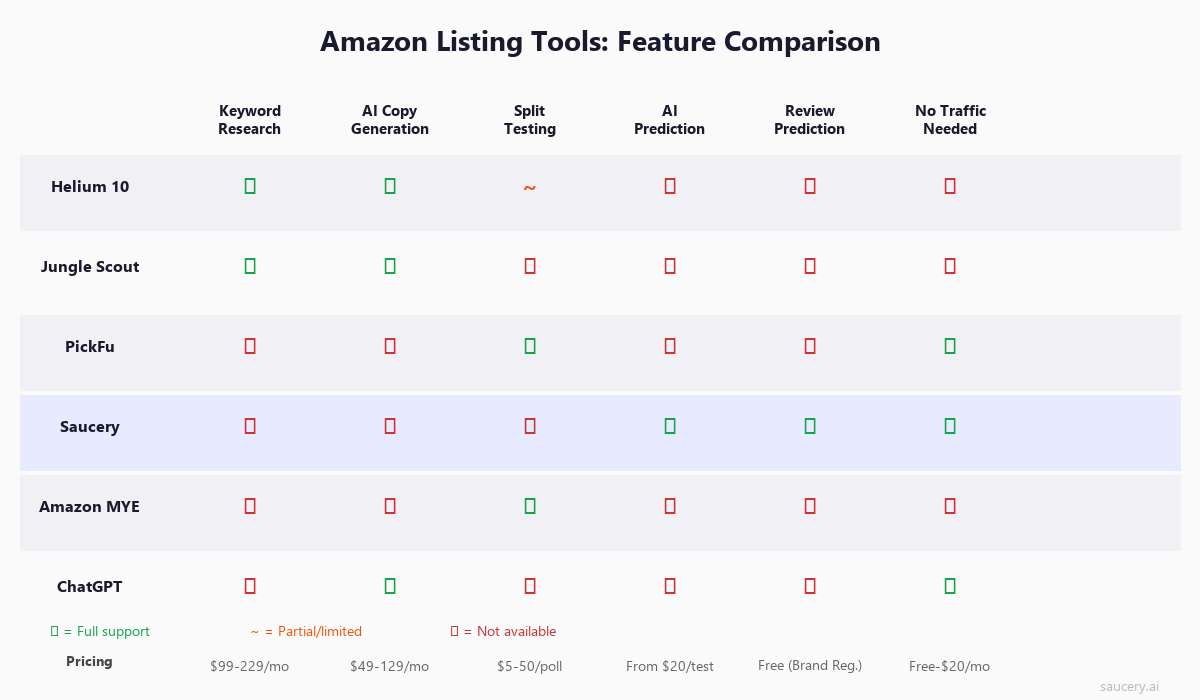
A few things jump out from this comparison. No single tool covers everything. The keyword research tools (Helium 10, Jungle Scout) do not test. The testing tools (PickFu, Saucery, Amazon MYE) do not research keywords. And the generation tools (ChatGPT) neither research nor test – they just produce copy.
This is why the “stack” approach matters. The right combination depends on where you are in the optimisation process and what resources you have available.
When to Use Which Tool
The right tool depends on your specific situation. Here is a decision framework based on the most common scenarios I see.
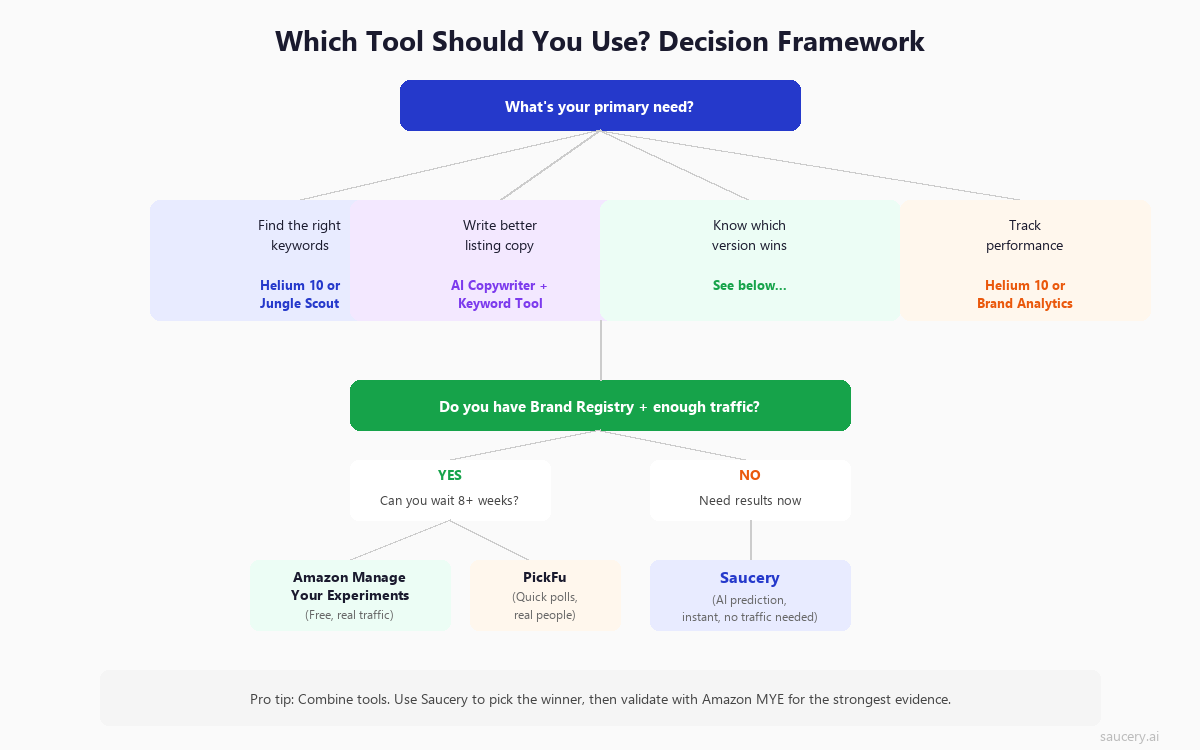
You are launching a new product
You have no traffic, no reviews, no data. You need to get the listing right before traffic arrives because your launch window is your most expensive period (high PPC, low organic ranking).
Best approach: Use Helium 10 or Jungle Scout for keyword research. Generate multiple copy variations with AI. Test those variations with Saucery to pick the winner before going live. Once live with traffic, validate with Amazon Manage Your Experiments.
You have an established ASIN that is underperforming
You have traffic and data. Your conversion rate is below category average. You need to identify what to change and confirm the change helps.
Best approach: Check Brand Analytics to understand which search terms drive purchases. Use keyword tools to identify gaps. Generate variations and test with Saucery for rapid iteration. Deploy the winner and validate with Manage Your Experiments for statistical confidence.
You want to test images
Main image testing has the largest impact on click-through rate. You want to know which image gets more clicks.
Best approach: PickFu excels here. The visual feedback and written explanations from respondents are more valuable for images than any automated tool. For main images specifically, PickFu’s respondent quality and targeting options make it the strongest choice.
You do not have Brand Registry
Without Brand Registry, Amazon’s native tools are mostly unavailable. You cannot run Manage Your Experiments or access Brand Analytics.
Best approach: Helium 10 or Jungle Scout for keyword research (they do not require Brand Registry). Saucery for testing variations (no Brand Registry needed). Track performance manually using session and conversion data from Business Reports.
You have a limited budget
You cannot afford $99-229/month in tooling. You need maximum impact for minimum spend.
Best approach: ChatGPT (free) for copy generation. Amazon SEO fundamentals applied manually. Saucery ($20/test) for critical decisions only – test your title and main image before launch, then rely on Amazon’s free tools for ongoing optimisation once you have Brand Registry.
The Stack Approach: Which Tools Work Together
No listing optimisation tool works in isolation. The most effective approach combines tools that serve different functions in your optimisation workflow. Here are three recommended stacks based on budget and scale.
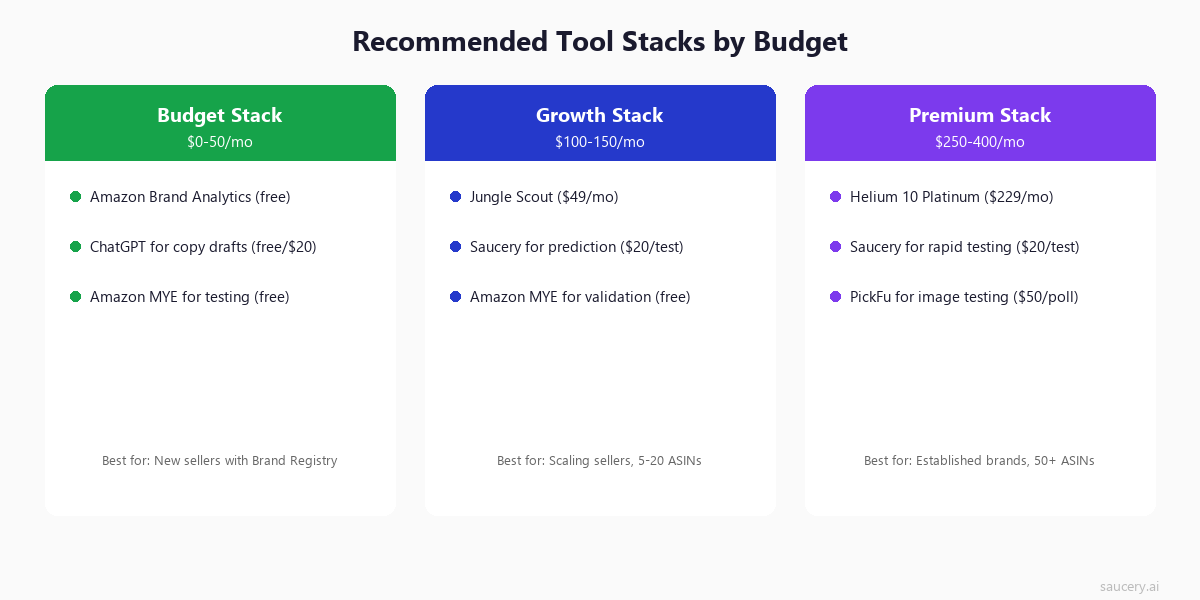
Budget Stack ($0-50/month)
For new sellers or those with a single ASIN:
- Research: Amazon Brand Analytics (free, requires Brand Registry) + ChatGPT for competitive analysis
- Generation: ChatGPT or Claude with well-crafted prompts
- Testing: Amazon Manage Your Experiments (free, but slow)
- Total cost: $0-20/month
This stack works but is slow. You will wait 8-12 weeks for test results. If you can afford one paid tool, add Saucery ($20/test) for rapid testing before deploying to Manage Your Experiments for validation.
Growth Stack ($100-150/month)
For sellers with 5-20 ASINs actively optimising:
- Research: Jungle Scout ($69/month) for keyword research + competitor tracking
- Generation: Jungle Scout AI Assist + ChatGPT for variations
- Testing: Saucery ($20/test) for rapid iteration + Amazon MYE for validation
- Total cost: ~$100-150/month
This is the sweet spot for most growing brands. You get professional keyword data, fast testing, and validation through Amazon’s own system. The workflow: research keywords, generate variations, predict the winner, deploy, confirm with live test.
Premium Stack ($250-400/month)
For established brands with 50+ ASINs:
- Research: Helium 10 Platinum ($229/month) for deep keyword intelligence + Brand Analytics
- Generation: Helium 10 Listing Builder + agency/freelance copywriters
- Testing: Saucery for rapid screening + PickFu for image decisions + Amazon MYE for final validation
- Total cost: ~$300-400/month
At this scale, you are optimising constantly. The premium stack gives you the deepest research data, multiple testing methodologies for different decision types, and the speed to iterate across a large catalogue. The ROI math works easily at 50+ ASINs – even a 1% conversion improvement across the catalogue justifies the investment many times over.
Why Testing Beats Generating
This is the single most important insight in this entire article, and the reason I built Saucery.
Generating listing copy is easy. Knowing which listing copy wins is hard.
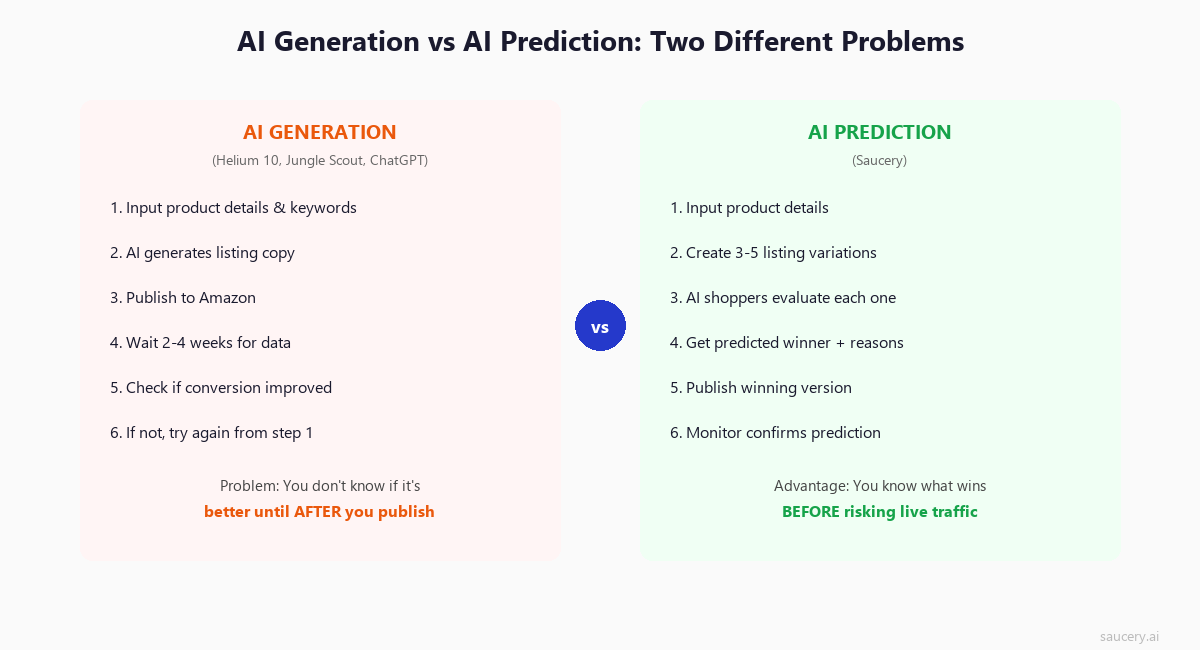
Any AI tool can generate a listing in 30 seconds. Helium 10, Jungle Scout, ChatGPT, Claude, specialised Amazon generators – they all produce functional copy. The output quality is converging. In 2026, the difference between a ChatGPT-generated listing and a Helium 10-generated listing is marginal.
But here is what none of them answer: is it actually better than what you have now?
I have seen sellers replace perfectly good listings with AI-generated alternatives and watch conversion drop. The AI copy was well-written, keyword-rich, and followed best practices – but it removed the specific, credible claims that were driving purchases. The elements that shoppers actually read got diluted into generic benefit statements.
The generation-first approach has a fundamental flaw: it assumes better-written copy is better-converting copy. That is often true, but not always. Sometimes the awkward, specific, ugly listing converts better because it answers the exact question shoppers have in that category.
Testing solves this. Whether you use Saucery (AI prediction), PickFu (human polls), or Amazon Manage Your Experiments (live traffic), the act of comparing options against a decision metric is more valuable than any amount of copy generation.
The ideal workflow in 2026:
- Research keywords and understand your category (Helium 10 / Jungle Scout / Brand Analytics)
- Generate 3-5 strong variations (ChatGPT / AI writers / human copywriter)
- Predict which wins (Saucery – instant results, no traffic needed)
- Deploy the winner
- Validate with live data (Amazon Manage Your Experiments)
This workflow uses the strengths of each tool at the right stage. Generation is cheap and fast – so generate many options. Testing identifies the winner – so test before committing. Validation provides ground truth – so confirm with real data when available.
The sellers I see winning in 2026 are not the ones with the best AI copywriter. They are the ones who test systematically and deploy what works, regardless of whether it “looks” like the best option to them personally.
Frequently Asked Questions
What is the best free Amazon listing optimisation tool?
Amazon’s own Brand Analytics and Manage Your Experiments are the best free tools – but they require Brand Registry. Without Brand Registry, ChatGPT for copy generation and Amazon Business Reports for basic analytics are your free options. For keyword research specifically, Amazon’s search bar autocomplete is surprisingly useful and completely free.
Do I need Helium 10 AND Jungle Scout?
No. They overlap significantly. Pick one based on your priority: Helium 10 for the deepest keyword database and most comprehensive toolkit, Jungle Scout for cleaner UX and stronger product research. Running both is a waste unless you are doing extensive competitive research that requires cross-referencing data sources.
How accurate is AI prediction compared to live A/B testing?
On binary choices (A vs B), AI prediction tools like Saucery show approximately 90% agreement with real-world outcomes. On multi-alternative comparisons (choosing from 4-5 options), accuracy is lower but still significantly better than guessing. Live A/B testing remains the gold standard for confidence, but AI prediction is faster and works without traffic – making them complementary rather than competing approaches.
Is Amazon Manage Your Experiments worth the wait?
Yes, if you have the traffic and time. It provides the highest-confidence data because it uses real shoppers making real purchases in a randomised trial. The limitation is speed – 8-12 weeks per test means you can only run 4-6 experiments per year on a single ASIN. Use faster tools (Saucery, PickFu) to narrow down to your best two options, then validate the winner with Amazon’s tool.
Can I use ChatGPT to optimise my Amazon listing?
You can use it to generate drafts, but do not publish AI output without testing. ChatGPT produces grammatically correct, keyword-rich copy – but it does not know your specific competitive landscape, what shoppers in your category actually respond to, or whether its output is better than your current listing. Use it for generation, then validate with a testing tool.
What should I test first on my listing?
Test in order of impact: main image first (drives click-through rate), then title (affects both CTR and SEO), then bullet points (conversion rate). A+ content and backend keywords have lower incremental impact and should come after you have optimised the high-visibility elements.
How often should I optimise my listings?
Review quarterly at minimum. Major optimisation when: conversion rate drops below category average, a new competitor enters with a superior listing, you receive consistent negative review themes that could be addressed with better copy, or seasonal demand shifts require different keyword emphasis. Do not change a listing that is converting well just because a tool suggests “improvements.”
Are Amazon listing optimisation tools worth the investment?
Calculate it simply: if a tool costs $100/month and helps you improve conversion rate by even 0.5% on a product doing $10,000/month in revenue, that is $50/month in additional revenue for the first month and compounding thereafter. For most sellers doing $5,000+/month, at least basic tooling pays for itself quickly. The exception is very new sellers with low traffic – focus on PPC and reviews first, optimise listings once you have baseline data.
What is the difference between Amazon SEO tools and listing optimisation tools?
Amazon SEO focuses on ranking – getting your listing to appear in search results. Listing optimisation focuses on conversion – getting shoppers who see your listing to actually buy. They overlap (keywords affect both ranking and relevance perception) but the tools serve different primary goals. Keyword research tools are primarily SEO tools. Testing tools are primarily conversion tools. The best approach addresses both.
About the Author
Andrew Mac is the founder of Saucery, an AI prediction platform that helps Amazon sellers test listing variations before going live. Previously spent a decade in consumer goods product development, watching too many good products fail because of bad listings. Now builds tools to fix that.
Same product. Better listing. More sales.
Subscribe for F&B Consumer Insights
Data-driven insights on food & beverage consumer preferences, straight to your inbox.