Most Amazon product launches fail within the first 90 days. Not because the product is bad – because the launch execution was wrong. Sellers skip keyword research, underfund PPC, launch with three mediocre images, and wonder why page two is as close to page one as they ever get.
I have watched hundreds of product launches across food, beverage, supplements, and household categories. The difference between sellers who hit 100 sales in their first month and those who stall at 15 comes down to preparation, not luck. This guide covers the complete launch sequence – from the work you do four weeks before going live through to the optimisation decisions that get you past the 100-sale milestone where Amazon starts rewarding you with stable organic rankings.
Every step here is sequenced deliberately. Do them out of order and you will burn budget on traffic that does not convert. Skip them entirely and you are launching blind.
Table of Contents
- The Amazon Product Launch Timeline
- Pre-Launch Checklist
- Listing Optimisation Before You Go Live
- Inventory Planning
- Launch Pricing Strategy
- PPC Strategy for Launch
- Getting Initial Reviews
- The First 30 Days
- Common Launch Mistakes
- When to Optimise vs When to Wait
- The 100-Sale Milestone
- Scaling After Launch
- FAQ
The Amazon Product Launch Timeline
A successful amazon product launch is not a single event. It is a sequence that begins four weeks before your listing goes live and extends at least 30 days after. Each phase builds on the previous one – rushing through pre-launch work means you are spending money to send traffic to a listing that cannot convert.
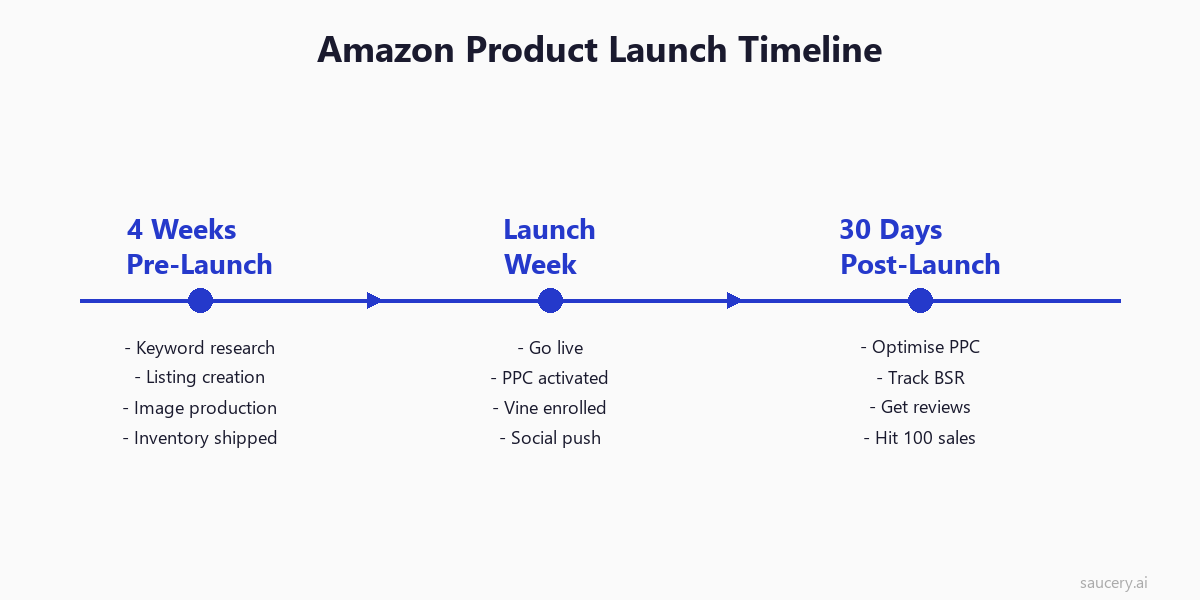
The timeline breaks into three distinct phases:
Weeks 1-4 (Pre-Launch): This is where 80% of your launch success is determined. You are researching keywords, creating your listing, producing images, setting pricing, and getting inventory into FBA. Most sellers compress this into a weekend and it shows.
Launch Week: Your listing goes live, PPC campaigns activate, you enroll in Vine (if eligible), and you drive any external traffic you have. The goal is maximum velocity in the first 7 days because Amazon weights early sales signals heavily in its ranking algorithm.
Days 8-30 (Post-Launch): You optimise PPC based on real data, track your BSR trajectory, accumulate reviews, and push toward 100 sales. This phase separates products that rank from those that fade.
According to Jungle Scout’s 2025 seller survey, sellers who spent at least 3 weeks in pre-launch preparation were 2.7x more likely to achieve profitability within the first quarter compared to those who launched within a week of deciding on a product.
Pre-Launch Checklist: Everything Before You Go Live
Think of pre-launch as building the foundation. Every element here directly impacts your conversion rate on day one – and conversion rate on day one determines how much of your PPC spend turns into rankings versus waste.
Keyword Research
Your Amazon keyword research determines which searches your product appears for. Get this wrong and you are either invisible (targeting keywords with no volume) or buried (targeting keywords where page one is dominated by established brands with thousands of reviews).
Start with your main keyword – the one phrase that most precisely describes what you sell. For a collagen powder supplement, that might be “collagen peptides powder” rather than just “collagen” (too broad) or “hydrolysed marine collagen peptides type 1 and 3 unflavoured” (too specific for a main keyword).
Then build your keyword universe:
- Primary keywords (3-5): High volume, high relevance. These go in your title.
- Secondary keywords (10-20): Medium volume, high relevance. These go in bullets and description.
- Long-tail keywords (50-100): Lower volume but highly specific. These go in backend search terms and A+ Content.
- Competitor keywords: Terms your top 5 competitors rank for that you do not.
Tools like Helium 10 Cerebro and Jungle Scout Keyword Scout will give you search volume estimates. Cross-reference with Amazon’s own autocomplete suggestions – if Amazon suggests it, people are searching for it.
Competitor Analysis
Pull the top 10 listings for your primary keyword. Document:
- Their price range (you will need to be competitive)
- Review count and rating (this tells you the barrier to entry)
- Image quality and quantity
- A+ Content presence
- Title structure and keyword usage
- Monthly sales estimates (Jungle Scout or Helium 10)
If the top 10 listings all have 1,000+ reviews and 4.5+ stars, you are entering a mature market. Not impossible, but your launch budget needs to account for the longer road to page one. If the top listings have under 200 reviews and mediocre images, that is a signal you can win quickly with a superior listing and aggressive launch strategy.
Listing Creation
Your listing is your salesperson. It works 24 hours a day and it needs to convert strangers into buyers within 15 seconds – that is the median time a shopper spends before deciding to scroll past or add to cart.
Do not write your listing once and go live. Write it, revise it, test the copy against your product differentiation strategy, and ensure every word earns its place. We will cover the specific elements in the next section.
Images
Amazon allows up to 9 images (7 on mobile). You need at minimum 7 for launch. The requirement is not a suggestion – listings with fewer than 5 images convert at roughly half the rate of those with 7+, according to PickFu research on Amazon image impact.
Your image stack should include:
- Main image (white background, product fills 85% of frame)
- Lifestyle image (product in use context)
- Infographic with key benefits
- Size/scale reference
- Ingredients or materials detail
- Comparison or “what is in the box”
- Social proof or certification badges
Professional product photography costs $150-500 per listing depending on complexity. It is one of the highest-ROI investments in your launch budget. Never launch with phone photos or renders that look like renders.
Pricing Decision
Your launch price needs to account for three things: competitor pricing, your margin requirements, and the promotional strategy you will use in the first 30 days. We cover the specifics in the pricing strategy section below, but during pre-launch you need to have your pricing architecture decided. What is your regular price? What is your launch promotion? What is your break-even point factoring in PPC costs?
Listing Optimisation Before You Go Live
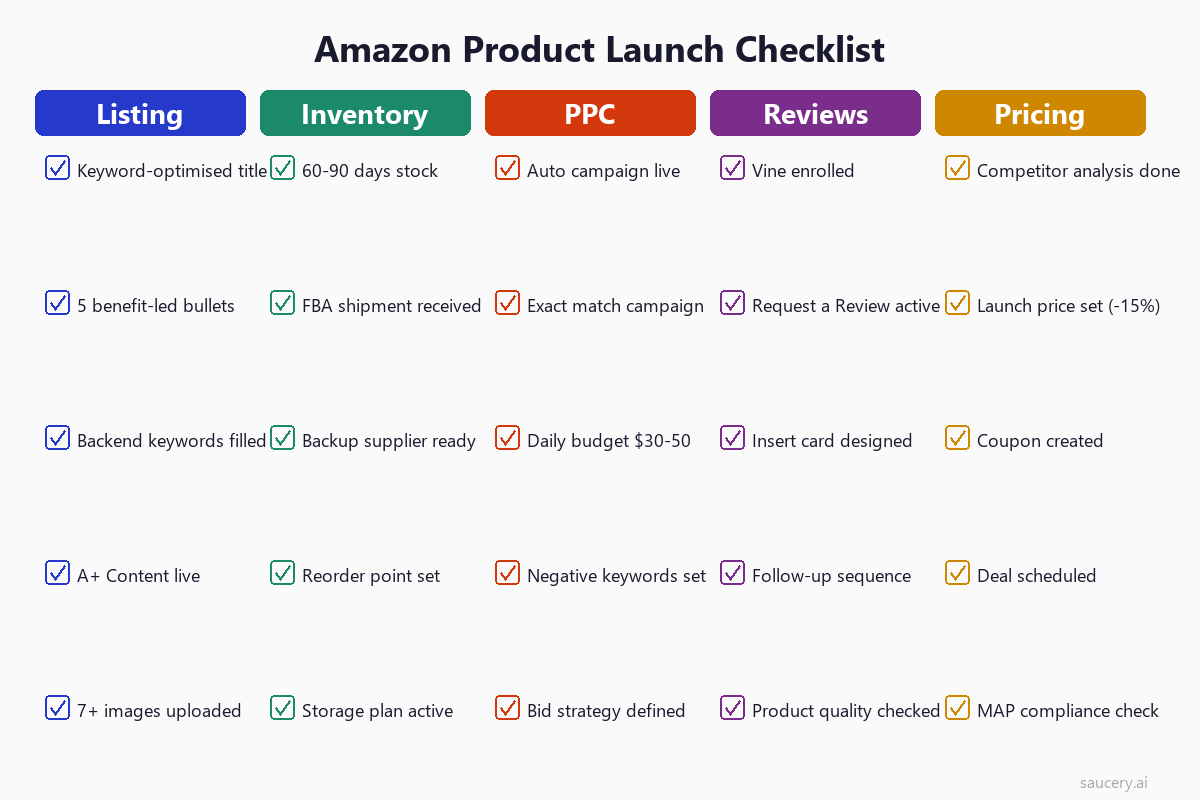
Your listing has five optimisable elements that directly impact both search visibility and conversion rate. Get these right before launch day – you do not want to be rewriting your title while simultaneously trying to build sales velocity.
Title Structure
Your product title is the single most important ranking factor in Amazon SEO. It carries more keyword weight than any other field and it is the first text shoppers see in search results.
The formula that works for most categories:
[Brand] + [Primary Keyword] + [Key Differentiator] + [Secondary Keyword] + [Size/Quantity]
Example: “NutriPure Collagen Peptides Powder – Grass-Fed Hydrolysed Protein for Skin, Hair, Nails and Joints – Unflavoured, 500g (50 Servings)”
Keep it under 200 characters (some categories cap at 150). Front-load your primary keyword. Do not stuff – Amazon penalises keyword repetition in titles.
Bullet Points
Your Amazon bullet points are where most purchase decisions happen. Research on what shoppers actually read on product listings shows that bullet points receive more sustained attention than any other listing element after the main image.
Five bullets, each following this structure:
- Bullet 1: Primary benefit (the main reason someone buys this)
- Bullet 2: Unique differentiator (what makes you different from alternatives)
- Bullet 3: Quality/trust signal (certifications, sourcing, testing)
- Bullet 4: Usage/versatility (how to use, who it is for)
- Bullet 5: Risk reversal (guarantee, what is in the box, customer support)
Each bullet should lead with a capitalised benefit headline followed by a supporting sentence. Keep bullets under 250 characters for mobile readability – longer bullets get truncated on the app.
Backend Keywords
Amazon gives you 249 bytes (not characters – bytes) of backend search terms. These are invisible to shoppers but indexed for search. Use them for:
- Misspellings of your product (people search “colegen” more than you would think)
- Spanish/French translations if selling in US/CA
- Synonyms not already in your title or bullets
- Related use cases (“post workout recovery” if you sell protein powder)
Do not repeat keywords already in your title or bullets – Amazon indexes your entire listing, so repetition wastes your limited backend space. Do not use commas (they waste bytes). Separate terms with spaces only.
Images for Conversion
Beyond having 7+ images, sequence matters. Your image stack tells a story:
- What is it? (main image)
- What does it look like in my life? (lifestyle)
- Why should I choose this one? (benefits infographic)
- What exactly am I getting? (size, quantity, contents)
- Can I trust it? (certifications, testing, social proof)
Each image should answer a buying objection. If you cannot articulate what objection an image overcomes, replace it with one that does.
A+ Content
If you are brand registered (and you should be before launching), A+ Content lets you replace the basic product description with rich media modules. Amazon reports that A+ Content increases conversion by 3-10% on average.
For launch, create A+ Content that:
- Tells your brand story (builds trust for a new, unreviewed product)
- Shows comparison tables (positions you against alternatives without naming them)
- Includes lifestyle imagery that differs from your main image stack
- Addresses the top 3 questions customers ask about your category
Complete Amazon listing optimisation before you start spending on PPC. Driving traffic to an unoptimised listing is like paying for footfall into a shop with empty shelves.
Same product. Better listing. More sales.
Inventory Planning: How Much Stock for Launch
Running out of stock during your launch window is the most expensive mistake you can make. A stockout does not just pause your sales – it collapses your rankings, and recovering from a stockout takes 2-4 weeks of re-building velocity once you are back in stock.
How Much Stock to Order
The formula is straightforward but most sellers get it wrong by being too conservative:
Launch stock = (Target daily sales x 90 days) + 30% buffer
If you are targeting 5 sales per day, that is 450 units + 135 buffer = 585 units minimum for your first order. This accounts for your launch velocity (which should be higher than cruise), plus the lead time on your reorder.
For most private label sellers in food, supplement, and household categories, a first order of 500-1,000 units is the sweet spot. Below 500, you risk stockout before your reorder arrives. Above 1,000, you are over-committing capital before validating product-market fit.
FBA vs FBM: The Launch Decision
For launch, FBA (Fulfilled by Amazon) wins almost every time. Here is why:
- Prime badge: Increases click-through rate by 24-35% in most categories
- Buy Box eligibility: FBA sellers win the Buy Box far more frequently
- Customer trust: New brands benefit enormously from the Amazon fulfilment trust signal
- Logistics simplicity: During launch week, you need to focus on optimisation not shipping
The exception: if your product is oversized, fragile, or has a very low margin, FBM may be necessary. But recognise this means slower ranking velocity due to lower conversion rates without the Prime badge.
Ship your FBA inventory at least 2 weeks before your planned launch date. Amazon receiving and check-in can take 5-10 business days, and delays happen. Do not plan a hard launch date without confirmed “in stock” status.
Launch Pricing Strategy
Your pricing strategy during launch serves one purpose: maximising unit velocity while maintaining enough margin to fund your PPC campaigns. You are not trying to be profitable on day one. You are trying to buy rankings.
Introductory Pricing
Set your launch price 10-20% below your target regular price. This does two things:
- Improves conversion rate against established competitors who have review advantages
- Creates urgency when you later raise to regular price (the original price shows as struck through)
Important: Amazon requires you to maintain a price for at least 30 days before it shows the “was/now” pricing. So your introductory price becomes your baseline. When you raise the price after 30 days, the discount appears.
Coupons
Amazon coupons (the green badge in search results) increase click-through rate by 12-18%. During launch, stack a 5-15% coupon on top of your introductory price. Yes, this cuts into margin. That is the point – you are buying velocity.
Coupon tips for launch:
- Percentage-off coupons perform better than fixed-amount for products under $30
- Fixed-amount coupons ($5 off) perform better for products over $30
- Set a budget limit (e.g., 500 redemptions) so costs do not spiral
- Amazon charges $0.60 per coupon redemption on top of the discount
Lightning Deals and 7-Day Deals
You will not be eligible for Lightning Deals immediately (Amazon requires sales history), but 7-Day Deals are available sooner. Schedule one for your second or third week when you have some review coverage. The deal badge in search results provides significant visibility lift.
Pricing architecture summary for a $25 regular-price product:
- Week 1-4 launch price: $21.99 (12% below target)
- Coupon: 10% off ($2.20 clip)
- Effective price to customer: $19.79
- After 30 days: Raise to $24.99, maintain 5% coupon
PPC Strategy for Launch
PPC (Pay-Per-Click advertising via Amazon Sponsored Products) is non-negotiable for launch. Organic rankings require sales velocity, and new products have zero organic visibility. PPC is how you bootstrap that initial velocity.
Campaign Structure
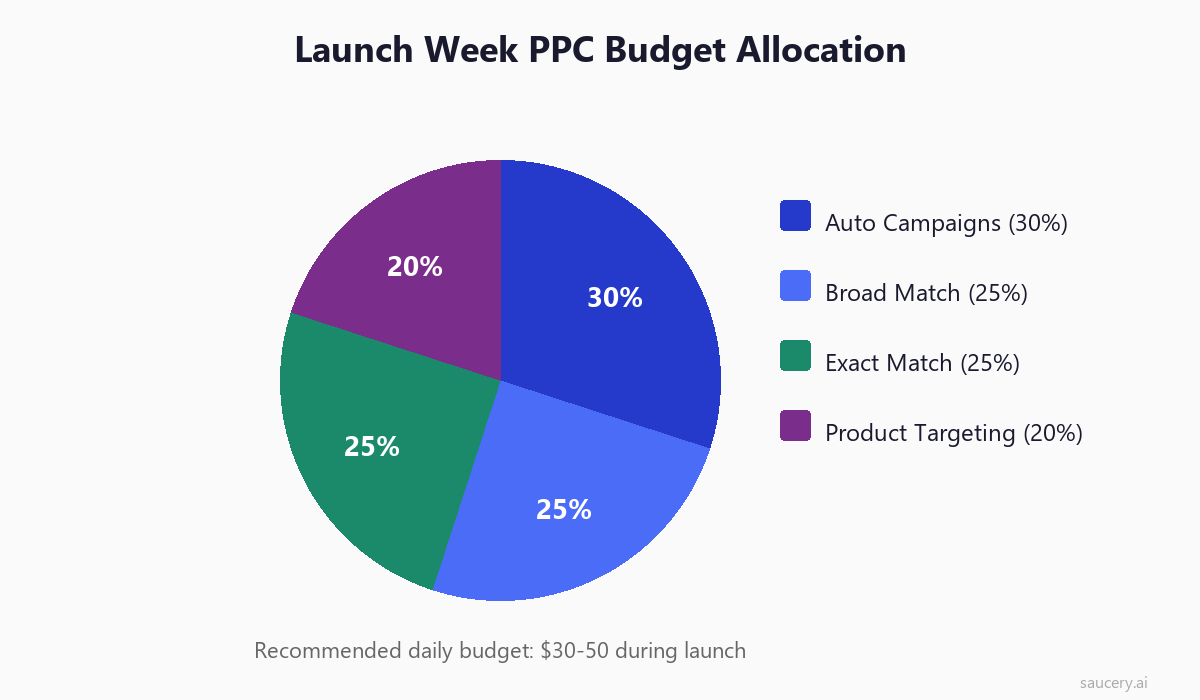
Launch with four campaign types running simultaneously:
1. Auto Campaign (30% of budget): Let Amazon decide where to show your ads. This is your discovery campaign – it will find keywords and product targets you did not think of. Run for at least 2 weeks before harvesting data.
2. Broad Match Campaign (25% of budget): Target your 10-15 most relevant keywords on broad match. This captures variations and long-tail searches related to your core terms.
3. Exact Match Campaign (25% of budget): Target your top 5-8 highest-volume, highest-relevance keywords on exact match. These are your money keywords – the ones where you want to build ranking.
4. Product Targeting (20% of budget): Target specific competitor ASINs. Show your product on their listing pages. Choose competitors with similar products but weaker listings, higher prices, or lower ratings.
Budget Allocation
For most categories, a launch PPC budget of $30-50 per day is the minimum for meaningful data collection and velocity building. Below $30/day, you are spread too thin across campaigns to generate enough clicks for the algorithm to optimise.
First two weeks: Be willing to run at break-even or slight loss on ACoS (Advertising Cost of Sale). Your target ACoS during launch should be your product margin (e.g., if your margin is 40%, accept up to 40% ACoS). You are buying data and rankings, not profit.
After two weeks: Start tightening. Reduce bids on non-converting keywords. Increase bids on keywords driving sales. Add negatives for irrelevant search terms bleeding budget.
Bid Strategy
Start bids 20-30% above Amazon’s suggested bid. New products need to bid aggressively because Amazon’s algorithm has no sales history to judge relevance. Higher bids get you impressions in better positions, which gets you click-through data faster.
Use “dynamic bids – down only” for your first week. This lets Amazon reduce your bid when it predicts a click is less likely to convert, protecting budget on low-quality placements. Switch to “dynamic bids – up and down” in week 2 once you have conversion data.
Same product. Better listing. More sales.
Getting Initial Reviews
Reviews are the chicken-and-egg problem of Amazon launches. You need reviews to convert, but you need sales to get reviews. The average organic review rate on Amazon is 1-3% – meaning for every 100 sales, you might get 1-3 unsolicited reviews.
Being able to predict what reviews will say before launch gives you an advantage: you can address potential complaints in your listing copy before they become one-star reviews.
Amazon Vine
Amazon Vine is the fastest legitimate way to get reviews on a new product. You provide up to 30 free units to Amazon’s Vine Voice reviewers (trusted reviewers selected by Amazon). They are obligated to leave an honest review.
Key details:
- Cost: $200 per parent ASIN enrollment (one-time fee)
- Eligibility: Brand Registered, fewer than 30 reviews, FBA inventory in stock
- Timeline: Reviews typically appear within 2-4 weeks of enrollment
- Risk: Vine reviewers are often more critical than average buyers. Only enroll products you are confident in.
- Benefit: Vine reviews carry a green “Vine Customer Review of Free Product” badge – these are trusted more by shoppers than unverified reviews
Enroll in Vine immediately when your product goes live. The sooner you get those first 5-10 reviews, the sooner your conversion rate climbs.
Request a Review Button
Amazon’s “Request a Review” button in Seller Central sends a standardised review request email to buyers 5-30 days after delivery. This is Amazon’s compliant alternative to custom email sequences (which are increasingly restricted).
You can manually click this for each order, or use tools like Jungle Scout or Helium 10 to automate the process. The button increases review rate from the 1-3% baseline to approximately 5-8%.
Timing matters: Request reviews between day 5 and day 14 after delivery. Too early and the customer has not used the product. Too late and they have moved on mentally.
Product Insert Cards
A physical card inside your packaging can encourage reviews – but compliance matters. Amazon’s Community Guidelines are clear:
- Allowed: “We would love to hear your feedback” with a QR code to the product page
- Allowed: Tips on how to get the most from the product
- Not allowed: Offering incentives for reviews (“leave a review and get 10% off next order”)
- Not allowed: Directing only happy customers to leave reviews
- Not allowed: Asking for 5-star reviews specifically
A well-designed insert card that adds value (usage tips, recipe ideas, care instructions) and gently reminds buyers to share their experience can lift your review rate by an additional 2-4 percentage points without violating Amazon’s terms.
The First 30 Days: Tracking and Optimising
Once you are live, your job shifts from preparation to observation and adjustment. The first 30 days produce the data that determines your product’s long-term trajectory on Amazon.
Sales Velocity
Track daily unit sales from day one. Amazon’s algorithm cares about velocity (units per day) not just total sales. A product selling 5 units daily for 20 days will rank better than one that sold 100 units on day 1 and zero thereafter.
Target velocity for your first month should be at least the average daily sales of page-two products in your category. If page-two sellers average 4 units/day, you need sustained 4+ units/day to climb onto page one.
BSR (Best Seller Rank) Tracking
BSR updates hourly and reflects your sales velocity relative to other products in your category. Track your sub-category BSR (not the overall Amazon BSR). A BSR under 5,000 in most sub-categories indicates healthy sales. Under 1,000 means you are in the top tier.
What to watch for:
- Improving BSR (number going down): Your velocity is increasing relative to competitors. Stay the course.
- Flat BSR: You are maintaining but not gaining. Look for optimisation opportunities.
- Declining BSR (number going up): Your velocity is dropping. Diagnose immediately – is it a PPC issue, a conversion issue, or a stockout risk?
Keyword Ranking Monitoring
Track your organic ranking position for your top 10-15 keywords daily. Tools like Helium 10 Keyword Tracker or Jungle Scout Rank Tracker automate this.
During the first 30 days, you should see progressive improvement: page 5+ in week 1, page 2-3 by week 2, approaching page 1 by week 3-4 for your best keywords. If you are not seeing this trajectory, your velocity is insufficient for the competition level.
Conversion Rate Optimisation
Amazon reports your Unit Session Percentage (their version of conversion rate) in Business Reports. Average across Amazon is 10-15%, but category and price point matter enormously.
If your conversion rate is below category average:
- Check your main image (number one conversion factor)
- Compare your price to page-one competitors
- Review your title for keyword stuffing or confusion
- Assess your review situation (sub-10 reviews significantly hurt conversion)
- Use Amazon A/B testing (Manage Your Experiments) once eligible
Common Launch Mistakes (and Their Impact)
After analysing launch data across hundreds of Amazon products, these are the mistakes that most severely impact first-month performance. Each percentage below represents the estimated reduction in first-month sales compared to an optimised launch.
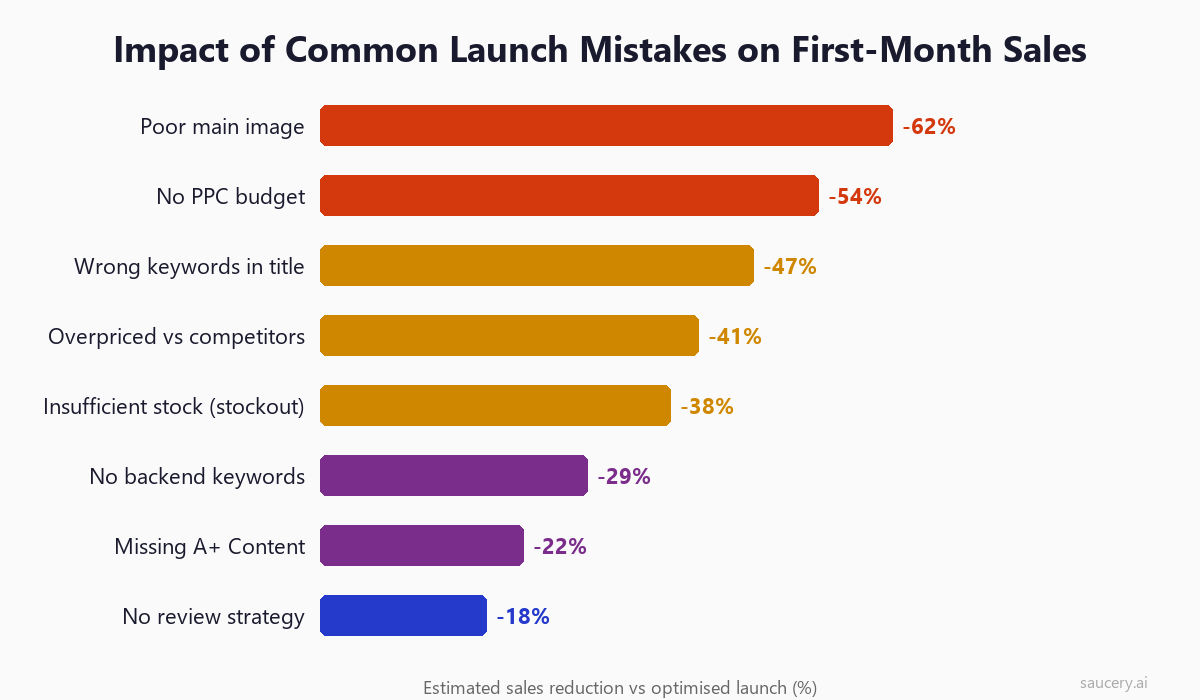
1. Poor Main Image (-62% Sales Impact)
Your main image is the single biggest conversion lever. A low-quality, poorly lit, or small-in-frame main image means shoppers never click in the first place. No click, no sale. Professional photography with pure white background, product filling 85%+ of the frame, and proper lighting is non-negotiable.
2. No PPC Budget (-54% Sales Impact)
Launching without PPC and hoping organic traffic will find you is fantasy for new products. Amazon’s algorithm needs sales signals to rank you, and PPC is the only reliable source of those signals for a product with zero history. Even $30/day is infinitely better than zero.
3. Wrong Keywords in Title (-47% Sales Impact)
If your title contains keywords that do not match what shoppers search, or irrelevant keywords that attract wrong-fit clicks, your indexing is wrong and your conversion rate suffers. Research keywords with actual tools – do not guess.
4. Overpriced vs Competitors (-41% Sales Impact)
New products without reviews need to compete on value. If you are priced 20%+ above established competitors who have hundreds of reviews, shoppers have no rational reason to choose you. Price competitively until you have enough reviews and sales history to justify a premium.
5. Insufficient Stock Leading to Stockout (-38% Sales Impact)
Running out of stock during your launch window destroys momentum. Rankings tank within 48 hours of going out of stock, and recovering takes 2-4 weeks of rebuilding velocity. Order enough for 90 days based on your target velocity, not your conservative estimate.
6. No Backend Keywords (-29% Sales Impact)
Leaving the 249-byte backend search terms field empty means you are missing indexing for dozens of relevant keywords. This is free discoverability you are leaving on the table.
7. Missing A+ Content (-22% Sales Impact)
Shoppers scroll past basic HTML descriptions. A+ Content with comparison charts, lifestyle images, and brand storytelling increases time on page and conversion. If you are brand registered, there is no reason not to have it ready for launch.
8. No Review Strategy (-18% Sales Impact)
Hoping reviews will come naturally is not a strategy. Products with zero reviews convert at roughly half the rate of products with 10+ reviews. Vine enrollment, Request a Review automation, and well-designed insert cards are all part of a deliberate review acquisition plan.
Same product. Better listing. More sales.
When to Optimise vs When to Wait
One of the most common mistakes new sellers make is changing things too quickly based on too little data. Amazon’s algorithm takes time to index changes, and statistical significance requires volume.
Data Thresholds Before Making Changes
PPC keywords: Wait for at least 20 clicks before judging whether a keyword converts. At a 10% conversion rate, 20 clicks gives you only a 2-order sample – barely meaningful but enough to spot obvious non-performers (keywords with 40+ clicks and zero orders can be paused).
Title changes: Wait at least 7 days after a title change before evaluating impact. Amazon re-indexes titles within 24-48 hours, but ranking changes take longer to manifest.
Price changes: Give pricing changes 5-7 days to impact conversion rate. Shoppers do not immediately notice, and Amazon’s algorithm needs time to recalculate your organic position based on new velocity.
Image changes: Wait for 100+ sessions after changing your main image before evaluating conversion impact. Fewer sessions means your sample size is too small for meaningful conclusions.
Overall listing performance: Do not judge your launch as a success or failure until day 21. The first week is always volatile (high variance, small sample), and Amazon’s algorithm takes 2-3 weeks to stabilise your organic positions.
What to Change First
When data shows underperformance, prioritise changes by impact:
- Main image (if CTR is below category average)
- Price (if conversion rate is below category average)
- PPC bids (if impressions are too low)
- Title keywords (if indexing on wrong terms)
- Bullet points (if sessions are fine but conversion lags)
Change one variable at a time. If you change your image, price, and title simultaneously, you will never know which change drove the result. Apply the same discipline you would to any A/B test on your listing – one variable, sufficient data, then conclude.
The 100-Sale Milestone: Why It Matters
100 sales is not an arbitrary number. It represents the threshold where Amazon’s algorithm has enough data to rank your product with confidence. Before 100 sales, your rankings are volatile – you might bounce between page 2 and page 5 day to day. After 100 sales, your positions stabilise.
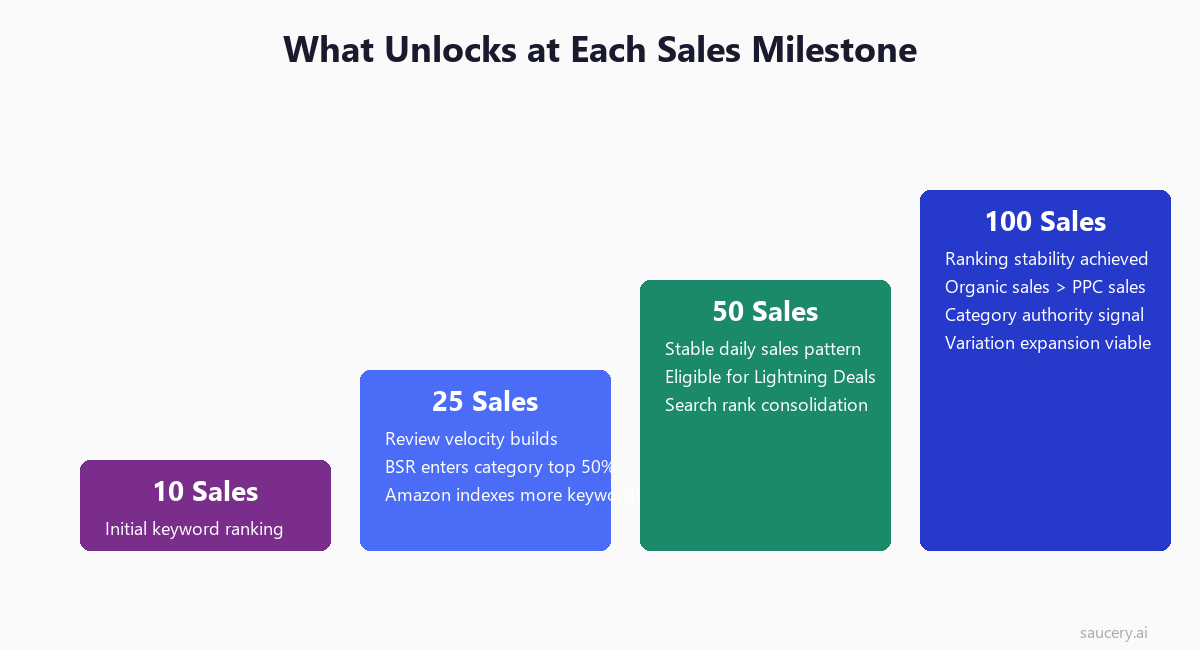
What Changes at 100 Sales
- Ranking stability: Your organic positions stop fluctuating wildly. The algorithm trusts your conversion signals.
- Organic > PPC: If your listing converts well, organic sales should now exceed PPC-driven sales. This is the inflection point for profitability.
- Category authority: Amazon begins surfacing your product in “frequently bought together” and “customers also viewed” placements more consistently.
- Review accumulation: At a 5% review rate, 100 sales yields 5 reviews. Combined with Vine, you should have 10-15+ reviews by this point – enough to meaningfully influence conversion.
- Data confidence: You now have enough conversion data to make informed decisions about pricing, images, and copy changes.
How Long to Reach 100 Sales
For a well-executed launch in a moderately competitive category:
- Aggressive launch (good product-market fit, $50/day PPC): 10-14 days
- Standard launch (decent competition, $30/day PPC): 21-30 days
- Conservative launch (competitive category, $20/day PPC): 30-45 days
If you are not hitting 100 sales within 45 days, something fundamental is wrong – either your product does not match market demand, your listing is not converting, or your PPC strategy is not driving enough relevant traffic.
Scaling After Launch: From 100 Sales to Category Authority
Once you have passed the 100-sale milestone and your rankings are stable, the game changes from “survive and rank” to “scale and dominate.” This is where you transition from launch mode to growth mode.
Expanding Keywords
During launch, you focused on your top 5-15 keywords. Now it is time to expand. Review your Search Term Report in Amazon Seller Central to find:
- Converting search terms from auto campaigns that you have not explicitly targeted
- Long-tail variations of your main keywords driving sales
- Competitor brand names where your product appears in “compare with similar items”
Create new exact-match campaigns for proven converters. Expand your broad match campaigns with new keyword themes. Your keyword universe should grow from 15-20 targeted terms at launch to 50-100+ across campaigns.
Adding Variations
Variations (size, colour, flavour, quantity packs) are a powerful scaling lever because they share review count across the parent listing. If your original ASIN has 50 reviews, a new variation inherits that social proof immediately.
When to add variations:
- Your original ASIN is stable on page 1
- Customer questions or reviews indicate demand for other options
- You have identified a gap in the variation options competitors offer
- Your supply chain can handle additional SKUs without complexity risk
International Expansion
Amazon’s international marketplaces (UK, DE, FR, IT, ES, JP, AU) represent growth opportunities with often lower competition than the US market. Consider expansion when:
- Your US listing is profitable and stable
- Your product does not have regulatory barriers in target markets
- You have (or can create) localised listings (translated titles, bullets, A+ Content)
- Your margin supports international FBA fees and currency conversion
Start with the UK or German marketplace – both have high Prime penetration and established buyer behaviour. Use Amazon’s Build International Listings (BIL) tool for initial setup, then optimise manually with market-specific listing optimisation.
Defend Your Rankings
Scaling is not just about growth – it is about defending the rankings you have built. Competitors will launch against you using the same strategies you used. Maintain your position by:
- Continuously testing and improving your main image
- Maintaining PPC on your core keywords (even at lower budgets) to prevent competitors from outbidding you
- Adding new images and A+ Content quarterly
- Responding to negative reviews with product improvements
- Monitoring your unique selling proposition against new market entrants
Same product. Better listing. More sales.
Frequently Asked Questions
How much does it cost to launch a product on Amazon?
A realistic launch budget for a private label product is $3,000-8,000 beyond product costs. This covers professional photography ($300-500), initial PPC spend ($900-1,500 for the first month at $30-50/day), Vine enrollment ($200), and tools/software ($100-200/month). Under-funding your launch is the most common cause of failure – you cannot bootstrap rankings without investment.
How long does it take to rank on page one?
For moderately competitive keywords (search volume 5,000-20,000/month), expect 3-6 weeks with a well-executed launch. Highly competitive keywords (50,000+ monthly searches) may take 2-3 months. Low competition keywords (under 5,000/month) can reach page one within 1-2 weeks. The variables are your PPC budget, listing conversion rate, and the strength of existing page-one competition.
Should I use external traffic for my Amazon launch?
External traffic (social media, email lists, influencers, Google Ads) can boost launch velocity, but only if properly attributed. Use Amazon Attribution links to ensure external sales count toward your organic ranking. The Amazon Brand Referral Bonus program even gives you a 10% referral fee credit for external traffic. However, do not rely on external traffic alone – PPC should be your primary velocity driver because it directly builds keyword-specific ranking.
What if my product gets negative reviews early?
Early negative reviews are painful but not fatal if you respond correctly. First, address the product issue if it is legitimate (packaging damage, misleading claims, quality defect). Second, do not panic-change your listing – one negative review among several positives is normal. Third, accelerate your review strategy to dilute the negative with positives. If you are getting consistent negative feedback about the same issue, that is a product problem, not a marketing problem – fix the product before spending more on traffic.
Is Amazon Vine worth it for every product?
Vine is worth it for most products, with two exceptions: products you are not fully confident in (Vine reviewers are critical and will highlight flaws), and very low-margin products where giving away 30 units significantly impacts your economics. For products over $15 with good quality, the $200 fee plus product cost is one of the highest-ROI review investments available. The alternative – waiting for organic reviews at 1-3% rate – means waiting months to accumulate meaningful social proof.
How do I know if my product is ready to launch?
Your product is ready to launch when: inventory is confirmed in FBA, your listing has all seven elements complete (title, bullets, backend keywords, 7+ images, A+ Content, brand story, price set), your PPC campaigns are built and ready to activate, your Vine enrollment is prepared, and your first 30 days of budget is allocated. If any of these are incomplete, delay launch until they are done. A half-ready launch always underperforms a fully-prepared one.
What daily sales do I need to be profitable?
Profitability depends on your per-unit margin after Amazon fees, PPC costs, and product costs. A common benchmark: if your product margin (revenue minus COGS minus Amazon fees) is 40%, and your target ACoS is 25%, your net margin is 15%. At a $25 selling price, that is $3.75 profit per unit. You need enough daily volume to cover your fixed costs (tools, photography amortisation, time) and generate the return you need. For most sellers, 5-10 units/day at 15% net margin is the minimum viable business threshold.
Can I launch multiple products simultaneously?
You can, but I would not recommend it for your first launch. Each product needs dedicated attention for PPC management, listing optimisation, and troubleshooting during the critical first 30 days. Splitting focus across multiple launches means none get the attention they need. Launch one product, get it to 100+ sales and stable rankings, then use that cash flow and experience to launch your second product. The exception is if you are launching variations of the same product – those can and should launch together.
About the Author
Andrew Mac is the founder of Saucery, where he works with product brands to optimise their e-commerce listings using data from AI-modelled shoppers. Before Saucery, he spent over a decade in consumer goods commercialisation, working across product development, pricing, and go-to-market strategy for brands launching into retail and online channels.
Same product. Better listing. More sales.
Subscribe for F&B Consumer Insights
Data-driven insights on food & beverage consumer preferences, straight to your inbox.