I’ve tested title variants across hundreds of product listings on Amazon, eBay, Etsy, Walmart, and Shopify. The pattern is always the same: a title change alone can shift click-through rates by 15-30%, yet most sellers treat their product title as an afterthought. They write it once during listing creation, stuff in every keyword they can think of, and never revisit it.
That’s a mistake. Your product title is the single most visible piece of copy in search results. On most marketplaces, it’s the only text a shopper reads before deciding whether to click or scroll past. And every platform has different rules, character limits, and ranking algorithms that reward different title structures.
This guide is the definitive cross-platform resource for product title optimisation. I’ll cover exact character limits, keyword placement strategy, mobile truncation realities, platform-specific formulas, and testing approaches that let you find the winning variant before committing. Whether you’re selling on one marketplace or five, you’ll walk away with a title framework that drives both visibility and clicks.
Table of Contents
- Why Product Titles Matter More Than You Think
- Character Limits by Platform: The Complete Breakdown
- Mobile Truncation: What Shoppers Actually See
- Keyword Placement Strategy: Front-Loading vs Natural Flow
- Platform-Specific Title Formulas
- Clarity vs Keyword Stuffing: Before and After Examples
- Common Product Title Mistakes (With Real Examples)
- Testing Your Product Titles
- Cross-Platform Title Strategy
- Frequently Asked Questions
Why Product Titles Matter More Than You Think
Your product title serves three audiences simultaneously. First, the search algorithm uses it to determine relevance and ranking. Second, the shopper uses it to decide whether your product matches their intent. Third, external search engines (Google Shopping, Bing) index your title for off-platform discovery.
Most sellers optimise for just one of these. They either write titles for the algorithm (keyword-stuffed, unreadable) or for the human (clear and concise but invisible in search). The best product titles satisfy all three simultaneously.
According to Amazon’s Style Guide documentation, titles are the primary indexing field for product search. Amazon’s A9 algorithm weights title keywords more heavily than any other listing element. eBay’s Cassini search engine follows a similar approach, with eBay’s seller documentation confirming that title keywords are the primary ranking factor for Best Match results.
The commercial impact is significant. In my experience running listing experiments, the difference between a mediocre title and an optimised one typically represents a 15-30% shift in click-through rate. On a listing generating 10,000 impressions per month, that’s 1,500 to 3,000 additional clicks from a change that takes minutes to implement. This aligns with findings from Shopify’s product page research, which identifies the title as the highest-leverage element for organic conversion.
If you’re building a unique selling proposition for your brand, the product title is where that USP first meets the shopper. It’s not just metadata. It’s your first and sometimes only chance to differentiate.
Character Limits by Platform: The Complete Breakdown
Every marketplace enforces different title length limits. Some are hard caps (your title gets truncated or rejected), while others are soft guidelines (you can exceed them, but the algorithm penalises you). Here’s the current state as of 2026:
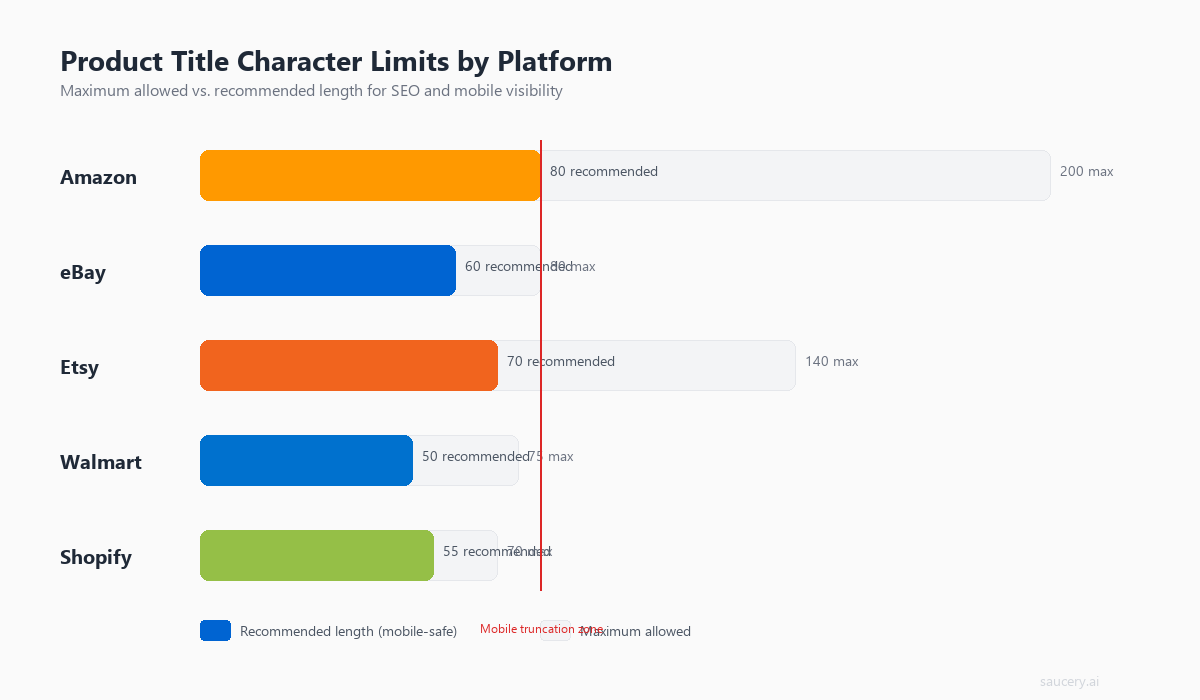
| Platform | Maximum Characters | Recommended Length | Hard or Soft Limit |
|---|---|---|---|
| Amazon | 200 characters | 80-150 characters | Hard (suppressed if exceeded) |
| eBay | 80 characters | 60-80 characters | Hard (cannot exceed) |
| Etsy | 140 characters | 100-140 characters | Hard (cannot exceed) |
| Walmart | 75 characters | 50-75 characters | Soft (penalised in search) |
| Shopify (storefront) | Unlimited | 60-70 characters (for SEO) | No platform cap |
| Google Shopping | 150 characters | 70-100 characters | Soft (truncated in display) |
Amazon: 200 Characters (But Aim for 150)
Amazon allows up to 200 characters in most categories, though some restricted categories (jewellery, clothing) limit titles to 80 characters. Amazon Seller Central’s product title requirements state that titles exceeding category limits may result in search suppression.
The practical recommendation is to stay between 80 and 150 characters. Amazon’s own internal data (shared at various Accelerate conferences) suggests that titles between 80-120 characters achieve the best balance of keyword coverage and readability. Titles that max out at 200 characters tend to look spammy and reduce buyer confidence.
For a deeper look at Amazon-specific strategies, see my full Amazon listing optimisation guide, which covers title structure alongside bullet points, descriptions, and backend keywords.
eBay: 80 Characters (Every Character Counts)
eBay’s 80-character limit is the tightest among major marketplaces. This constraint forces discipline. You cannot afford filler words, redundant descriptors, or unnecessary punctuation. According to eBay’s listing tips documentation, the title is the most important factor in search visibility, making efficient keyword usage critical.
I cover eBay-specific title strategies in detail in the eBay listing optimisation guide, including how to handle the 80-character constraint when selling products that need multiple descriptors.
Etsy: 140 Characters (Front-Load for Mobile)
Etsy allows 140 characters and indexes the full title for search. However, Etsy’s SEO handbook recommends placing your most important keywords at the beginning because the platform displays only the first 40-55 characters in most search result views. The remaining characters still help with search matching but are invisible to browsers until they click through.
For Etsy sellers, I’ve written a complete Etsy SEO guide that covers how title, tags, and attributes work together in Etsy’s search algorithm.
Walmart: 75 Characters (The Tightest Mainstream Limit)
Walmart Marketplace enforces a recommended 75-character limit. According to Walmart’s Content Quality guidelines, titles exceeding this threshold receive lower content quality scores, which directly impact search ranking. Walmart’s algorithm is particularly punitive about title violations compared to other platforms.
The Walmart listing optimisation guide covers how to make every character count within this strict constraint.
Shopify: Unlimited (But Google Isn’t)
Shopify doesn’t impose a character limit on product titles. But your Shopify store relies on Google for organic traffic, and Google displays approximately 50-60 characters of a page title in search results before truncating with an ellipsis. Google’s title link documentation confirms that titles should be concise and descriptive.
For Shopify sellers, this means your product title should contain your primary keywords within the first 60 characters, even if the full title is longer for on-page display purposes. For a broader look at how your listings fit together, check the e-commerce listing optimisation guide.
Mobile Truncation: What Shoppers Actually See
Here’s a reality most sellers ignore: the majority of marketplace shoppers browse on mobile. Amazon reports over 70% of browsing sessions occur on mobile devices. On a phone screen, your carefully crafted 200-character title gets brutally truncated. What shoppers actually see in search results varies by platform and device:
| Platform | Desktop Search Display | Mobile Search Display | Mobile App Display |
|---|---|---|---|
| Amazon | ~115-150 characters | ~70-80 characters | ~55-70 characters |
| eBay | Full 80 characters | ~55-65 characters | ~50-60 characters |
| Etsy | ~80-100 characters | ~40-55 characters | ~35-50 characters |
| Walmart | Full 75 characters | ~50-60 characters | ~45-55 characters |
| Shopify (Google) | ~55-60 characters | ~50-55 characters | N/A |
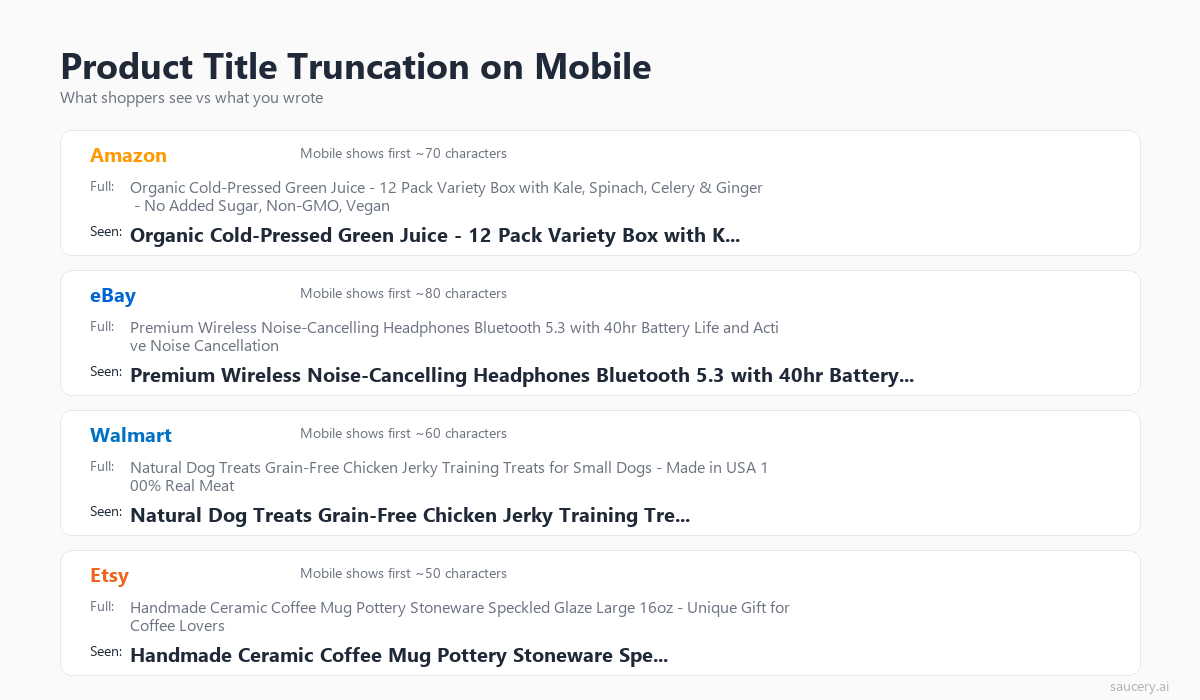
The practical implication is clear: whatever appears in the first 50-70 characters of your title needs to communicate your product’s identity and primary value proposition. Everything after that is bonus keyword coverage for the algorithm. It won’t help you win the click on mobile.
The “Two-Title” Approach
I recommend thinking of your title as having two parts:
- Part 1 (first 50-70 characters): The “mobile title.” This must be compelling, clear, and contain your primary keyword. It’s what most shoppers will actually read.
- Part 2 (characters 70+): The “algorithm tail.” Additional keywords, secondary attributes, and variant information that helps with search matching but won’t be seen by most mobile browsers.
This mental model prevents the common mistake of burying your key differentiator at character 120, where only desktop shoppers and the search algorithm will ever encounter it.
Keyword Placement Strategy: Front-Loading vs Natural Flow
The debate around keyword placement in product titles comes down to two schools of thought: front-loading (cramming your primary keyword as close to the beginning as possible) versus natural flow (writing a readable title that incorporates keywords organically).
The answer depends on the platform.
Where Front-Loading Wins
eBay: eBay’s Cassini search engine historically weighted keywords at the beginning of titles more heavily. While eBay hasn’t publicly confirmed exact positional weighting, years of seller testing and the platform’s own best practices suggest that leading with your primary keyword delivers better search positioning.
Etsy: Given the severe mobile truncation (only 40-55 characters visible), front-loading ensures your primary keyword is actually seen by shoppers. Etsy’s algorithm also gives slight weight to keyword position, according to their official SEO documentation.
Google Shopping / Shopify SEO: Google’s ranking algorithm considers keyword proximity to the beginning of the title tag as a relevance signal. For Shopify sellers relying on organic search, front-loading your primary keyword is standard SEO practice.
Where Brand-First Works Better
Amazon (for branded sellers): Amazon’s style guide recommends the format Brand + Product Line + Key Feature + Size/Variant. If you have brand recognition, leading with your brand name leverages that trust. For private label sellers with unknown brands, leading with the product type keyword often performs better.
Walmart: Walmart’s content guidelines explicitly recommend Brand + Key Feature + Product Type format. Their algorithm doesn’t significantly penalise keyword position the way eBay’s does, and Walmart shoppers tend to be brand-conscious.
The Hybrid Approach
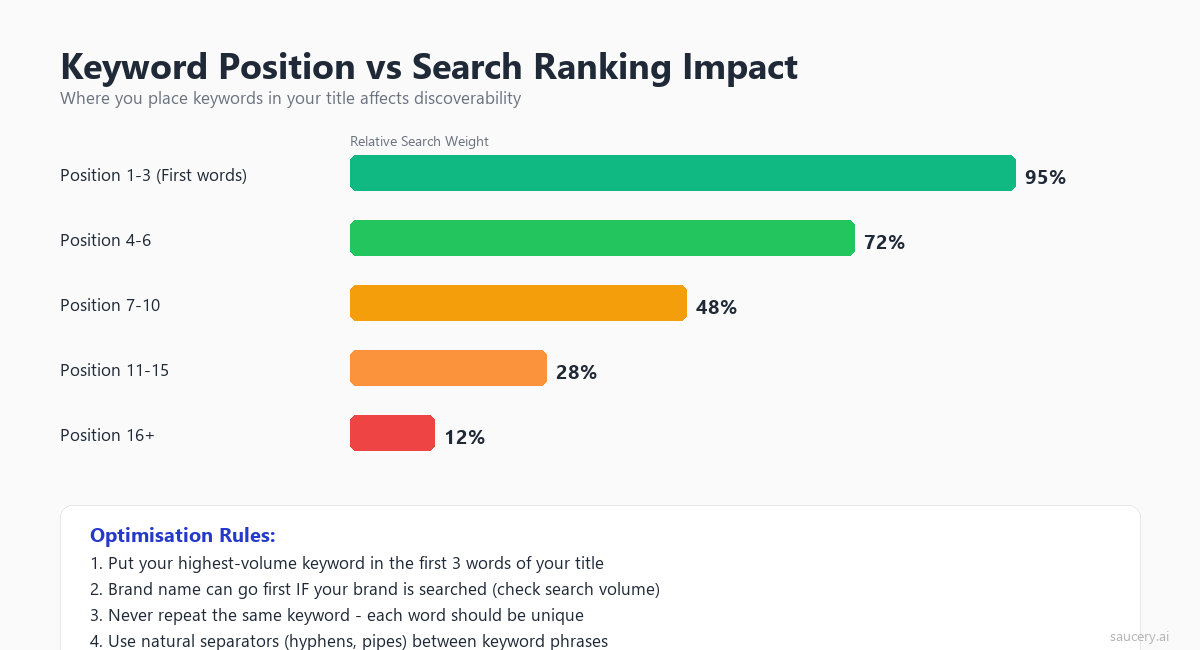
For most sellers, the optimal approach is a hybrid: place your primary keyword within the first 3-5 words while maintaining readability. You don’t need to start your title with a raw keyword. You can incorporate it naturally.
Weak front-loading: “Protein Powder Whey Isolate Chocolate Flavor 2lb Tub Gym Supplement”
Strong hybrid: “Whey Protein Isolate Powder, Chocolate, 2lb – Low-Carb Muscle Recovery”
Both contain “protein powder” and “whey isolate” within the first few words. But the second reads like a product name rather than a keyword list. Understanding how your USP translates into listing copy helps you identify which keywords actually drive differentiation versus which ones are table-stakes.
Same product. Better listing. More sales.
Find out which version of your product listing converts best – before you publish.
Platform-Specific Title Formulas
Each marketplace has an optimal title formula. These aren’t arbitrary. They’re derived from platform style guides, search algorithm behaviour, and patterns I’ve observed across thousands of listings.
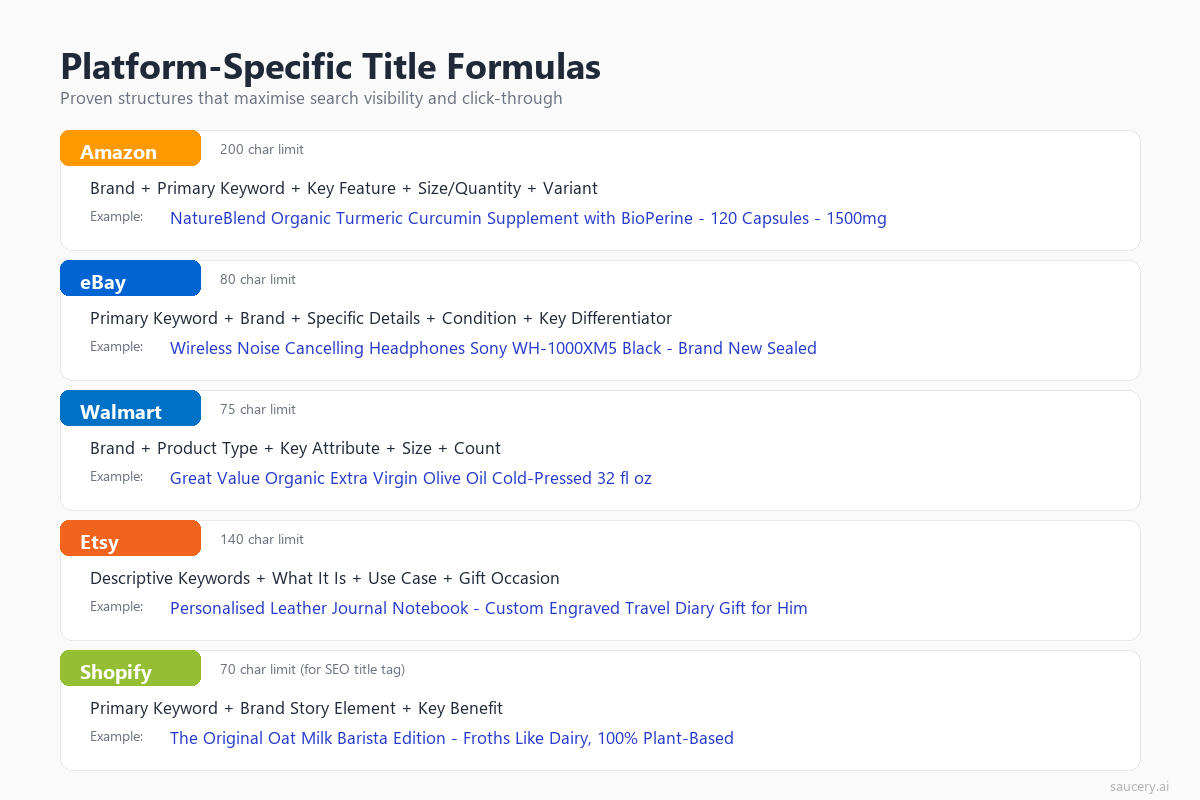
Amazon Title Formula
Format: Brand + Product Line + Material/Key Ingredient + Key Feature + Product Type + Size/Quantity + Colour/Variant
Example: “NutriFuel Plant Protein Powder, Organic Pea & Rice Blend, Vanilla Bean, 2lb (30 Servings) – Dairy Free”
Key rules:
- Capitalise the first letter of each word (title case)
- Use pipes (|) or hyphens (-) to separate logical segments
- Never use ALL CAPS (violates Amazon policy)
- No promotional phrases (“Best Seller”, “Free Shipping”, “Sale”)
- No special characters for decoration (stars, hearts, arrows)
- Include the size/quantity for products with variants
Amazon’s algorithm indexes every word in your title, regardless of position. But the first 80 characters appear in most search result views, so front-load your primary keywords there. Your Amazon bullet points handle the detail. The title handles discovery.
eBay Title Formula
Format: Primary Keyword + Brand + Key Attribute + Product Type + Size/Colour + Condition
Example: “Organic Whey Protein Powder NutriFuel Vanilla 2lb Isolate Gym Supplement New”
Key rules:
- Use all 80 characters (every unused character is a wasted keyword opportunity)
- No filler words (“the”, “and”, “for”) unless absolutely necessary for readability
- Include condition (New, Used, Refurbished) as it’s a common search modifier
- No excessive punctuation, asterisks, or symbols
- Consider singular AND plural forms of key terms if space allows
eBay’s 80-character constraint means every word must earn its place. I explore this tension between completeness and concision in the eBay listing optimisation guide.
Etsy Title Formula
Format: Primary Keyword Phrase + Descriptive Details + Use Case/Occasion + Secondary Keywords
Example: “Personalised Leather Journal, A5 Handbound Notebook, Custom Name Embossing, Third Anniversary Gift for Him”
Key rules:
- Use commas to separate keyword phrases (Etsy reads these as individual search terms)
- Include occasion/recipient keywords (“gift for him”, “wedding favour”)
- Place your most important search phrase first (mobile truncation)
- Use natural language that doubles as descriptive text (Etsy shoppers read titles more carefully)
- Don’t repeat tags in the title. Etsy’s algorithm combines title + tags for relevance
Etsy is unique because buyers actively read titles as product descriptions. On Amazon, shoppers scan titles for confirmation. On Etsy, the title often sells the item. My Etsy SEO guide covers how title, tags, categories, and attributes work as an integrated system.
Walmart Title Formula
Format: Brand + Key Feature/Ingredient + Product Type + Quantity/Size
Example: “NutriFuel Organic Plant Protein Powder, Vanilla, 30 Servings”
Key rules:
- Stay under 75 characters (strict Content Quality scoring)
- No promotional language whatsoever
- No redundant information (don’t repeat the category name)
- Use proper grammar and punctuation (Walmart penalises keyword-stuffed titles)
- Include pack size/count for multipacks
Walmart’s algorithm is less keyword-dependent than Amazon’s because Walmart relies more heavily on structured product attributes (shelf, category, variant data) for search matching. The title needs to be clean and descriptive rather than keyword-rich. See the full breakdown in the Walmart listing optimisation guide.
Shopify / DTC Title Formula
Format: Product Name + Primary Keyword + Key Differentiator
Example: “Organic Vanilla Plant Protein Powder – 30 Servings, Dairy Free”
Key rules:
- Keep under 60 characters for clean Google SERP display
- Include your primary SEO keyword naturally
- Your site name gets appended automatically in search results (“| Brand Name”), so account for that space
- Make it compelling for click-through from Google results
- Consider how the title displays as an H1 on your product page
Clarity vs Keyword Stuffing: Before and After Examples
Keyword stuffing is the most common product title mistake. Sellers fear missing out on search terms, so they cram every possible keyword into the title. The result is a title that triggers algorithmic penalties on some platforms, reduces buyer confidence on all platforms, and often performs worse than a clean alternative.
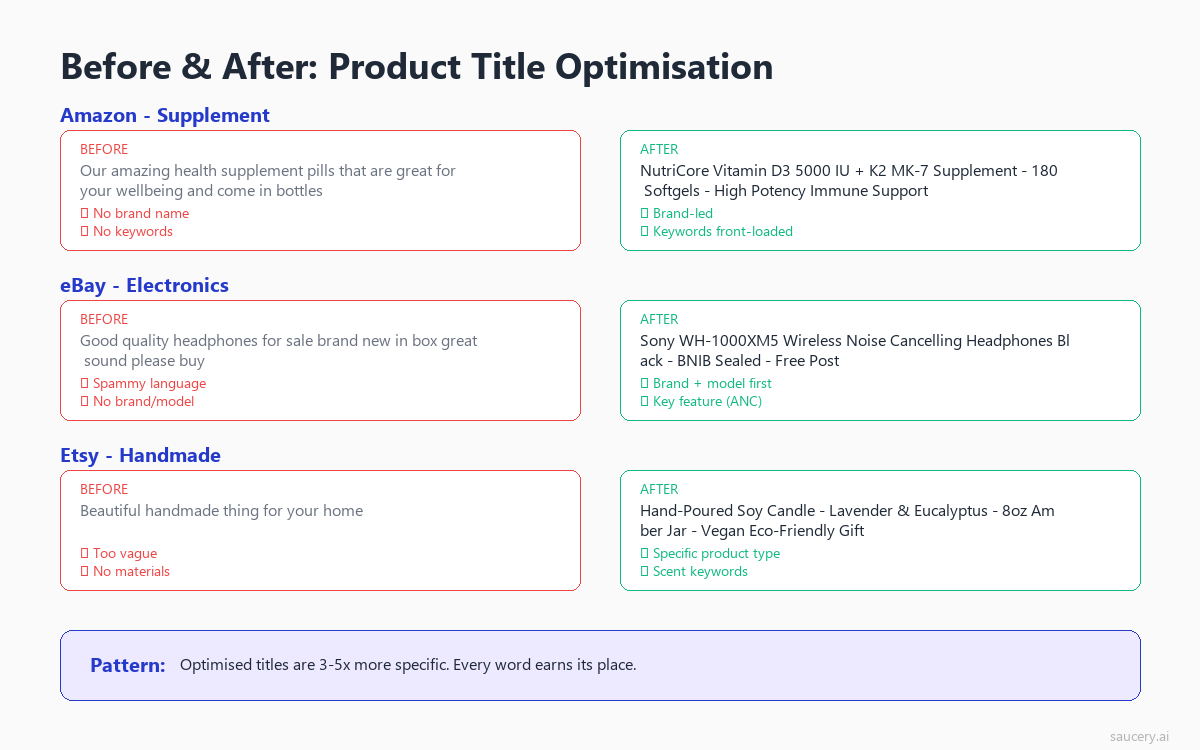
Here are real before-and-after examples showing how clarity beats keyword density:
Example 1: Supplement (Amazon)
Before (keyword-stuffed):
“Protein Powder Whey Protein Isolate Protein Shake Muscle Building Protein Supplement Gym Protein Recovery Protein Chocolate Flavour 2lb Whey Powder Bodybuilding”
After (optimised):
“NutriFuel Whey Protein Isolate Powder, Chocolate, 2lb (30 Servings) – Low-Carb Muscle Recovery Supplement”
Why it works: The optimised version contains the same primary keywords (whey protein isolate, protein powder, chocolate, 2lb) but reads like a product name. It includes the brand, specifies the variant, and communicates a benefit. The stuffed version repeats “protein” seven times and reads like a search query, not a product.
Example 2: Home Decor (Etsy)
Before (keyword-stuffed):
“Candle Soy Candle Scented Candle Handmade Candle Vanilla Candle Gift Candle Home Decor Candle Natural Candle”
After (optimised):
“Hand-Poured Vanilla Soy Candle, 8oz Natural Wax, Minimalist Glass Jar, Housewarming Gift”
Why it works: Etsy shoppers read titles. The optimised version tells them exactly what they’re getting (hand-poured, vanilla, soy, 8oz), what makes it special (natural wax, minimalist glass jar), and suggests a use case (housewarming gift). All within 140 characters.
Example 3: Electronics Accessory (eBay)
Before (keyword-stuffed):
“Phone Case iPhone Case Phone Cover iPhone Cover Protective Case Shockproof Case Clear”
After (optimised):
“Clear Shockproof iPhone 15 Pro Max Case – Slim Protective Cover, MagSafe Compatible”
Why it works: Within 80 characters, this title specifies the exact model (iPhone 15 Pro Max), the key feature (shockproof, MagSafe compatible), and the style (clear, slim). A shopper knows immediately whether this matches their need. The stuffed version could apply to any phone case ever made.
Example 4: Food Product (Walmart)
Before (too long, keyword-stuffed):
“Organic Granola Cereal Healthy Breakfast Granola Oats Granola with Almonds and Dark Chocolate Gluten Free Non-GMO Crunchy Granola Clusters”
After (optimised for Walmart’s 75 characters):
“Purely Good Organic Granola, Dark Chocolate Almond, 12oz, Gluten Free”
Why it works: Walmart’s algorithm rewards clarity and penalises keyword repetition. This title fits within 75 characters, includes the brand, flavour variant, size, and key dietary claim. That’s everything a Walmart shopper needs to make a click decision.
The principle behind all of these transformations is the same one that drives product differentiation: specificity beats generality. A title that tries to rank for everything ranks for nothing. A title that clearly identifies what the product IS, for whom, and why it’s different captures both algorithmic relevance and human attention.
Common Product Title Mistakes (With Real Examples)
After reviewing thousands of product listings across every major marketplace, these are the title mistakes I see most frequently. Each one costs sellers clicks and conversions.
Mistake 1: Repeating Keywords
Example: “Yoga Mat Exercise Mat Fitness Mat Workout Mat Non-Slip Mat Thick Mat”
Repeating “mat” six times doesn’t improve your ranking. Every major marketplace algorithm counts a keyword once for relevance. Repetition either does nothing (Amazon) or actively penalises you (Walmart, eBay). Use the space for additional descriptors: material, thickness, dimensions, colour.
Mistake 2: Missing the Model/Variant Identifier
Example: “Wireless Bluetooth Headphones Over-Ear Noise Cancelling”
This title could describe a thousand products. Which model? Which brand? What’s the battery life? Shoppers searching for headphones are comparing 20+ results simultaneously. If your title doesn’t include the specific model name or unique identifier, you’re invisible in a sea of generic listings.
Mistake 3: Leading with Unknown Brand Name
Example: “ZyxTech Pro X7 Ultra Premium Series – for Active Users”
Unless your brand has recognition (think Anker, Bose, or Nike), leading with a brand name that means nothing to the shopper wastes your most valuable title real estate. The first 50 characters determine whether someone clicks on mobile. “ZyxTech Pro X7 Ultra Premium” tells the shopper nothing about what the product actually is.
Fix: “Wireless Noise-Cancelling Headphones, 40hr Battery – ZyxTech Pro X7”
Mistake 4: Using Promotional Language
Example: “BEST SELLING Premium Dog Treats – #1 Choice – FREE SHIPPING – Limited Time”
Every major marketplace prohibits promotional language in titles. Amazon will suppress your listing. eBay will flag it. Walmart will reduce your content quality score. Beyond policy violations, promotional language erodes trust. If you need to shout “BEST SELLING,” the product probably isn’t.
Mistake 5: Ignoring Platform-Specific Rules
Example: Using the same 200-character Amazon title on eBay (gets truncated at 80) or Walmart (penalised for exceeding 75).
If you’re selling cross-platform, you need platform-specific titles. A title optimised for Amazon’s 200-character allowance is a liability on eBay. Each platform’s algorithm, display behaviour, and shopper expectations are different. Treat each marketplace as its own channel with its own title strategy.
Mistake 6: Punctuation and Symbol Abuse
Example: “***PREMIUM*** Dog Collar || Leather || Adjustable || S/M/L || FREE Engraving!!!”
Excessive punctuation, pipes used as decorative separators, asterisks for emphasis, and exclamation marks all signal low quality to both algorithms and shoppers. Use standard punctuation (commas, hyphens, parentheses) and let your product’s actual attributes do the selling.
Mistake 7: Omitting Size/Quantity for Variants
Example: “Organic Green Tea – Premium Japanese Matcha Powder”
Is this 30g, 100g, or 500g? A shopper comparing options needs to know the quantity from the title. Omitting size information increases your listing’s bounce rate because shoppers click in, discover the size doesn’t match their needs, and leave. Including size in the title pre-qualifies clicks and improves conversion rate.
If you’re building listings from scratch, start with your USP examples to identify what makes your product genuinely different. Then build your title around that differentiator rather than generic category keywords.
Same product. Better listing. More sales.
Find out which version of your product listing converts best – before you publish.
Testing Your Product Titles
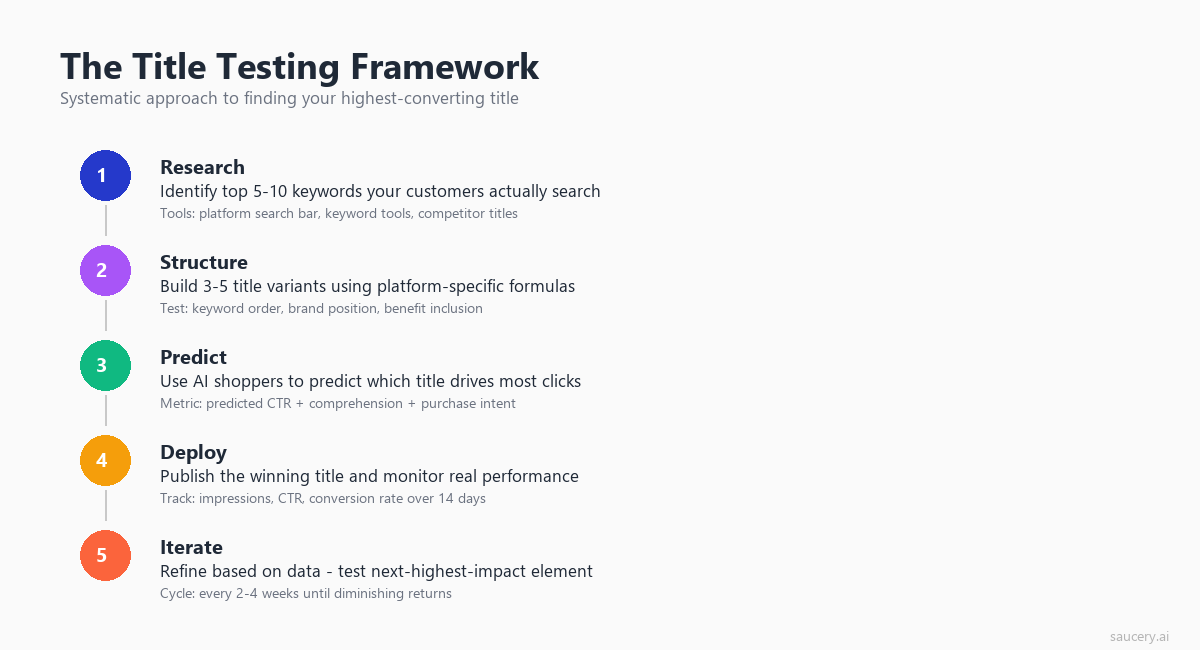
Writing a good title is step one. Knowing which title variant performs best is where the real gains are. I’ve seen sellers agonise over title phrasing for hours, only to pick the wrong option based on gut feel. Testing removes the guesswork.
Why You Should Test Before Publishing
Changing a live listing title carries risk. On Amazon, title changes can temporarily affect your search ranking while the algorithm re-indexes. On eBay, editing a title resets your listing’s search history. Testing title variants before committing to a change lets you make decisions with data, not intuition.
Here’s the reality of live A/B testing on marketplaces:
- Amazon Manage Your Experiments: Available only to Brand Registry sellers with sufficient traffic. Tests typically require 4-8 weeks to reach significance. During that time, you’re splitting traffic between variants, meaning half your audience sees the potentially weaker option.
- Manual rotation: Some sellers change titles weekly and compare metrics. This is flawed because seasonality, advertising changes, competitor activity, and inventory fluctuations all confound the results. You’re never comparing like with like.
- eBay Promoted Listings testing: eBay doesn’t offer native A/B testing for listing content. Your only option is creating duplicate listings (which violates policy) or sequential testing (which has the same confounding issues as Amazon manual rotation).
Pre-Publication Testing Approaches
The more efficient approach is to test title variants before they go live. This eliminates the risk of tanking your current listing’s performance while you wait for data.
- Predictive testing: Use tools that simulate buyer behaviour against your title variants. This gives you directional data in hours rather than weeks, without any risk to your live listing.
- Search term validation: Before choosing keywords for your title, verify actual search volume. Helium 10’s Magnet tool (for Amazon) and Terapeak (for eBay) provide marketplace-specific search volume data that helps you prioritise which keywords deserve title placement versus backend/tag placement.
- Click-through modelling: Write 3-5 title variants and show them to people who match your target buyer profile. Ask which they’d click. Simple preference testing reveals whether your “clever” title actually communicates clearly.
- Competitor title analysis: Study the top 10 results for your primary keyword. What title patterns do they use? Where are the gaps? If every competitor leads with “Premium,” that word has lost all meaning. Find the angle they’re missing.
What to Test
Not all title changes are worth testing. Focus your testing on these high-impact variables:
- Keyword order: Does “Wireless Bluetooth Headphones” outperform “Bluetooth Wireless Headphones”?
- Benefit inclusion: Does adding “40hr Battery Life” to the title increase clicks?
- Brand position: Does leading with brand or leading with product type drive more engagement?
- Specificity level: Does “Running Shoes” or “Trail Running Shoes for Wide Feet” get better qualified clicks?
- Separator style: Do commas, hyphens, or pipes perform differently?
If you’re wondering how testing fits into a broader listing strategy, the e-commerce listing optimisation guide covers the full hierarchy of what to test and in what order. Titles typically deliver the highest ROI per minute of optimisation effort because they affect both visibility (search ranking) and clickability (CTR from results pages).
Price testing is a separate discipline entirely. If you’re considering whether to include pricing signals in your title (common on eBay for competitive categories), understand how that interacts with your broader product pricing strategy first.
Cross-Platform Title Strategy
If you sell on multiple marketplaces (and most growing brands do), you need a systematic approach to title management. The worst thing you can do is copy-paste the same title across platforms. The second worst thing is treating each platform completely independently with no shared strategy.
The Master Title Framework
Start with what I call a “master title” containing all the information you might need across platforms:
- Brand name
- Product type (primary keyword)
- Key ingredient/material
- Primary benefit/feature
- Size/quantity
- Variant (colour/flavour)
- Secondary feature
- Use case/occasion
Master title example: “NutriFuel Organic Plant Protein Powder, Pea & Rice Blend, Vanilla Bean Flavour, 2lb (30 Servings), Dairy Free, Low-Carb Muscle Recovery Supplement for Athletes”
Then derive platform-specific titles by trimming to fit each marketplace’s constraints:
| Platform | Derived Title | Characters |
|---|---|---|
| Amazon | NutriFuel Organic Plant Protein Powder, Pea & Rice Blend, Vanilla Bean, 2lb (30 Servings) – Dairy Free Low-Carb Recovery | 118 |
| eBay | Organic Plant Protein Powder NutriFuel Vanilla 2lb Dairy Free Low-Carb New | 74 |
| Etsy | Organic Plant Protein Powder, Vanilla Bean 2lb, Dairy Free Vegan, Fitness Gift for Athletes, Low-Carb Recovery | 109 |
| Walmart | NutriFuel Organic Plant Protein Powder, Vanilla Bean, 30 Servings | 65 |
| Shopify | Organic Vanilla Plant Protein Powder – 30 Servings, Dairy Free | 62 |
Each derived title prioritises what matters most on that platform: Amazon gets full detail with brand leadership. eBay front-loads the keyword and uses every character. Etsy includes occasion-based language. Walmart stays concise and brand-forward. Shopify optimises for Google’s display length.
Maintaining Consistency Across Channels
While each title is different, they should all be recognisably the same product. A shopper who finds you on Amazon and later searches on eBay should be able to identify the same product. Key consistency elements:
- Brand name always present (even if position varies)
- Size/quantity always present (shoppers compare across platforms)
- Primary variant (flavour/colour) always present
- Product type keyword always present (even if phrased slightly differently)
What can vary between platforms: keyword order, secondary features, benefit language, use-case phrases, and formatting conventions.
When to Customise vs When to Standardise
Customise when:
- Platform algorithms reward different keyword positions
- Character limits force you to cut content
- Shopper behaviour differs (Etsy buyers read titles; Amazon buyers scan)
- Platform-specific features exist (eBay condition, Etsy occasion keywords)
Standardise when:
- Brand identity needs to be consistent across channels
- Product identification must be clear for cross-platform shoppers
- You’re managing hundreds of SKUs and need efficient processes
Understanding your product differentiation at a strategic level makes cross-platform title decisions easier. When you know your genuine differentiator, you know which element MUST appear in every title regardless of character constraints.
Advanced Title Techniques
Using Search Query Data to Inform Titles
Your title should reflect how buyers actually search, not how you think about your product internally. Most sellers describe their product using industry terminology or internal product names. Buyers use different language.
Use these data sources to find buyer language:
- Amazon Brand Analytics (Search Query Performance): Shows exactly what terms shoppers use to find products in your category
- eBay Terapeak: Reveals which title keywords correlate with higher sell-through rates
- Etsy Search Analytics: Shows which search terms drive impressions and clicks to your listings
- Google Search Console: For Shopify sellers, shows actual queries bringing traffic to your product pages
- Ahrefs or Semrush: For competitive keyword research across all platforms
The gap between seller language and buyer language is often significant. A seller might call their product “artisanal cold-pressed botanical face serum.” Buyers search for “natural face oil for dry skin.” Put the buyer’s language in your title.
Seasonal Title Adjustments
Some products benefit from seasonal title modifications. A scented candle might add “Christmas Gift” in November or “Mother’s Day Present” in April. A fitness supplement might emphasise “New Year Resolution” in January.
Platform-specific considerations for seasonal titles:
- Amazon: Title changes can temporarily affect ranking. Plan seasonal changes 2-3 weeks before peak season to allow re-indexing
- eBay: Fixed-price listings can be edited without penalty. Auction titles are locked once bids exist
- Etsy: Seasonal keywords work well here because Etsy shoppers actively search by occasion (“Valentine’s Day gift for boyfriend”)
- Walmart: Avoid frequent title changes. Walmart’s quality scoring system prefers stability
Title Optimisation for Voice Search and AI Shopping
As voice assistants and AI shopping agents become more common, title readability matters more than ever. When Alexa reads out search results or a shopping AI evaluates product options, a natural-language title performs better than a keyword string.
“NutriFuel Organic Vanilla Plant Protein, 30 Servings” is easy for an AI to parse and present to a shopper. “Protein Powder Vanilla Organic Plant Protein Supplement 30 Serve Gym Recovery Vegan Dairy Free” is not.
This trend reinforces what we’ve been saying throughout: clarity beats keyword density. The platforms that reward readable titles today (Walmart, Shopify) are pointing toward where all platforms are heading.
Localisation for International Marketplaces
If you sell on Amazon UK, Amazon DE, or other international marketplaces, don’t just translate your title. Localise it. This means:
- Using local spelling conventions (“colour” for UK, “color” for US)
- Adapting measurement units (ml vs oz, cm vs inches)
- Including locally relevant keywords (UK shoppers search “trainers,” US shoppers search “sneakers”)
- Adjusting brand positioning (some brands are known in one market but not another)
A title optimised for Amazon.com will underperform on Amazon.co.uk if it uses American spelling and imperial measurements for a product where British shoppers expect metric units.
Same product. Better listing. More sales.
Find out which version of your product listing converts best – before you publish.
Product Title Optimisation Checklist
Before publishing or updating any product title, run through this checklist:
Essential Elements
- Primary keyword present within first 50 characters
- Brand name included
- Product type clearly identifiable
- Size/quantity/variant specified
- Within platform character limit
- Readable on mobile (key info in first 55-70 characters)
Quality Checks
- No keyword repetition
- No promotional language (best, #1, free shipping, sale)
- No ALL CAPS words
- No excessive punctuation or special characters
- No competitor brand names (policy violation on all platforms)
- Proper capitalisation (title case for Amazon/Walmart, as appropriate per platform)
Strategic Checks
- Title reflects buyer language (not internal product name)
- Key differentiator is visible (what makes this product different from competitors)
- Platform-specific formula followed
- Consistent with brand across other marketplaces
- Tested against alternative variants (or planned for testing)
Measuring Title Performance
You can’t improve what you don’t measure. Here are the key metrics to track when evaluating title performance:
Primary Metrics
- Click-through rate (CTR): The percentage of shoppers who click your listing after seeing it in search results. This is the most direct measure of title effectiveness. Available in Amazon Brand Analytics, eBay Seller Hub, and Etsy Stats.
- Search impressions: How often your listing appears in search results. An increase after a title change suggests improved keyword relevance.
- Conversion rate: While influenced by the full listing, a title that attracts better-qualified clicks will improve conversion rate by reducing “mismatch” visits.
Secondary Metrics
- Search ranking position: Track your position for target keywords before and after title changes.
- Session duration: If shoppers spend more time on your listing after a title change, the title is attracting more relevant traffic.
- Add-to-cart rate: A well-qualified click (driven by a clear, specific title) converts to cart additions at a higher rate than an unqualified one.
Establishing Baselines
Before making any title change, record your current metrics for at least 14 days (30 is better). Account for day-of-week patterns, promotional activity, and seasonal fluctuations. After your title change, wait another 14-30 days before drawing conclusions. Short-term fluctuations after a title edit are normal as algorithms re-index.
The sellers who improve fastest are the ones who treat their listings as living assets rather than set-and-forget assets. Titles, like bullet points, should evolve as you gather data on what resonates with your audience.
Frequently Asked Questions
How often should I update my product titles?
Review titles quarterly or whenever you notice a significant change in click-through rate. Avoid making changes more frequently than every 4-6 weeks, as most platforms need time to re-index and stabilise rankings after a title edit. The exception is seasonal adjustments, which should be planned 2-3 weeks ahead of peak periods and reverted promptly after. If your current title is performing well (above-average CTR for your category), resist the urge to tinker for the sake of it.
Does keyword order matter in product titles?
Yes, but the degree varies by platform. On eBay and Etsy, keywords closer to the beginning of the title carry more weight in search algorithms. On Amazon, keyword position matters less for indexing (all words are weighted equally for search matching), but the first 80 characters matter enormously for click-through because that’s what shoppers see in search results. On Walmart, the algorithm cares less about position, but their Content Quality scoring rewards natural language over keyword strings. The safest approach across all platforms is to place your primary keyword within the first 3-5 words.
Should I include my brand name in the product title?
Always include your brand name. The question is where to place it. If you have brand recognition in your category (shoppers actively search for your brand), lead with it. If your brand is unknown or you’re a private label seller, place it after the primary product keyword. Every major marketplace requires or strongly recommends brand inclusion, and it helps with brand-specific search queries, repeat purchases, and cross-platform product identification. Amazon will often add your brand name automatically if you don’t include it, but you lose control over placement.
What’s the difference between backend keywords and title keywords?
Title keywords are visible to shoppers and indexed for search. Backend keywords (called Search Terms on Amazon, Item Specifics on eBay, and Tags on Etsy) are indexed for search but invisible to buyers. The strategy is: put your primary, high-volume keywords in the title where they serve double duty (ranking AND click-through). Put secondary keywords, misspellings, synonyms, and long-tail phrases in backend fields where they help you rank without cluttering your title. Never duplicate title keywords in backend fields. The algorithm already indexes them from the title.
Can I use the same title across all marketplaces?
You should not. Each marketplace has different character limits (200 on Amazon, 80 on eBay, 75 on Walmart), different algorithm weightings, and different shopper behaviours. A title optimised for Amazon’s generous character allowance will be truncated on eBay and penalised on Walmart. Start with a master title containing all your product information, then derive platform-specific versions by trimming and reordering elements to fit each marketplace’s constraints and best practices. The core product identity should remain consistent, but the presentation should be tailored.
How do I know if my title is keyword-stuffed?
Read your title aloud. If it sounds like a search query rather than a product name, it’s stuffed. More specifically: if any word appears more than once, you’re stuffing. If the title contains more than 3 consecutive words without punctuation or a preposition, it’s likely stuffed. If you can’t identify a clear product name within the first 50 characters, it’s stuffed. A good test is to show your title to someone unfamiliar with your product and ask them what you’re selling. If they can’t answer quickly, your title prioritises algorithms over humans.
Do product title changes affect my existing reviews and sales rank?
On Amazon, title changes do not affect your reviews, sales history, or BSR (Best Sellers Rank). However, there can be a temporary ranking fluctuation (typically 2-7 days) while the algorithm re-processes your listing’s relevance for search terms. On eBay, editing a fixed-price listing title doesn’t reset your sales history, but auction listings cannot be edited once bids are placed. On Etsy, title changes are reflected in search within 24-48 hours with no negative impact on existing sales data. The key risk across all platforms is losing ranking for terms you remove from the title, so always ensure your new title covers the same primary keywords unless you’re deliberately deprioritising them.
Bringing It All Together
Product title optimisation isn’t about gaming algorithms or stuffing keywords. It’s about clearly communicating what your product is, who it’s for, and why it’s the right choice. Do that within each platform’s constraints, and you’ll outperform the vast majority of competitors who treat their title as an afterthought.
The sellers I’ve seen achieve the best results follow a consistent process:
- Research buyer language using search data (not internal product names)
- Build a master title with all relevant product information
- Derive platform-specific variants that respect each marketplace’s limits and conventions
- Front-load the first 50-70 characters for mobile readability
- Test variants before committing to find the winner
- Measure performance and iterate quarterly
Whether you’re launching your first product or optimising an existing catalogue of hundreds of SKUs, the principles are the same. Clarity wins. Specificity converts. And testing beats guessing every time.
For a complete view of how titles fit into your broader listing strategy, start with the e-commerce listing optimisation guide and work through the platform-specific guides for Amazon, eBay, Etsy, and Walmart.
Same product. Better listing. More sales.
Find out which version of your product listing converts best – before you publish.
About the Author
Andrew Mac is the founder of Saucery.ai, where he builds AI-powered tools that help e-commerce sellers write product listings that convert. He’s run listing experiments across Amazon, eBay, Etsy, and Walmart for brands ranging from private label supplements to handmade homewares. Connect with Andrew on LinkedIn.
Subscribe for F&B Consumer Insights
Data-driven insights on food & beverage consumer preferences, straight to your inbox.