eBay gives you exactly 80 characters and zero backend keywords. Every word in your title must earn its place. The fundamentals of product title optimisation apply here with even more urgency given the 80-character limit.
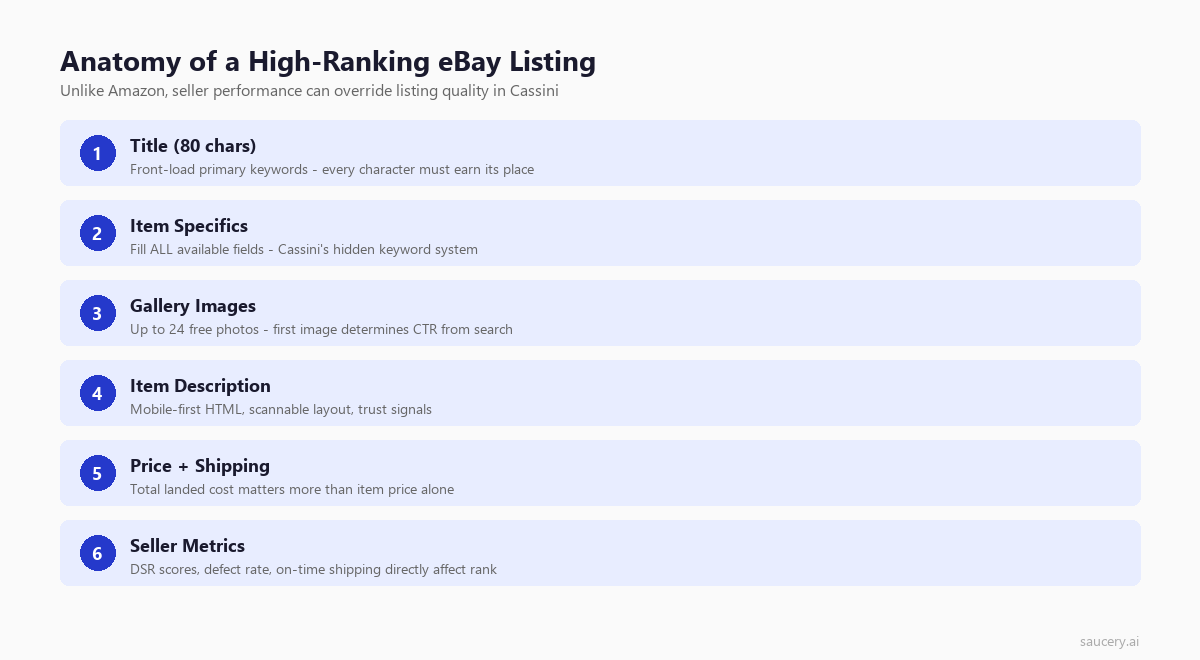
That constraint changes everything about how you optimise listings. Strong product differentiation becomes critical when you have so few characters to work with. On Amazon, you can stuff 250 characters into a backend search terms field and hope for the best (see our full Amazon listing optimisation guide for how to use them properly). On eBay, what the buyer sees is all you get. Your title, your item specifics, your seller metrics – they form the entire ranking equation.
eBay’s Cassini search engine processes over 250 million live listings at any given time. It decides which listings surface on page one and which disappear into the void. Understanding what shoppers actually read on product listings helps you prioritise the right elements. Understanding how Cassini evaluates your listings is the difference between consistent sales and paying listing fees for items nobody ever sees.
This guide covers the complete eBay listing optimisation process (part of our broader e-commerce listing optimisation series) – from the 80-character title through item specifics, images, pricing signals, and the seller performance metrics that can override everything else. Every recommendation is based on how Cassini actually works in 2026. You can test listing variations in 24 hours to validate which approach converts best, not outdated advice from the fixed-price era. For multi-marketplace sellers, our Walmart listing optimisation guide covers the third major platform.
How eBay’s Cassini Search Algorithm Works
Cassini replaced eBay’s original Best Match algorithm in 2013. Unlike Google, which indexes the entire internet and must infer relevance from thousands of signals, Cassini operates within a closed marketplace. For sellers managing pricing across channels, understanding markup vs margin is essential for maintaining profitability. It knows exactly what every seller offers, what every buyer searches for, and what happens after each transaction. Your unique selling proposition must be crystal clear to convert within this system.
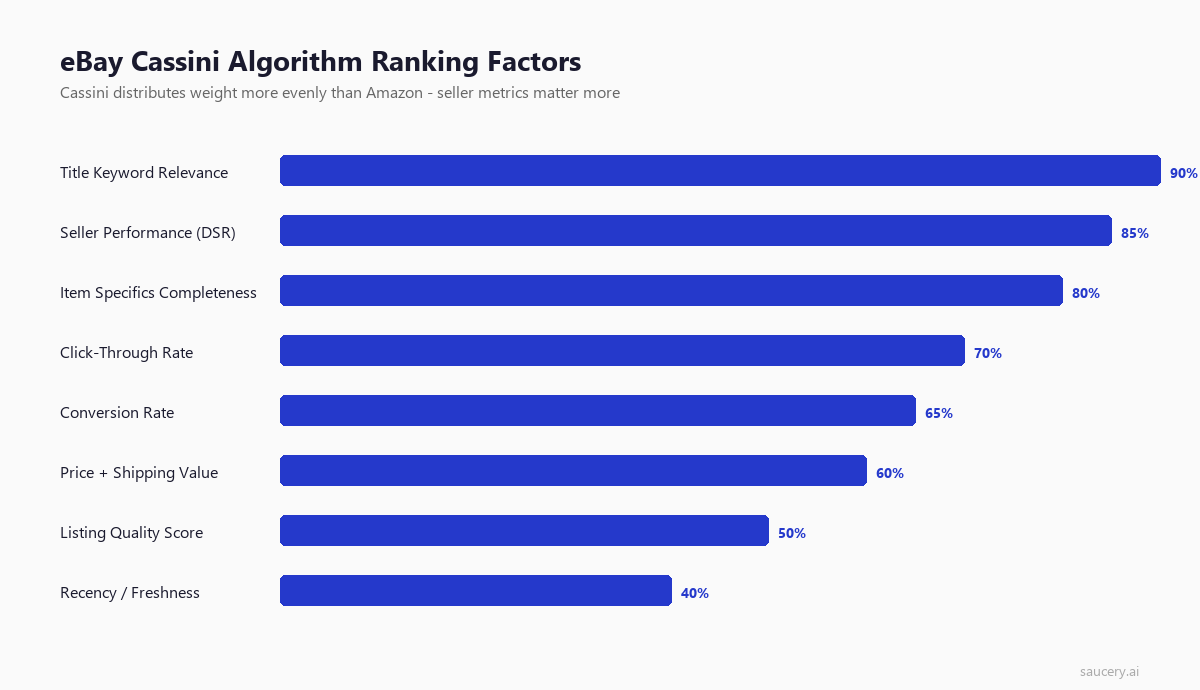
That closed loop gives Cassini access to data most search engines never see: actual purchase behaviour, return rates, shipping speeds, and buyer satisfaction scores. It uses all of it.
The Five Pillars of Cassini Ranking
Cassini evaluates listings across five primary dimensions. Unlike Amazon’s A9/A10 algorithm, where sales velocity dominates everything, eBay distributes weight more evenly – particularly toward seller performance.
1. Title Keyword Relevance
Cassini matches buyer search queries against your listing title using both exact match and phrase match logic. An exact match for the full search query ranks higher than a listing where those words appear scattered throughout the title. Word order matters.
If a buyer searches “Nike Air Max 90 black size 10,” a listing titled “Nike Air Max 90 Black Men’s Size 10 Running Shoes” will outrank “Size 10 Black Running Shoes Nike Air Max 90” – even though both contain identical keywords. The first listing matches the natural search phrase. Cassini interprets word proximity and sequence as relevance signals.
2. Item Specifics Completeness
This is where eBay diverges most significantly from Amazon. Item specifics function as eBay’s structured data layer – they determine whether your listing appears when buyers use sidebar filters. A listing missing “Brand” or “Size” item specifics will not appear when buyers filter by those attributes, regardless of how perfectly optimised your title is.
eBay has confirmed that item specifics completeness directly impacts search ranking, not just filter eligibility. Listings with all available specifics filled receive a ranking boost over those with gaps.
3. Seller Performance Metrics
eBay weights seller quality more heavily than any other major marketplace. Your defect rate, late shipment rate, cases closed without resolution, and tracking upload percentage all feed directly into Cassini’s ranking decisions. A Top Rated Seller listing will consistently outrank an identical listing from a below-standard seller.
This is fundamentally different from Amazon, where a new third-party seller with zero history can win the Buy Box on price alone. On eBay, you earn visibility through sustained performance.
4. Click-Through Rate and Engagement
Cassini monitors how buyers interact with search results. Listings that receive higher click-through rates from search results pages earn improved positioning over time. This creates a feedback loop: better titles and images generate more clicks, which generates better ranking, which generates more impressions.
Conversely, listings that appear in results but rarely get clicked will gradually sink. Cassini interprets low CTR as a relevance problem – the listing appeared for a query it does not actually satisfy.
5. Listing Quality Signals
Several additional factors contribute to Cassini’s ranking decisions:
- Free shipping – eBay has confirmed that free shipping listings receive preferential treatment in search results. The Seller Centre shipping guidelines explicitly state this.
- Return policy generosity – 30-day free returns rank higher than 14-day buyer-pays returns. eBay views generous return policies as buyer confidence signals.
- Competitive pricing – Cassini compares your price against similar listings. Significant overpricing relative to comparable items suppresses visibility.
- Listing format – Fixed-price (“Buy It Now”) listings generally rank above auction-format listings in Best Match results, unless the auction is ending soon.
Title Optimisation: Making Every Character Count
Your eBay title is a strict 80-character field. No exceptions, no workarounds, no subtitle tricks that influence search. Those 80 characters are your entire keyword real estate for Cassini’s primary matching algorithm.
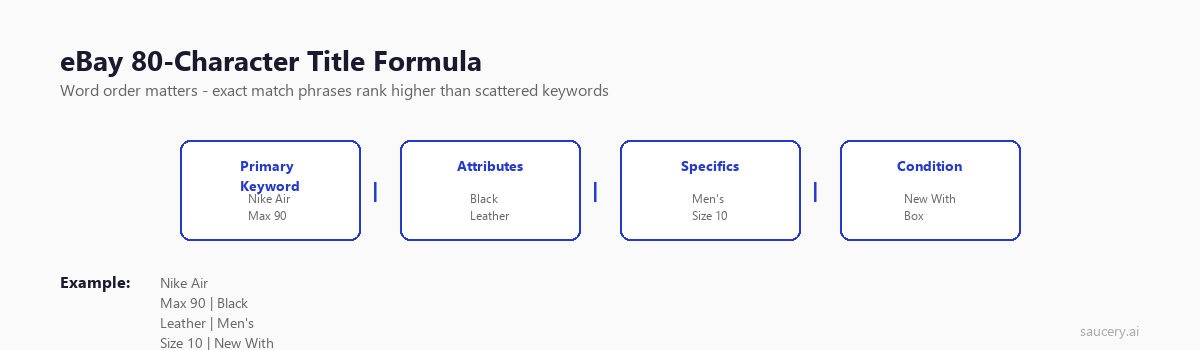
Compare this to Amazon’s 200-character title allowance plus 250 bytes of backend search terms. On eBay, you are working with roughly one-fifth of the keyword space. Precision replaces volume.
The Title Formula That Works
After analysing thousands of top-ranking eBay listings across categories, a consistent pattern emerges in high-performing titles:
Brand + Product Name + Key Attribute 1 + Key Attribute 2 + Key Attribute 3
The specific attributes depend on your category, but they typically include size, colour, material, model number, or condition. The formula prioritises the words buyers actually type into the search bar.
Front-Load Your Most Important Keywords
Cassini gives additional weight to words appearing at the beginning of your title. This makes intuitive sense – titles get truncated on mobile devices, and the first 40-50 characters are all most buyers see in search results.
Place your brand name and primary product identifier at the front. Supporting attributes come after. If a buyer searches “Sony WH-1000XM5,” your title should start with those exact words – not “Wireless Noise Cancelling Headphones Sony WH-1000XM5.”
Real Examples: Good vs Poor Titles
Let us look at concrete examples across different categories:
Electronics – Headphones:
- Poor (72 chars):
WOW!!! Amazing Headphones LOOK Sony Noise Cancel Wireless L@@K Brand New!!! - Good (78 chars):
Sony WH-1000XM5 Wireless Noise Cancelling Headphones Black - Brand New Sealed
The poor title wastes 20+ characters on filler words that Cassini ignores and buyers distrust. The good title uses every character for searchable, descriptive keywords.
Fashion – Trainers:
- Poor (64 chars):
BRAND NEW Nike Trainers Mens Running Shoes Gym Sports Sneakers - Good (79 chars):
Nike Air Max 90 Men's Running Trainers White Black UK Size 9 CN8490-100 New
The poor title stuffs generic keywords without specificity. No model name, no size, no colour, no style code. The good title includes the exact model, colour, size, and manufacturer style number – all terms that real buyers search for.
Home & Garden – Kitchen:
- Poor (55 chars):
Kitchen Knife Set Professional Chef Knives BEST QUALITY - Good (80 chars):
Wusthof Classic 8-Piece Knife Block Set German Steel - 1090170806 Brand New Box
Generic category terms like “kitchen knife set” face enormous competition. Specific brand and model terms match exact buyer intent with far less competition.
Title Mistakes That Kill Rankings
Avoid these common title errors that waste characters and can trigger Cassini penalties:
- Filler words – “WOW,” “LOOK,” “L@@K,” “BARGAIN,” “AMAZING,” “MUST SEE” consume characters while adding zero search value. Cassini does not index these as meaningful keywords.
- ALL CAPS – eBay’s listing policies explicitly discourage excessive capitalisation. While not always penalised, it signals low-quality listings to both Cassini and buyers.
- Keyword stuffing – Cramming unrelated keywords (“Nike Adidas Puma Reebok”) violates eBay policy and confuses Cassini’s relevance matching. Stick to terms that accurately describe your specific item.
- Special characters for attention – Stars (★), arrows (►), and Unicode symbols waste bytes and add no search value. Some may even cause rendering issues on certain devices.
- Not using all 80 characters – A 50-character title leaves 30 characters of keyword opportunity on the table. Use the full allocation.
Using eBay’s Terapeak for Title Research
eBay’s built-in Terapeak Product Research tool shows you exactly what terms successful listings use in their titles. Access it through Seller Hub > Research.
Search for your product category and sort by sold items. Study the titles of top-selling listings – these have already passed Cassini’s relevance tests. Look for patterns in word choice, attribute ordering, and which specific terms appear consistently across successful listings.
Item Specifics: eBay’s Hidden Keyword System
If title optimisation is where most sellers focus, item specifics are where the informed sellers gain their edge. Item specifics are eBay’s equivalent of Amazon’s backend search terms – except they are simultaneously visible to buyers AND used for search indexing.
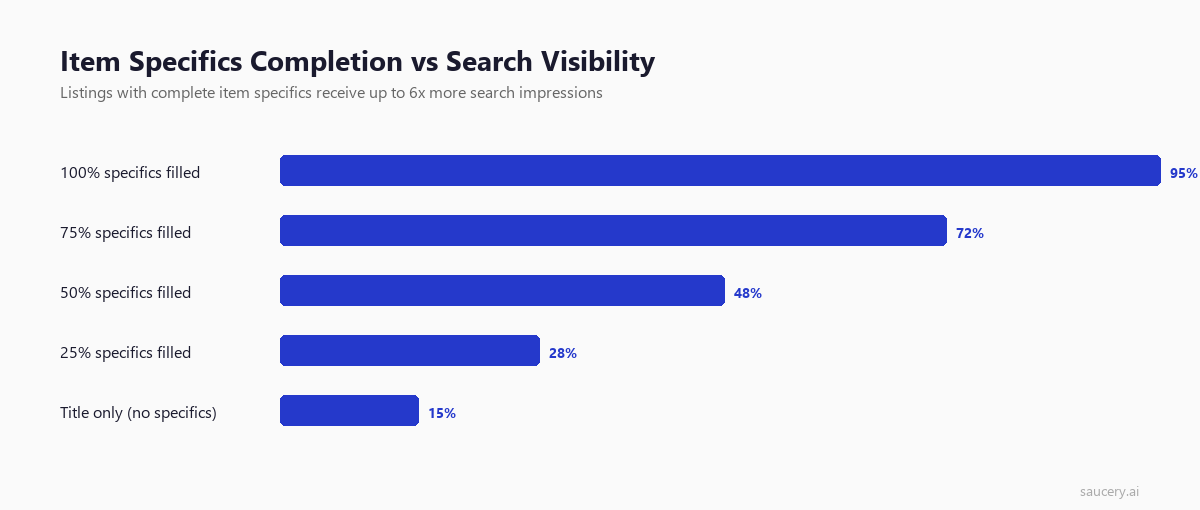
Every eBay category has a set of required and optional item specifics. Required specifics must be filled for the listing to go live. Optional specifics are where the opportunity lives – most sellers skip them, creating a clear ranking advantage for those who complete them.
Why Item Specifics Matter More Than You Think
Consider how buyers actually shop on eBay. A significant percentage use the left-hand sidebar filters to narrow results by brand, size, colour, condition, and category-specific attributes. Each filter corresponds to an item specific.
If your listing is missing the “Colour” item specific and a buyer filters for “Black,” your listing disappears from their results entirely. It does not matter if “Black” appears in your title. The filter operates on structured item specifics data, not free-text title content.
eBay’s own data indicates that listings with complete item specifics receive up to 12% more visibility in search results compared to listings with gaps. That is a substantial competitive advantage gained simply by filling in fields.
Category-Specific Item Specifics Examples
The available item specifics vary dramatically by category. Here are examples of what complete coverage looks like in common categories:
Electronics (Mobile Phones):
- Brand (required)
- Model (required)
- Storage Capacity
- Colour
- Network
- Operating System
- Screen Size
- RAM
- Processor
- Camera Resolution
- Battery Capacity
- SIM Card Slot
- Connectivity
A mobile phone listing with all 13+ specifics filled will outperform one with only the 2 required fields – because buyers filtering by “128GB” or “Unlocked” will only see the complete listing.
Fashion (Women’s Dresses):
- Brand (required)
- Size (required)
- Colour
- Material
- Style
- Neckline
- Sleeve Length
- Length
- Pattern
- Occasion
- Season
- Features
Home & Garden (Power Tools):
- Brand (required)
- Type (required)
- Power Source
- Voltage
- Model
- Chuck Size
- Speed
- Features
- Colour
- Bundle Listing
- Custom Bundle
Best Practices for Item Specifics
- Fill every single available field – Both required and optional. If eBay presents it, fill it. There is no penalty for completeness, only reward.
- Use eBay’s suggested values where possible – When eBay offers a dropdown with predefined values, use them. These are the exact values that power sidebar filters.
- Add custom item specifics – eBay allows you to add your own item specifics beyond the predefined list. Use these for additional keywords and attributes that buyers might search for.
- Match the exact category conventions – “UK 10” not “10” for sizes. “Black” not “Blk.” Use the full, standard terminology that matches how eBay structures its filters.
- Update when eBay adds new specifics – eBay regularly adds new item specific fields to categories. Review your listings quarterly and fill any newly available fields.
Description Best Practices
Here is what most eBay optimisation guides get wrong: the description has minimal impact on Cassini search ranking. Unlike Amazon, where A+ Content and description keywords influence search visibility, eBay’s Cassini algorithm primarily indexes titles and item specifics for search matching.
That does not make descriptions unimportant. They serve a different purpose – converting browsers into buyers and reducing post-sale issues.
What Your Description Should Accomplish
Your description should answer every question a buyer might have that would otherwise prevent them from purchasing:
- Exact specifications – Dimensions, weight, materials, compatibility details
- Condition details – For used items, be explicit about wear, defects, and functionality
- What is included – List every item in the package to prevent “item not as described” claims
- What is NOT included – Clarify if batteries, cables, or accessories are excluded
- Shipping information – Processing time, carrier, international availability
- Return policy details – Reinforce your return terms within the description
Mobile-First Formatting
Over 65% of eBay traffic comes from mobile devices. Your description must render correctly on small screens. Follow these formatting principles:
- Use eBay’s native description editor – Avoid pasting HTML from external editors. Complex HTML often breaks on mobile.
- Short paragraphs – 2-3 sentences maximum per paragraph. Wall-of-text descriptions are unreadable on mobile.
- Bullet points for specifications – Scannable lists outperform dense paragraphs for technical details.
- No external links or active content – eBay blocks JavaScript and restricts external links in descriptions. They also violate eBay policy.
- Minimal inline CSS – Keep formatting simple. Font size, basic alignment, bold for emphasis. Elaborate stylesheets break across devices.
- No background images or tables – These render unpredictably on mobile eBay apps.
What to Exclude From Descriptions
- Contact information or off-eBay communication requests (policy violation)
- Links to external websites (policy violation and ranking penalty)
- Irrelevant keywords stuffed for search purposes (ineffective and policy violation)
- Excessive branding or self-promotion that delays product information
- Stock photos if you have real product images
Image Optimisation: Leveraging eBay’s 24-Photo Allowance
eBay allows up to 24 images per listing – more than any other major marketplace. Amazon caps at 9, Etsy at 10. This generous allowance exists because eBay’s buyer base spans new-in-box to heavily used items, and images are the primary tool for communicating condition.
Yet most sellers use 3-4 images at most. The sellers ranking at the top of competitive categories consistently use 8-12+ images. More images mean longer time on listing, lower bounce rate, and higher conversion – all signals Cassini monitors.
Image Requirements and Best Practices
Main image (Gallery photo):
- White or light neutral background
- Product fills 80%+ of the frame
- Minimum 500px on the longest side (eBay requires), but aim for 1600px+ to enable zoom functionality
- No watermarks, logos, or text overlays (eBay policy and they look unprofessional)
- No borders or frames
- Sharp focus, even lighting, accurate colour representation
Your main image is what buyers see in search results. It directly determines your click-through rate. A professional, clean main image on white background consistently outperforms lifestyle shots or cluttered backgrounds for search CTR.
Supporting images (aim for 6-12 minimum):
- Multiple angles (front, back, sides, top, bottom)
- Close-ups of important details, labels, or serial numbers
- Scale reference (item next to a common object or with measurements visible)
- Packaging and included accessories
- For used items: clear photos of any wear, defects, or damage
- Context/lifestyle shots showing the product in use
- Label or tag shots for authenticity (especially fashion and electronics)
How Images Impact Ranking
Images influence Cassini ranking through indirect signals rather than direct indexing:
- Click-through rate – Better main images generate more clicks from search results
- Conversion rate – More comprehensive image sets reduce buyer uncertainty and increase purchase probability
- Return rate – Detailed condition photography reduces “item not as described” returns, improving seller metrics
- Time on listing – Multiple images keep buyers engaged longer, signalling quality to Cassini
eBay’s photo guidelines confirm that high-quality images improve both search ranking and conversion rates. The recommendation is to use as many of the 24 available photo slots as practical.
Seller Performance Metrics and Search Ranking
This is where eBay’s ranking system differs most dramatically from Amazon. On Amazon, a new seller with zero feedback can win the Buy Box immediately if their price is competitive and they use FBA. On eBay, seller history and performance metrics carry substantial weight in Cassini’s ranking decisions.
eBay publicly discloses the metrics it tracks through its Seller Performance Standards page. Understanding these metrics is essential because they function as a persistent ranking modifier – a tax or bonus applied to every listing you create.
The Metrics That Matter
Transaction Defect Rate:
This measures the percentage of transactions with significant problems – cases closed without seller resolution, “item not as described” claims upheld, or cancelled transactions where the seller was at fault. eBay’s threshold for Top Rated status is a defect rate below 0.5%. Sellers above 2% face search visibility restrictions.
Late Shipment Rate:
The percentage of orders shipped after the stated handling time. Top Rated requires less than 3% late shipments. Consistently late shipping not only harms ranking but can lead to listing restrictions.
Tracking Upload Rate:
eBay expects tracking to be uploaded and validated for the vast majority of transactions. While the exact percentage required varies by category and volume, Top Rated Sellers typically maintain 95%+ tracking upload rates. Tracking also protects sellers against “item not received” claims.
“Item Not As Described” Rate:
This tracks how often buyers open cases claiming the item differs from the listing description. High INAD rates signal listing quality problems to Cassini. Detailed descriptions and comprehensive images are your primary defence against INAD claims.
Seller Levels and Their Ranking Impact
eBay categorises sellers into three performance tiers, each with distinct search visibility implications:
Top Rated Seller:
- Search ranking boost across all listings
- Top Rated Plus badge (when offering 1-day handling + free 30-day returns)
- Additional 10% final value fee discount with Top Rated Plus
- Priority in Best Match search results
- Higher buyer trust and click-through rates
Above Standard:
- Neutral ranking treatment – no boost, no penalty
- Standard search visibility
- Full access to all selling features
Below Standard:
- Active search ranking penalty – listings pushed down in results
- Possible listing restrictions and selling limits
- Reduced visibility in Best Match
- Potential account restrictions if not improved
How to Improve Seller Metrics
- Ship same day or next business day – Set 1-day handling time and actually meet it. Use shipping automation if necessary.
- Always upload tracking – No exceptions. Even for Royal Mail without tracking, purchase the tracked service. The ranking benefit outweighs the cost difference.
- Write accurate descriptions – INAD claims come from description gaps. Over-describe, over-photograph, under-promise on condition.
- Respond to buyer messages within 24 hours – Response time affects seller metrics and resolves issues before they become formal cases.
- Offer free returns where commercially viable – eBay rewards generous return policies. If your margins support it, free returns improve both ranking and conversion.
Want to know which version of your listing will perform best?
Pricing Strategy and Cassini
Cassini does not simply rank the cheapest listings first – that would make eBay a race to the bottom. Instead, it evaluates pricing within context: Is your listing competitively priced relative to similar items currently available? Are you significantly above or below market rate?
Significant overpricing relative to comparable listings suppresses search visibility. Cassini interprets this as a listing that will not satisfy buyer intent – why show a buyer a listing priced 40% above alternatives?
Conversely, dramatic underpricing can also trigger buyer suspicion (especially for branded goods) and may signal counterfeit risk to eBay’s systems. Price within the competitive range for genuine items in your condition.
Free Shipping vs Calculated Shipping
eBay has openly stated that listings with free shipping receive preferential treatment in Cassini search results. The rationale is straightforward: buyers overwhelmingly prefer free shipping, and eBay wants to surface listings that satisfy buyer preferences.
For most items, building shipping cost into your item price and offering “free” shipping will outperform listing at a lower price with separate shipping charges. The search visibility boost from free shipping typically more than compensates for any price perception disadvantage.
The exception is heavy, bulky items where shipping costs are genuinely high and variable by location. For these, eBay’s calculated shipping option is more appropriate – buyers understand that a 50kg item incurs real delivery costs.
Understanding product pricing strategy fundamentals helps you determine the right balance between competitive pricing and margin preservation across your eBay catalogue.
Promoted Listings: Paid Visibility on eBay
eBay’s Promoted Listings programme allows sellers to pay for enhanced visibility in search results. Unlike Amazon’s PPC (pay-per-click) model, eBay’s standard promoted listings use a cost-per-sale model – you only pay when the promoted listing results in a purchase.
Promoted Listings Standard
The standard programme works on a percentage-of-sale basis. You set an ad rate (typically 2-15% of the final sale price), and your listing receives boosted placement in search results. You only pay the percentage if a buyer clicks your promoted listing and completes a purchase within 30 days.
Key characteristics:
- Cost model: Cost-per-sale (you pay nothing if the item does not sell from the promoted click)
- Ad rate range: Typically 2-15% of sale price
- Suggested rate: eBay provides suggested rates based on category competition
- Placement: Listings appear with a “Sponsored” label in search results, category browse, and product pages
- Attribution window: 30 days from click
Promoted Listings Advanced
eBay also offers an Advanced programme that operates on a cost-per-click (CPC) model, similar to Amazon Sponsored Products. Key differences from Standard:
- Cost model: Pay per click regardless of whether a sale occurs
- Targeting: Keyword-level targeting available
- Placement: Top of search results (above organic listings)
- Budget: Daily budget controls available
- Availability: Currently limited to select sellers and categories
When Promoted Listings Make Sense
Promoted Listings Standard is generally worthwhile when:
- Your margins can absorb 2-8% advertising cost while remaining profitable
- You are in a competitive category where organic ranking is difficult to achieve quickly
- You are launching new listings that lack sales history (Cassini favours listings with proven conversion)
- You have seasonal inventory that must sell within a specific timeframe
- Your category has high average selling prices (the percentage model favours higher-value items)
Promoted Listings are less effective when:
- Your margins are already thin (adding 5-10% advertising cost makes the listing unprofitable)
- You already rank well organically (you would be paying for visibility you already have)
- The category has very low competition (organic ranking is easy to achieve)
- Your listing has quality issues – promoting a poorly optimised listing amplifies its weaknesses
Always optimise your listing fully before promoting it. Promoted Listings amplify existing listing quality – they cannot compensate for poor titles, missing item specifics, or weak images.
Key Differences Between eBay and Amazon Listing Optimisation
If you sell on both platforms – or are considering expanding from one to the other – understanding the fundamental differences prevents you from applying Amazon tactics to eBay (or vice versa). They are architecturally different marketplaces with different search philosophies.
For a broader view of listing optimisation principles that apply across all platforms, see our complete e-commerce listing optimisation guide.
| Factor | eBay | Amazon |
|---|---|---|
| Title length | 80 characters (strict) | 200 characters |
| Backend keywords | None | 250 bytes search terms field |
| Product pages | Separate listing per seller | Shared product page (Buy Box) |
| Item specifics/attributes | Critical for search + filters | Important but less weight than on eBay |
| Description SEO value | Minimal search impact | Moderate search impact |
| Seller metrics weight | High – direct ranking factor | Moderate – mainly affects Buy Box eligibility |
| Images allowed | Up to 24 | Up to 9 (7 for some categories) |
| Advertising model | Cost-per-sale (Standard) + CPC (Advanced) | CPC (Sponsored Products/Brands/Display) |
| Sales velocity weight | Moderate | Very high – dominant ranking signal |
| New listing handling | Temporary boost for new listings | No inherent new listing advantage |
The Unique Selling Proposition Challenge on eBay
Because each eBay seller has their own listing (no shared Buy Box), your unique selling proposition matters differently than on Amazon. On Amazon, you compete on price and fulfilment within a shared product page. On eBay, you compete on the entire listing experience – title quality, image professionalism, description completeness, and seller reputation.
This means two sellers offering identical products will perform very differently based on listing quality alone. The seller with better images, more complete item specifics, and superior seller metrics will consistently outrank and outsell – even at a slightly higher price point.
Advanced eBay SEO Tactics
Listing Duration and Renewal Strategy
eBay offers Good ‘Til Cancelled (GTC) listings and fixed-duration options. GTC listings renew automatically every 30 days. Each renewal generates a minor freshness signal in Cassini, though this is a minor factor compared to relevance and performance.
More importantly, older listings with proven sales history accumulate ranking strength over time. A listing that has sold 50 units carries more weight than a freshly created listing for the same product. Do not delete and recreate listings – you lose accumulated sales history and reviews.
Multi-Variation Listings
For products available in multiple sizes, colours, or configurations, multi-variation listings consolidate ranking signals. Instead of creating 10 separate listings for 10 sizes, a single multi-variation listing accumulates all sales, views, and positive feedback into one entity.
Benefits include:
- Combined sales history strengthens ranking for all variations
- Single listing with multiple options appears more professional to buyers
- Reduced listing fees compared to separate listings
- Item specifics can cover all variation attributes
Category Selection
Listing in the correct category is fundamental but often overlooked. Cassini limits results to the category a buyer is browsing (when they navigate rather than search). Incorrect categorisation means your listing never appears for category browsers.
When in doubt, search eBay for similar products and note which categories top-performing competitors use. eBay also allows a second category for an additional fee – useful for items that legitimately fit multiple categories.
International Visibility
eBay’s Global Shipping Programme (GSP) and international shipping settings affect search visibility on other eBay sites. A UK listing offering international shipping can appear on eBay.com, eBay.de, and eBay.com.au search results. Enabling international shipping expands your potential audience without creating separate listings.
However, ensure your pricing accounts for the delivered cost international buyers will see. A seemingly competitive UK price can appear expensive to US buyers once eBay adds the GSP shipping estimate.
Want to know which version of your listing will perform best?
Common eBay Listing Mistakes and How to Fix Them
After auditing hundreds of eBay listings across categories, these are the most frequent optimisation failures – ranked by impact on search visibility:
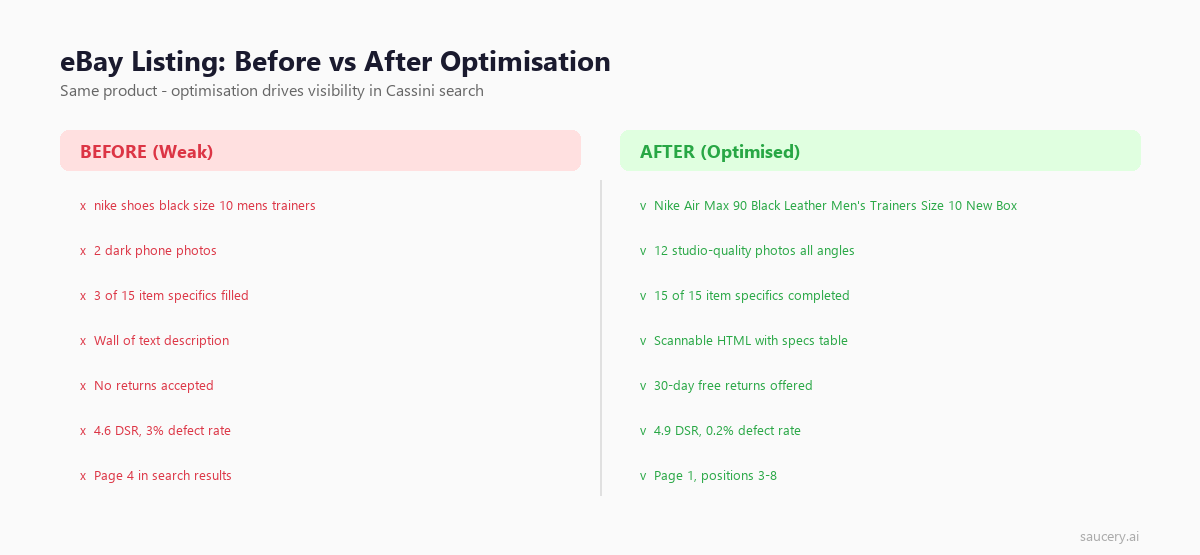
1. Incomplete Item Specifics
The problem: Sellers fill only required specifics and ignore optional fields, missing filter-based traffic entirely.
The fix: Audit every listing. Open the item specifics section in the listing editor and fill every available field. Set a quarterly reminder to check for newly added specifics in your categories.
2. Generic Titles Without Specific Attributes
The problem: Titles like “Men’s Trainers Running Shoes Sports Gym” that lack brand, model, size, or colour.
The fix: Include the specific product identity. Brand + model + distinguishing attributes. Study what successful competitors include in their titles using Terapeak.
3. Poor Main Image
The problem: Dark photos, cluttered backgrounds, low resolution, or stock images that do not match the actual item.
The fix: Invest in a lightbox or white background setup. Use natural lighting or a consistent artificial lighting setup. Minimum 1600px on the longest side. Photograph the actual item you are selling.
4. Ignoring Seller Metrics
The problem: Sellers focus entirely on listing optimisation while their defect rate and late shipping rate suppress all their listings.
The fix: Check your Seller Hub performance dashboard weekly. Address every case promptly. Ship on time, every time. Upload tracking immediately. One unresolved case can impact hundreds of listings.
5. Not Offering Free Shipping
The problem: Listing at a low item price with high shipping, thinking buyers focus on item price alone.
The fix: For items where shipping cost is predictable and moderate, build it into the item price and offer free shipping. The Cassini boost from free shipping typically outweighs any price perception disadvantage.
eBay Listing Optimisation Checklist
Use this checklist for every new listing and when auditing existing listings:
Title (80 characters):
- Brand name included and front-loaded
- Specific model/product name included
- Key attributes (size, colour, material) included
- All 80 characters used (or close to it)
- No filler words, ALL CAPS, or special characters
- Primary search keyword appears at the beginning
Item Specifics:
- All required specifics completed
- All optional specifics completed
- Custom specifics added where relevant
- Values match eBay’s standard terminology
Images:
- Main image on white background, 1600px+
- Minimum 6 images (aim for 8-12)
- Multiple angles covered
- Close-up details included
- Scale reference provided
- All accessories/included items photographed
Description:
- Key specifications clearly listed
- Condition accurately described
- What is included/excluded stated explicitly
- Mobile-friendly formatting
- No external links or active content
Listing Settings:
- Free shipping enabled (where commercially viable)
- 30-day returns offered (free returns if margins allow)
- Correct category selected
- Competitive pricing within market range
- International shipping enabled (if applicable)
Seller Performance:
- Defect rate below 0.5%
- Late shipment rate below 3%
- Tracking uploaded for all orders
- Buyer messages answered within 24 hours
- Top Rated Seller status maintained
Frequently Asked Questions
How long does it take for eBay listing optimisation changes to affect ranking?
Title and item specifics changes typically take effect within 24-48 hours as Cassini re-indexes the listing. Seller metric changes are evaluated on a rolling basis – eBay updates seller levels monthly, but the underlying metrics feed into ranking continuously. You should see the full impact of optimisation changes within 1-2 weeks, assuming your changes improve click-through and conversion rates.
Does eBay’s subtitle help with search ranking?
No. eBay charges extra for subtitles, but they are not indexed by Cassini’s search algorithm. Subtitles appear in search results and can improve click-through rate (an indirect ranking factor), but they do not add keyword coverage. Only use subtitles if the CTR improvement justifies the additional listing cost – and even then, most sellers find better ROI from other investments.
Should I use auction or fixed-price format for best search visibility?
Fixed-price (Buy It Now) listings generally rank higher in Cassini’s Best Match results. The exception is auctions nearing their end time, which receive a temporary boost. For consistent, long-term search visibility, fixed-price with Good ‘Til Cancelled duration is optimal. Auctions are best reserved for unique, one-of-a-kind items where market price is genuinely uncertain.
How many item specifics should I fill in?
All of them. Every single required and optional item specific that eBay presents for your category should be completed. There is no penalty for filling too many specifics, but clear ranking and filter-visibility penalties for leaving them empty. If eBay allows you to add custom item specifics beyond the predefined list, use those as well for additional relevant attributes.
Does eBay give new listings a ranking boost?
Yes, eBay provides a temporary visibility boost to new listings – often referred to as the “new listing bump.” This typically lasts 1-3 days and gives Cassini initial data on how buyers interact with the listing. Use this window to ensure your listing is fully optimised before publishing – you want to maximise clicks and conversions during the boost period, as that initial performance data influences long-term ranking.
Can I copy my Amazon listing titles directly to eBay?
No. Amazon allows 200 characters; eBay allows 80. Directly copying will either get truncated or fail entirely. More importantly, the optimisation strategy differs. Amazon titles often include keywords that would go in eBay’s item specifics instead. You need to condense your title to the essential search-matching terms (brand, model, key attributes) and move everything else into item specifics.
How does eBay’s Best Match algorithm handle price?
Cassini does not simply rank cheapest first. It evaluates price competitiveness within context – comparing your listing against similar items in the same condition. Significant overpricing suppresses visibility, while competitive pricing improves it. However, price is just one factor among many. A higher-priced listing with superior seller metrics, better images, and complete item specifics can absolutely outrank a cheaper listing with poor optimisation.
Making Data-Driven Listing Decisions
The difference between eBay sellers who grow consistently and those who plateau often comes down to one thing: testing before committing. Whether it is choosing between product claims, deciding how to position a new SKU, or determining which features to emphasise in those critical 80 title characters – the sellers who test outperform those who guess.
Every listing decision is ultimately a hypothesis about what buyers want. Your title assumes certain keywords match buyer intent. Your images assume certain angles and details matter. Your pricing assumes a specific value perception. When those assumptions are wrong, you lose visibility, clicks, and sales – and on eBay, poor conversion feeds back into lower ranking through Cassini’s engagement signals.
Same Product. Better Listing. More Sales.
Find out which version of your product listing converts best – before you publish.
Subscribe for F&B Consumer Insights
Data-driven insights on food & beverage consumer preferences, straight to your inbox.