Your Amazon listing has roughly 3 seconds to convert a browsing shopper into a buyer. Research on what shoppers actually read on product listings confirms this narrow attention window. Here’s what the data says about which elements actually matter.
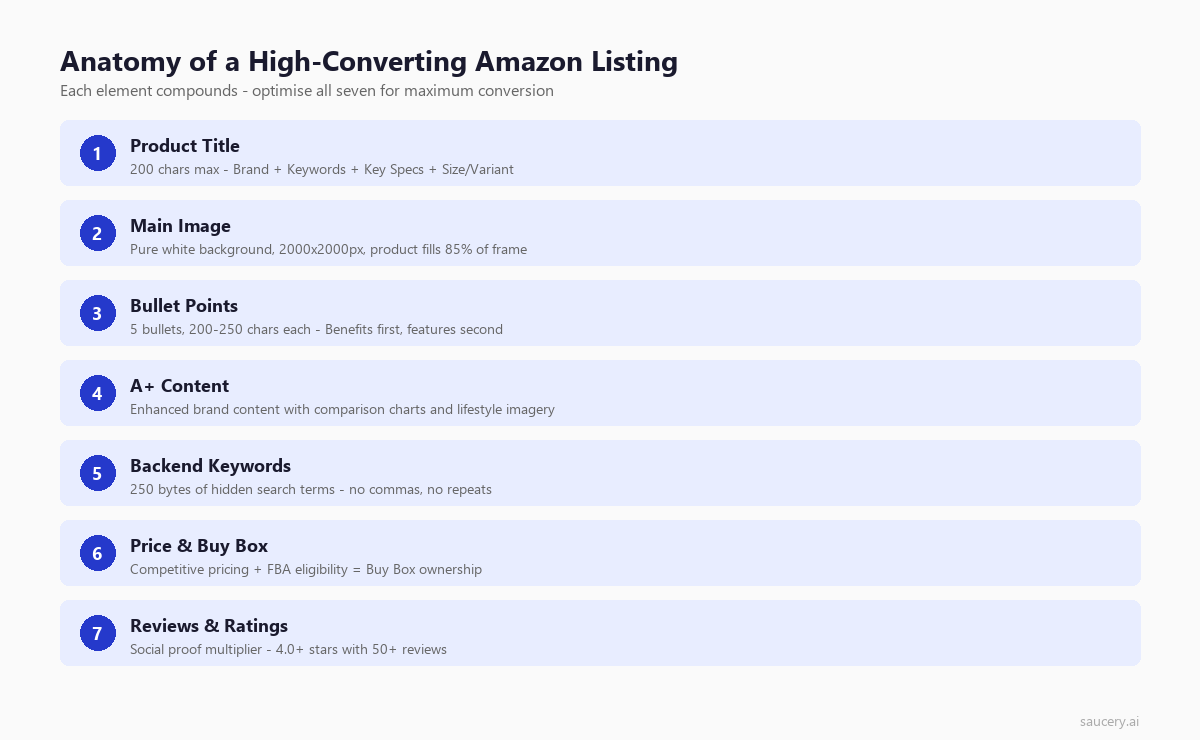
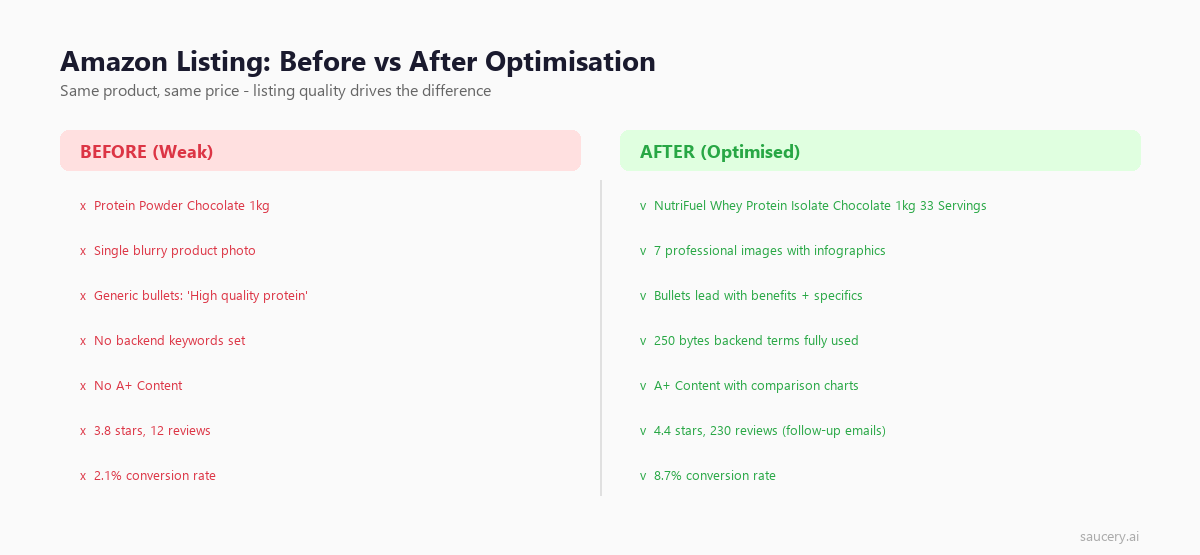
I’ve analysed thousands of Amazon listings across food, beverage, health, and household categories. The gap between top performers and average sellers isn’t budget or brand recognition – it’s listing quality and product differentiation. A well-optimised listing consistently outperforms a poorly optimised one by 3-5x on conversion rate, and Amazon bullet points are often the biggest lever, regardless of review count or advertising spend. Many of these principles translate to Walmart listing optimisation as well.
This guide breaks down every element of an Amazon product listing (for eBay sellers, see our eBay listing optimisation guide) – titles, bullet points, backend keywords, images, A+ Content, and pricing – with specific, actionable recommendations backed by data. Whether you’re launching your first product or optimising an existing catalogue, these principles apply. They also align with broader e-commerce listing optimisation best practices.
How Amazon’s A9/A10 Algorithm Ranks Listings in 2026
Before optimising individual elements, you need to understand what Amazon’s algorithm actually rewards. The algorithm (originally called A9, now commonly referred to as A10 after significant updates) determines which products appear for any given search query and in what order.
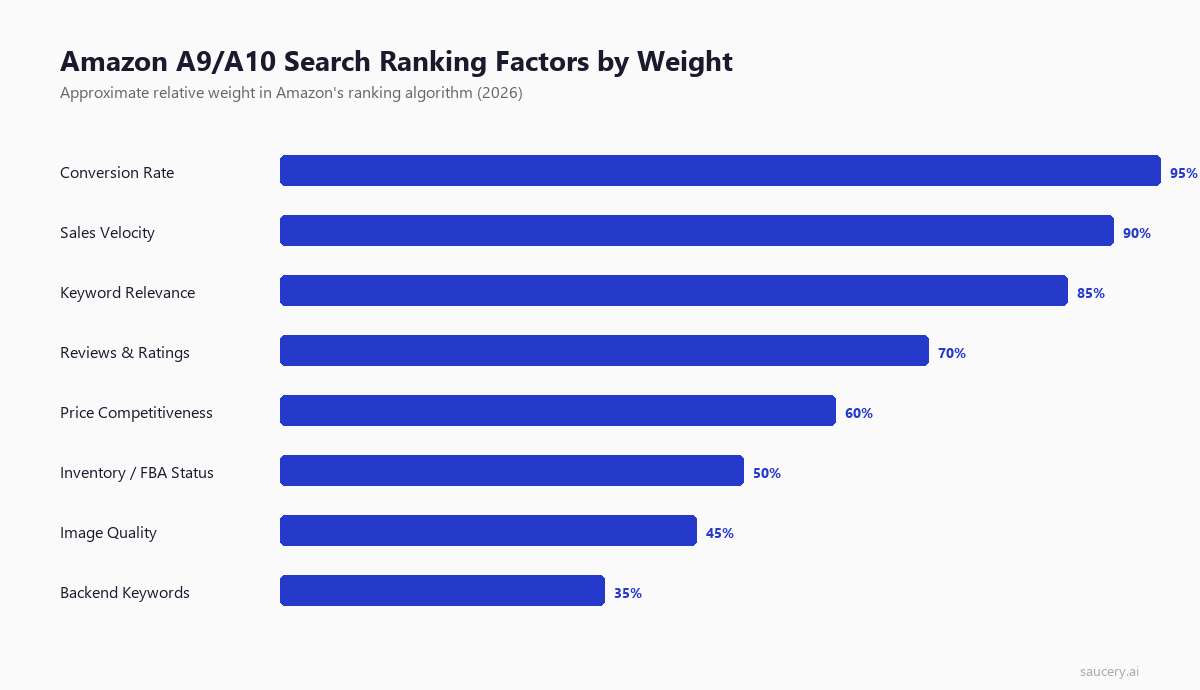
Amazon’s core ranking factors, in approximate order of weight:
1. Keyword Relevance
The product must contain the search term somewhere in its listing – title, bullets, backend keywords, or description. Amazon does not rank products for terms they don’t include. This is binary: you’re either eligible for a keyword or you’re not. Title keywords carry the most weight, followed by bullet points, then backend search terms. For a deep dive on product title optimisation principles that apply across all marketplaces, see our dedicated guide.
2. Conversion Rate (Unit Session Percentage)
Amazon tracks what percentage of visitors to your listing actually purchase. Higher conversion rate signals to the algorithm that your product satisfies shopper intent. This is where listing quality directly impacts ranking – better images, clearer benefits, and stronger social proof all lift conversion rate. Your unique selling proposition should be immediately visible in every element, which lifts organic rank.
3. Sales Velocity
Total units sold per time period matters. Amazon wants to show products that sell because Amazon makes money on transactions. This creates a flywheel: more sales lead to higher rank, which leads to more visibility, which leads to more sales. Breaking into this flywheel is the central challenge for new products. You can test product listing variations in 24 hours before committing to a final version.
4. Reviews and Ratings
Both quantity and quality matter. A product with 500 reviews at 4.3 stars generally outranks one with 50 reviews at 4.8 stars. However, dropping below 4.0 stars creates a significant ranking penalty. Amazon’s algorithm increasingly weights recent review velocity over total count – a product gaining 10 reviews per week outperforms one with more total reviews but slower accumulation.
5. Pricing Competitiveness
Amazon monitors your price relative to competitors and relative to your own pricing history. Dramatic price increases can trigger suppression. Being competitively priced (not necessarily cheapest) within your category contributes to ranking.
6. Fulfilment Method (FBA Preference)
Fulfilment by Amazon (FBA) products receive a ranking boost over merchant-fulfilled listings. This advantage has narrowed slightly in 2025-2026 as Amazon expanded Seller Fulfilled Prime, but FBA remains the default recommendation for competitive categories.
What Changed in 2025-2026
Several meaningful shifts have occurred in Amazon’s algorithm behaviour:
- External traffic signals now carry more weight. Products receiving traffic from Google, social media, and email marketing see ranking boosts that didn’t exist pre-2024. Amazon rewards sellers who bring their own customers to the platform.
- Listing completeness scoring has become more aggressive. Amazon now actively suppresses listings missing key attributes (material, size, target demographic) from search results in affected categories.
- AI-generated content detection is live. Amazon’s systems can identify purely AI-written listings and may apply quality penalties. Human-edited, brand-voice content performs better in ranking tests.
- Video in search results has expanded. Listings with video content receive preferential placement in mobile search results, where over 60% of Amazon shopping now occurs.
- Review authenticity algorithms have tightened. Incentivised reviews are detected and removed faster. Organic review velocity is weighted more heavily than ever.
The fundamental principle hasn’t changed: Amazon ranks products that make Amazon money. Every optimisation should ultimately serve conversion rate and sales velocity.
Title Optimisation: The Most Important Element
Your title is the single highest-impact element of your Amazon listing. It’s the primary factor for keyword relevance, the first thing shoppers read in search results, and the element with the most direct influence on click-through rate.
Here’s what most sellers get wrong: they either stuff keywords until the title is unreadable, or they write brand-focused titles that ignore search behaviour entirely. The best titles balance discoverability with readability.
Character Limits That Actually Matter
Amazon allows up to 200 characters in most categories, but the visible portion varies dramatically by device:
- Desktop search results: ~115-130 characters visible
- Mobile search results: ~60-80 characters visible
- Mobile app: ~55-70 characters visible
- Sponsored ad placements: ~50-65 characters visible
The practical implication: your first 80 characters must contain your primary keyword, your key differentiator, and enough information for a shopper to decide whether to click. Everything after 80 characters is bonus keyword real estate that most shoppers never see.
The Optimal Title Structure
After testing hundreds of title variations, this structure consistently performs:
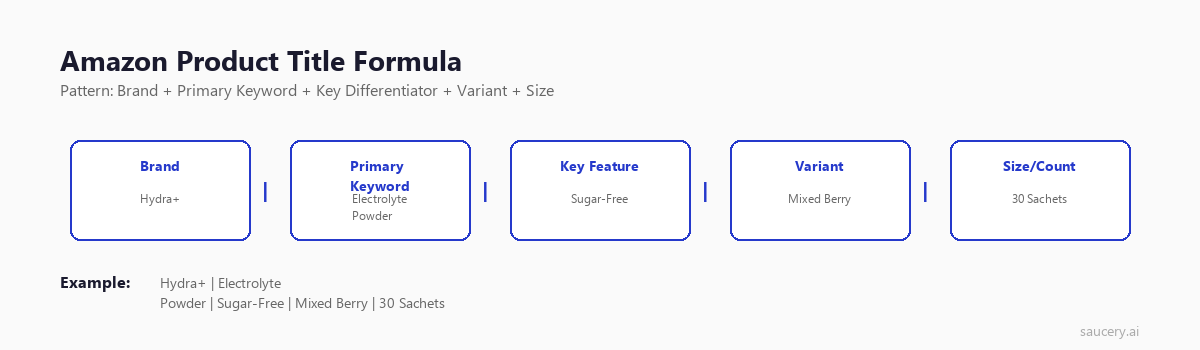
Brand + Primary Keyword/Product Type + Key Differentiator + Size/Quantity/Variant
This structure works because it front-loads the most important information where shoppers actually see it, while maintaining readability.
Real Examples: Good vs Bad Titles
Bad title (keyword-stuffed):
“Protein Bars High Protein Snack Bars Protein Bar Box Meal Replacement Bars Whey Protein Low Sugar Low Carb Protein Bars for Men Women Gym Fitness 12 Pack Chocolate Flavour”
This repeats “protein bars” four times, reads like a keyword dump, and buries the actual product details. Amazon’s algorithm now penalises this approach.
Good title:
“Grenade Carb Killa High Protein Bar – 20g Protein, Low Sugar – Chocolate Chip Cookie Dough, 12 x 60g Bars”
Brand first, product type clear, key specifications (20g protein, low sugar) front-loaded, flavour and quantity at end. A shopper knows exactly what this is within the first 60 characters.
Bad title (brand-obsessed):
“NutriBlast Pro Premium Collection – Our Signature Range – Crafted With Care Since 2019”
Contains zero information about what the product actually is. Zero searchable keywords. This listing will never rank for anything a customer would search.
Good title:
“NutriBlast Electrolyte Powder – Sugar-Free Hydration Mix with Magnesium, Potassium, Zinc – Tropical Mango, 30 Servings”
Brand included but not dominant. Product type immediately clear. Key ingredients listed. Flavour and quantity provide the detail needed for purchase decision.
Title Optimisation Rules
Include:
- Brand name (required by Amazon)
- Product type using the exact words shoppers search
- Key differentiator (what makes this different from competitors)
- Quantifiable specifications (grams, count, servings, millilitres)
- Size, quantity, or variant information
- Flavour or scent if applicable
Avoid:
- Promotional language (“Best Seller”, “Top Rated”, “Amazing”)
- ALL CAPS (violates Amazon guidelines and looks spammy)
- Special characters or emojis
- Repeating keywords (once is enough – the algorithm has counted it)
- Subjective claims (“Delicious”, “Premium Quality”)
- Price information in the title
- Competitor brand names
Bullet Points That Convert Browsers into Buyers
Bullet points are where you sell. If the title gets the click, bullets get the conversion. Amazon gives you 5 bullet points (10 if you’re a vendor), each with a recommended maximum of approximately 200 characters. Some categories allow up to 500 characters per bullet, but shorter bullets consistently outperform walls of text.
The data is clear on structure: lead with the benefit, follow with the feature. Shoppers don’t buy features – they buy outcomes. But they need features to justify the purchase rationally.
The Benefit-Feature Formula
Each bullet should follow this pattern:
[BENEFIT IN CAPS] – Supporting detail with specific feature
Example for a protein bar:
- FUEL YOUR WORKOUT – 20g whey protein per 60g bar supports muscle recovery after training. Each bar delivers a complete amino acid profile with 2.5g leucine.
- SATISFYING WITHOUT THE SUGAR CRASH – Only 1.5g sugar per bar with 13g fibre keeps you full for 3-4 hours. No artificial sweeteners – sweetened with stevia and erythritol.
Specificity Wins: The Data on Concrete Claims
One finding from our listing optimisation research stands out consistently: specific, quantified claims dramatically outperform vague ones.
In direct testing, “11g Protein Per Bar” beats “High Protein” by 12% on purchase intent. “Lasts 8 Hours on a Single Charge” beats “Long Battery Life” by 15%. “Made from 95% Recycled Ocean Plastic” beats “Eco-Friendly Materials” by 18%.
The pattern is universal: whenever you can replace an adjective with a number, do it. Numbers are credible. Adjectives are marketing noise that shoppers have learned to ignore.
Bullet Point Strategy by Position
Bullet 1: Your primary benefit and unique selling proposition. This is the one bullet most mobile shoppers will read. Make it count. See our guide on defining your unique selling proposition for how to identify what goes here.
Bullet 2: Secondary benefit that addresses the most common purchase concern (taste, durability, ease of use, safety).
Bullet 3: Social proof or credibility (certifications, awards, testing data, “trusted by X customers”).
Bullet 4: Use case or occasion (when/how to use the product, who it’s for).
Bullet 5: Risk reversal or guarantee information. Reduce purchase anxiety.
Common Bullet Point Mistakes
- Starting with features instead of benefits. “Contains vitamin B12” means nothing to most shoppers. “ENERGY THAT LASTS ALL DAY – packed with vitamin B12 for sustained natural energy” connects the feature to their life.
- Writing paragraphs. If your bullet requires scrolling on mobile, it’s too long. Maximum 250 characters including the benefit header.
- Copying manufacturer descriptions. Generic copy that appears on 50 other listings won’t differentiate you. Rewrite in your brand voice with your specific claims.
- Ignoring keyword placement. Bullets contribute to keyword indexing. Include relevant secondary keywords naturally, but never sacrifice readability for keyword insertion.
Backend Keywords: The Hidden 250 Bytes
Backend search terms are invisible to shoppers but indexed by Amazon’s algorithm. You get 250 bytes (not characters – bytes matter for languages with multi-byte characters) to include keywords that don’t fit naturally in your visible listing content.
This is where most sellers either waste space or miss opportunities entirely.
Backend Keyword Rules
- Space-separated, no commas. Commas waste bytes without adding functionality. “protein bar snack” is three keywords. “protein, bar, snack” is the same three keywords but with wasted bytes on commas.
- No repetition. If a word appears in your title or bullets, don’t repeat it in backend keywords. Amazon already indexes it. Repetition doesn’t increase relevance – it only wastes your 250 bytes.
- No brand name. Your brand is already in the title. Including it again wastes space.
- No ASINs or competitor brands. Amazon explicitly prohibits competitor brand names in backend keywords and may suppress your listing.
- Include misspellings. “protien” “protine” “protean” – real shoppers misspell words. If you have bytes remaining, common misspellings of your primary keywords capture traffic others miss.
- Include synonyms. “Flashlight” and “torch” mean the same thing. “Biscuit” and “cookie” depend on market. Include alternate terms your audience uses.
- Include alternate language terms. In US markets, Spanish-language terms for your product capture a meaningful audience segment. “Barras de proteina” costs only a few bytes but indexes you for millions of bilingual shoppers.
- Lowercase only. Amazon’s backend search is case-insensitive. Capitals waste no bytes but add no value either. Stick to lowercase for clarity.
Common Mistakes That Waste Backend Space
Mistake 1: Repeating title words. If your title says “Organic Dark Chocolate Protein Bar” you don’t need “organic” “dark” “chocolate” “protein” or “bar” in backend keywords. That’s 35 bytes wasted on already-indexed terms.
Mistake 2: Using phrases instead of individual words. Amazon indexes individual words and combines them. You don’t need “protein bar for women” as a phrase – if “protein” “bar” “for” and “women” are each present somewhere in your listing, Amazon will match the phrase search. Save bytes by only including words not present elsewhere.
Mistake 3: Including stop words. “For” “the” “a” “and” “with” are automatically ignored by Amazon’s search. Every stop word in your backend is wasted space.
Mistake 4: Exceeding 250 bytes. Amazon silently ignores your entire backend keyword field if it exceeds 250 bytes. Not just the overflow – everything. Paste your keywords into a byte counter before saving. This catches sellers constantly because multi-byte characters (accented letters, non-Latin scripts) consume 2-4 bytes each.
A Strategic Approach to Backend Keywords
Start by listing every keyword you want to rank for. Remove any word already present in your title or bullets. Remove duplicates. Remove stop words. Count bytes. If you’re over 250, prioritise by search volume – use Amazon’s Brand Analytics or tools like Helium 10 to identify which remaining terms get the most searches.
Product Description and A+ Content
Your product description appears below the fold on desktop and behind a “read more” tap on mobile. Its direct impact on conversion is lower than title, images, or bullets – but it serves two important functions: additional keyword indexing and answering detailed questions that prevent returns.
Standard Product Description
You get approximately 2,000 characters for the standard description. Without Brand Registry, this is your only below-the-fold content option. Use it to:
- Expand on benefits mentioned in bullets with more detail
- Include long-tail keywords that didn’t fit elsewhere
- Address common questions (ingredients, compatibility, dimensions)
- Tell a brief brand story if relevant to purchase decision
- Include usage instructions or recipes if applicable
Format with basic HTML (bold, line breaks, paragraph tags) to avoid a wall of unreadable text. Amazon’s description field supports limited HTML formatting that significantly improves scanability.
A+ Content (Enhanced Brand Content)
If you have Amazon Brand Registry, A+ Content replaces your standard description with rich media modules – comparison charts, lifestyle imagery, brand story sections, and detailed feature callouts.
Key facts about A+ Content:
- Not indexed for search. Text in A+ Content modules does not contribute to keyword ranking. This is confirmed by Amazon and verified through testing. Don’t rely on A+ Content for SEO.
- 5-10% conversion lift on average. Amazon’s own data shows Enhanced Brand Content typically lifts conversion by 5.6% on average, with some categories seeing up to 10%.
- Reduces returns. Better visual explanation of product features, size, and use cases means fewer “not what I expected” returns.
- Comparison charts sell. The comparison module (showing your product against your other products) is consistently the highest-converting A+ element because it keeps shoppers within your brand rather than comparing with competitors.
When to Invest in A+ Content vs Other Elements
A+ Content is important but not urgent for most sellers. Prioritise in this order:
- Title optimisation (free, highest impact on ranking)
- Main image quality (highest impact on CTR)
- Bullet point optimisation (highest impact on conversion)
- Backend keywords (free, captures missed traffic)
- Secondary images (moderate conversion impact)
- A+ Content (moderate conversion impact, requires Brand Registry)
- Brand Story module (incremental lift once everything else is optimised)
If your title, images, and bullets aren’t already optimised, A+ Content won’t save a listing. Fix the fundamentals first.
Images That Drive Clicks and Conversion
Images are arguably the most underinvested element in Amazon listings. On mobile – where the majority of Amazon shopping happens – images occupy the entire viewport. They’re not supplementary content; they ARE the listing for many shoppers who never scroll to bullets.
Main Image Requirements and Best Practices
Your main image is the one shown in search results. It must meet Amazon’s technical requirements:
- Pure white background (RGB 255, 255, 255)
- Product fills 85% or more of the image frame
- No text, graphics, watermarks, or borders
- Minimum 1000px on longest side (for zoom function – aim for 2000px)
- Show only what’s included in the purchase
- No lifestyle imagery or props in main image
Beyond compliance, main image optimisation for click-through rate comes down to:
- Lighting and shadow. Professional product photography with controlled lighting creates depth and perceived quality. Stock-quality flat images signal cheap product.
- Angle selection. Show the product from the angle that best communicates what it is. For food products, this often means showing the front label clearly. For multi-packs, show the quantity visually.
- Packaging clarity. If your packaging communicates key benefits (organic seal, protein count, serving count), ensure these are legible at thumbnail size.
- Fill the frame. Products that fill 85-90% of the image stand out in search grids against competitors who leave excessive white space.
Secondary Images: Your Silent Sales Team
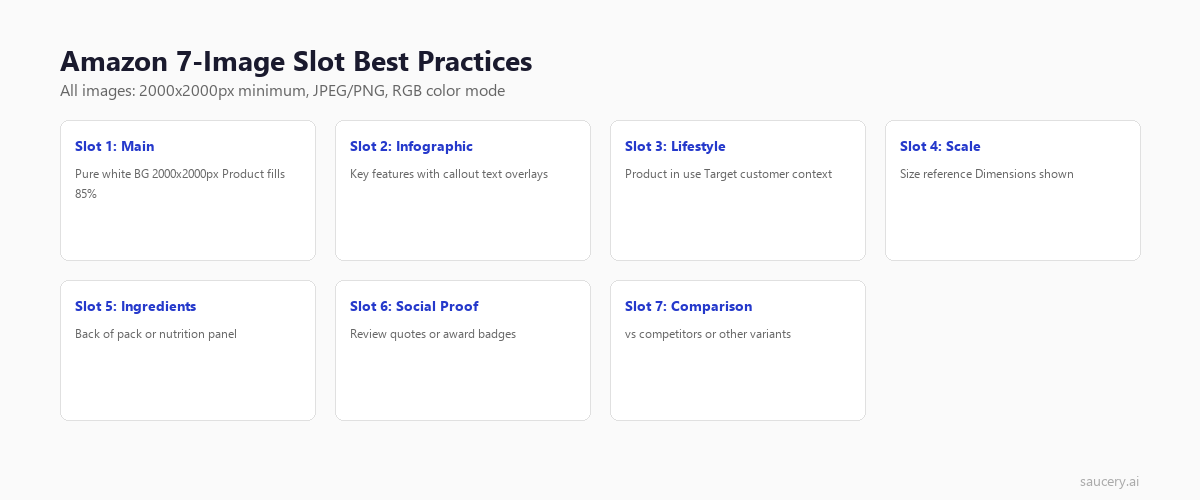
Amazon allows up to 9 images (7 secondary + 1 main + 1 video). Each secondary image should serve a specific purpose:
Image 2 – Infographic: Key benefits overlaid on product image. “20g Protein | 1.5g Sugar | 12 Bars” in clean typography. This is your bullet points in visual form for shoppers who don’t read.
Image 3 – Lifestyle/Context: Product in use. A person enjoying the snack at a gym, the supplement next to a morning smoothie. Creates emotional connection and shows scale.
Image 4 – Size/Scale Comparison: Product next to a common object (hand, phone, standard item) so shoppers understand physical dimensions without reading specifications.
Image 5 – Ingredients/Nutrition: For food and supplement products, a clear shot of the nutrition panel or ingredients list. Shoppers with dietary restrictions need this information.
Image 6 – What’s in the Box: Everything included in the purchase laid out clearly. Reduces “is X included?” questions and prevents returns.
Image 7 – Comparison or Variety: If you have multiple flavours or variants, show the range. Or compare to previous version highlighting improvements.
Impact of Image Quality on Performance
According to research from Jungle Scout, listings with 7+ images convert 30% higher than those with 4 or fewer. More significantly, upgrading from amateur to professional photography increases conversion by 25-40% on average – often the single highest-ROI investment a seller can make.
Video is increasingly important: Amazon reports that listings with video see a 9.7% increase in revenue. On mobile, video auto-plays in the image carousel, capturing attention in a way static images cannot.
Want to know which version of your listing copy will perform best?
Reviews and Ratings: The Trust Multiplier
Reviews are simultaneously the most important and least controllable element of an Amazon listing. You can’t buy them (legally), you can’t remove negative ones (usually), and you can’t speed them up artificially. But you can predict and influence them through listing quality.
How Reviews Impact Ranking and Conversion
The numbers from multiple studies are consistent:
- Products with 0 reviews convert at approximately 2-5%
- Products with 10-50 reviews convert at 10-15%
- Products with 100+ reviews convert at 15-25%
- Each 0.1 star increase in average rating correlates with a 2-3% conversion lift
- Dropping below 4.0 stars causes a conversion collapse of 30-50%
The first 10 reviews matter most. Going from 0 to 10 reviews typically doubles conversion rate. Going from 100 to 110 barely moves the needle.
How Listing Quality Predicts Review Outcomes
Here’s something most sellers don’t realise: your listing content directly predicts your review outcomes. In our testing at Saucery, we found that analysing listing content alone can predict eventual star ratings with 0.30-star accuracy – before a single unit ships.
Why? Because listings set expectations. A listing that over-promises creates disappointed customers who leave negative reviews. A listing that accurately represents the product – with specific, honest claims – creates customers whose expectations match reality. Those customers leave positive reviews.
The practical implication: if your listing claims “all-day energy” and the product delivers 4 hours, you’ll get negative reviews about false advertising. If your listing says “sustained energy for 4-6 hours” and delivers 5, you get positive reviews about it exceeding expectations.
Specificity in listings doesn’t just convert better – it generates better reviews downstream.
Strategies for New Products with Zero Reviews
- Amazon Vine programme: Available to Brand Registered sellers. Send units to verified reviewers. Expensive per review but generates authentic, detailed reviews quickly.
- “Request a Review” button: Amazon’s official review request system. Click it for every order between 5-30 days post-delivery. Expect 1-3% of customers to leave reviews.
- Product inserts (carefully): A card in the package thanking the customer and mentioning reviews is allowed. Offering incentives for positive reviews is explicitly prohibited and can get you banned.
- Variation listings: If you have a parent listing with multiple child variations, reviews aggregate across all children. Launching a new flavour under an existing parent inherits the review count.
- Exceptional unboxing: First impressions drive review likelihood. Thoughtful packaging, a personal note, or exceeding expectations on presentation increases the chance of organic positive reviews.
Amazon A/B Testing: Manage Your Experiments
Amazon’s built-in split testing tool, “Manage Your Experiments“, lets you test different versions of listing elements against each other with real traffic. It’s powerful but limited.
What You Can Test
- Titles: Test different keyword ordering, feature emphasis, or structure
- Main images: Test different angles, lighting, or styling approaches
- A+ Content: Test different module layouts, copy, or imagery
- Bullet points: Test different benefit ordering, specificity levels, or formatting
- Product descriptions: Test different copy approaches or information hierarchy
Limitations of Amazon’s A/B Testing
Manage Your Experiments has significant constraints that make it impractical for many sellers:
- Requires Brand Registry. No Brand Registry, no testing access.
- Minimum traffic thresholds. Your listing needs sufficient weekly sessions for Amazon to detect statistical significance. Low-traffic listings can’t run meaningful tests.
- Takes 8-14 weeks for results. Amazon recommends running experiments for at least 8 weeks, and many require 10-14 weeks to reach significance. That’s 2-3 months of uncertainty per test.
- One test at a time per ASIN. You can’t simultaneously test title AND images. Serial testing means optimising 5 elements takes 40-70 weeks.
- Risk of revenue loss. If your test variant performs worse, you’re losing sales for 8+ weeks before you know it. For seasonal products, this can mean missing an entire selling window.
- No pre-launch testing. You need an existing, live listing with traffic. New products can’t test before launching.
The Alternative: AI-Powered Prediction
The limitations of live A/B testing create a genuine problem for sellers who need to make listing decisions quickly – especially for launches, seasonal products, or when testing 8+ weeks simply isn’t viable.
AI prediction offers an alternative approach: test listing copy variations against modelled shoppers before going live. Instead of splitting real traffic for 8 weeks, you get directional data in minutes. It won’t replace rigorous live testing entirely, but it eliminates the worst options and focuses your live testing budget on genuinely close decisions.
In our validation work, AI shopper predictions match expert reasoning on listing preference at 90% accuracy – meaning 9 out of 10 times, the AI-predicted winner aligns with what experienced Amazon sellers would recommend. The value isn’t replacing intuition; it’s scaling it across hundreds of variations faster than any human team could evaluate.
Want to know which version of your listing will perform best?
Pricing’s Impact on Visibility and Buy Box
Pricing on Amazon isn’t just a margin decision – it’s a visibility decision. Your price directly impacts whether you win the Buy Box, where you appear in search results, and how Amazon’s algorithm perceives your listing’s competitiveness.
The Buy Box Algorithm
Over 80% of Amazon sales go through the Buy Box (the “Add to Cart” button). If multiple sellers offer the same product, Amazon’s algorithm chooses which seller gets the Buy Box based on:
- Price + shipping cost (landed price is the primary factor)
- Fulfilment method (FBA gets preference)
- Seller metrics (order defect rate, late shipment rate, cancellation rate)
- Stock levels (sellers who frequently go out of stock lose Buy Box share)
For private label sellers (where you’re the only seller on your listing), Buy Box is automatic – but pricing still matters for search ranking and conversion.
Competitive Pricing vs the Race to the Bottom
Amazon’s algorithm rewards competitive pricing, but “competitive” doesn’t mean “cheapest.” It means priced within the expected range for your category and quality tier. A premium protein bar at $3.50/bar can rank well if other premium bars are $3.00-$4.00. That same bar at $7.00 will struggle because it’s outside the expected range.
The race-to-bottom trap catches sellers who compete purely on price. Every price cut erodes margin, which reduces advertising budget, which reduces visibility, which requires another price cut. The sellers who win long-term compete on perceived value – better listings, better images, better reviews – that justify their price point.
For a deeper analysis of pricing strategy including margin calculations, see our product pricing strategy guide and markup vs margin calculator.
When to Test Price Points
Price testing on Amazon is risky because:
- Amazon tracks your pricing history and may suppress listings with erratic pricing
- Raising prices after a low period can trigger “was $X, now $Y” messaging that hurts conversion
- Competitors monitor your pricing and may start a price war
The safest approach to price testing on Amazon:
- Test price sensitivity using external tools (AI prediction, landing page tests) before changing Amazon pricing
- If testing live, make small changes (5-10%) and hold for at least 2 weeks to measure impact
- Use coupons and Lightning Deals for temporary price reductions rather than changing the listed price
- Test pricing on new variant launches rather than established listings
Putting It All Together: The Listing Optimisation Checklist
Here’s the prioritised checklist I use when optimising an Amazon listing from scratch or auditing an existing one:
Pre-Launch Research
- Identify top 3 competitors and analyse their title structure, claims, and image strategy
- Build keyword list using Brand Analytics, Helium 10, or Jungle Scout Keyword Scout
- Map keywords to listing elements (primary to title, secondary to bullets, tertiary to backend)
- Identify your unique differentiator – what can you claim that competitors cannot?
Title (Do First)
- Primary keyword within first 60 characters
- Brand + Product Type + Key Differentiator + Size/Quantity structure
- Readable as a sentence (not a keyword dump)
- Under 200 characters total, critical info under 80
- No prohibited elements (promotional language, ALL CAPS, special characters)
Images (Do Second)
- Professional main image on pure white background
- Product fills 85%+ of frame
- 7+ total images including infographic, lifestyle, scale, and detail shots
- All images minimum 2000px for zoom functionality
- Video included (even a simple 30-second product overview)
Bullet Points (Do Third)
- 5 bullets, each under 250 characters
- Each starts with BENEFIT IN CAPS, followed by supporting feature detail
- Specific numbers replace vague adjectives wherever possible
- Secondary keywords included naturally
- Ordered by importance (USP first, risk reversal last)
Backend Keywords (Do Fourth)
- Under 250 bytes (verify with byte counter)
- No words repeated from title or bullets
- Space-separated, no commas, no stop words
- Includes misspellings, synonyms, and alternate language terms
- No competitor brand names or prohibited terms
A+ Content (Do Fifth – if Brand Registered)
- Comparison chart module included
- Lifestyle imagery that connects product to use case
- Brand story module for cross-selling
- Mobile-first design (test on phone before publishing)
Advanced Optimisation: Beyond the Basics
Once your listing fundamentals are solid, these advanced tactics create incremental advantages:
Seasonal Keyword Rotation
Amazon allows you to update backend keywords at any time. Rotate seasonal terms in and out: “Christmas gift” in November-December, “Valentine’s day” in January-February, “back to school” in July-August. This captures seasonal search traffic without cluttering your permanent listing content.
Listing Quality Score
Amazon provides a Listing Quality Score in Seller Central that rates your listing completeness. In 2025-2026, this score increasingly correlates with search visibility. Check it under Catalogue > Manage All Inventory > Listing Quality. Fix any flagged attributes – missing dimensions, incomplete product descriptions, or absent category-specific fields suppress your visibility.
Search Query Performance Dashboard
Brand Registered sellers get access to the Search Query Performance dashboard, which shows exactly which search terms drive impressions and clicks to your listings. Use this data to identify:
- High-impression, low-click keywords (title/main image problem)
- High-click, low-conversion keywords (bullet/description/price problem)
- Keywords where you appear but shouldn’t (irrelevant traffic)
- Keywords competitors rank for that you’re missing entirely
External Traffic Strategy
Amazon’s algorithm now rewards external traffic sources. Driving traffic from Google, social media, email, or influencer partnerships signals to Amazon that your product has demand beyond their platform. Use Amazon Attribution links to track external traffic and receive potential advertising credits. This creates a dual benefit: direct sales from external traffic plus improved organic ranking from the algorithm boost.
Frequently Asked Questions
How long does it take for Amazon listing changes to affect ranking?
Title changes typically reflect in search within 24-48 hours. Backend keyword indexing can take up to 72 hours. However, the ranking impact of changes depends on whether the new content improves conversion rate – you’ll see meaningful ranking movement within 1-2 weeks if the changes genuinely improve performance.
Should I optimise for American or British spelling on Amazon UK?
Use British spelling in your visible listing content (title, bullets) for the UK marketplace – it looks more natural to British shoppers and avoids seeming like a foreign seller. Include American spelling variants in your backend keywords to capture searches from expats and shoppers who default to US English.
How many keywords should I target per listing?
A well-optimised listing typically targets 15-25 relevant keywords across all elements (title, bullets, backend, description). Trying to target 100+ keywords dilutes relevance for all of them. Focus on keywords where you can realistically rank on page 1 given your review count and sales velocity.
Does Amazon index bullet points for SEO?
Yes. Bullet points are fully indexed for Amazon search. Keywords in bullets carry less weight than title keywords but more weight than backend or description keywords. Every keyword in your bullets contributes to your searchability.
What’s the difference between indexed and ranked?
“Indexed” means Amazon recognises your listing as relevant to a keyword – it can appear in results. “Ranked” refers to your position in those results. Being indexed is binary (yes/no) and determined by keyword presence. Being ranked highly is continuous and determined by conversion, velocity, and all other ranking factors. You must be indexed before you can rank.
Can I use the same backend keywords across multiple listings?
Yes, and you should. Each listing should include relevant keywords for that specific product. There’s no penalty for using the same backend terms across your catalogue. Each listing is evaluated independently for keyword relevance.
How do I know if my listing is suppressed?
Check Seller Central under Catalogue > Manage Inventory > Suppressed Listings. Also search for your own product by ASIN – if it doesn’t appear in results, it may be suppressed. Common causes: incomplete required attributes, pricing errors, image policy violations, or intellectual property complaints. Fix the flagged issue and request reinstatement.
The Bottom Line
Amazon listing optimisation isn’t a one-time activity – it’s an ongoing process of refinement based on data. The sellers who win long-term are those who systematically test, measure, and improve each element of their listings.
Start with the fundamentals: a keyword-rich but readable title, benefit-led bullet points with specific claims, professional images, and well-researched backend keywords. Then layer in A+ Content, review strategy, and pricing optimisation as your product gains traction.
The single most important principle across every element: specificity beats generality. “20g protein” beats “high protein.” “Lasts 8 hours” beats “long-lasting.” “Used by 50,000+ athletes” beats “popular with fitness enthusiasts.” Every time you can replace a vague claim with a precise one, conversion improves.
The brands that dominate Amazon aren’t necessarily those with the biggest budgets – they’re the ones that treat every listing element as a testable hypothesis and systematically optimise based on evidence rather than gut feel.
Same product. Better listing. More sales.
Find out which version of your product listing converts best – before you publish.
Subscribe for F&B Consumer Insights
Data-driven insights on food & beverage consumer preferences, straight to your inbox.